LangGraph
- Platform
- Linux macOS Windows
- Licence
- MIT Open source
- Website
- langchain.com/langgraph
- Source code
- github.com/langchain-ai/langgraph
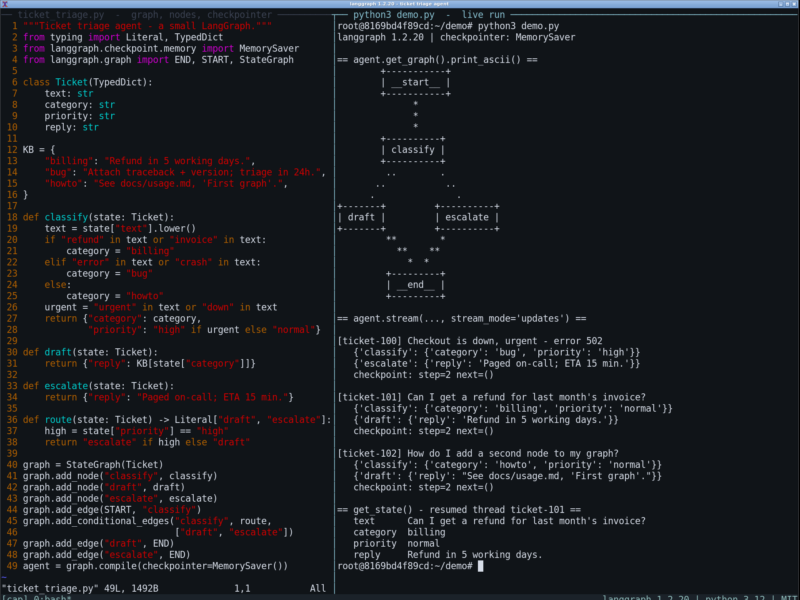
LangGraph is a low-level orchestration framework and runtime for agents that have to run for a long time, hold state, and survive failures. Rather than hiding the agent loop behind a prompt template, it lets you describe a workflow as a graph — shared state, nodes that do the work, and edges that decide what runs next — so hand-written deterministic steps and model-driven steps live in the same machine. It is the runtime underneath LangChain’s agent abstractions, but it does not require LangChain: bring your own model client, or none at all.
Key Features
- Graph API — StateGraph, nodes, edges and conditional edges, plus Send and Command for fan-out and hand-offs between actors, so branching, retries and multi-agent routing are explicit rather than implied by prompt wording.
- Durable execution — a checkpointer writes state after every step, so a run that dies mid-way resumes from the last completed node instead of starting again from the top.
- Human-in-the-loop — interrupts pause a run before a risky node, let a person read or edit the state, then continue with the edit in place.
- Memory — short-term state scoped to a thread, plus a Store for long-term memory that outlives one conversation.
- Streaming — several stream modes in one API: token deltas, per-node updates, and custom events, which is what an interface needs to show progress honestly.
- Time travel and subgraphs — replay an earlier checkpoint and branch from it to test a different decision, and embed one compiled graph inside another for teams that own separate parts of a workflow.
- Functional API —
@entrypointand@taskdecorators for people who find a full state machine heavier than the job needs. - Tracing and a visual debugger — runs can be traced in LangSmith, and LangSmith Studio gives a live view of a locally running agent: each step, the prompts, the tool calls and the resulting state.
Why Use LangGraph?
Most agent code starts as a while-loop around a model call and stops being debuggable the moment it needs retries, approvals, parallel branches or a resume after a crash. LangGraph replaces that loop with an explicit graph you can reason about and instrument: you can see which node produced which state, replay a run, and put a person in front of the one step that matters. It also refuses to prescribe the agent’s architecture — there is no bundled prompt strategy to fight, so the design of the agent stays yours.
Use Cases
- Approval-gated workflows, where a generated action waits for a person to confirm before a tool executes.
- Long research or data jobs that must survive a process restart and pick up from the last checkpoint.
- Multi-actor systems: a supervisor graph that routes work to specialised subgraphs, each with its own state.
- Agents with real memory — per-thread context for the conversation, a store for facts that must persist across sessions.
- Prototyping and testing agent logic step by step in Studio before wiring it into a product.
What to Expect
LangGraph is deliberately low-level, and that is the trade: you design the state, the nodes and the routing yourself, so expect more code than a one-call agent library and a real learning curve around checkpoints and interrupts. It ships no models and no tool integrations of its own — those come from LangChain, an SDK, or your own code, and the graph works with any of them. The Python package needs 3.10 or newer (a JavaScript port, LangGraph.js, tracks the same API). Studio, the visual debugger, is free but needs a LangSmith account; with tracing switched off nothing leaves your machine. Deployment is deliberately out of scope of the library: run it as a normal Python service, or use LangSmith Deployment if you want the managed one.
Getting Started
Install with pip install -U langgraph, define a StateGraph, compile it, and call invoke() or stream() — the quickstart builds a working tool-calling agent in about thirty lines. If you want an agent you can point at a repository today, the same category holds installable coding agents such as Aider, OpenHands, Cline and Continue; LangGraph is the layer you reach for when you are building that kind of tool rather than using one. Browse the rest of the AI Agents and Coding Assistants directory for more.