goose
- Platform
- Linux macOS Windows
- Licence
- Apache-2.0 Open source
- Website
- goose-docs.ai/
- Source code
- github.com/aaif-goose/goose
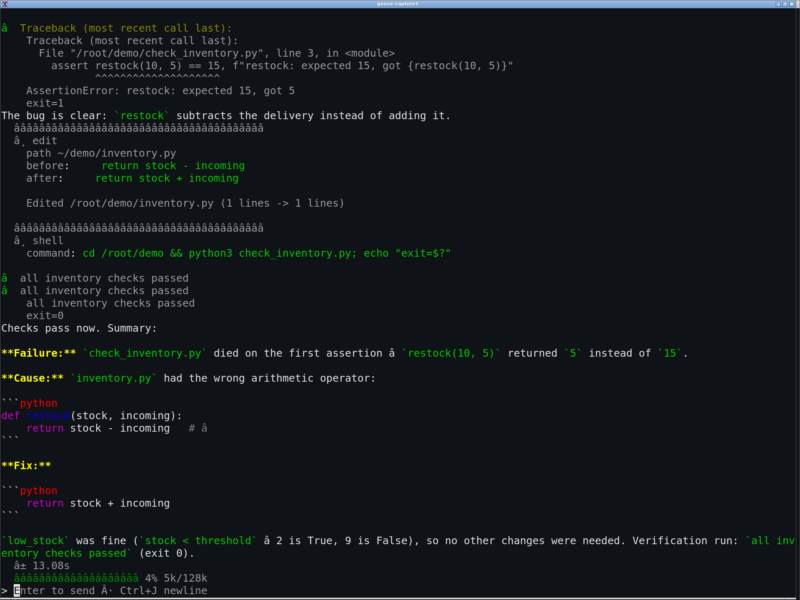
goose is a local AI agent that runs on your own machine rather than in a browser tab: a desktop app for macOS, Linux and Windows, a full CLI for terminal work, and an API for embedding the same agent loop in other software. It was created at Block and has since moved to the Agentic AI Foundation (AAIF) at the Linux Foundation, where the repository now lives under the aaif-goose organisation. Written in Rust for performance and portability, it is not a code-only assistant — the same session can research, write, run shell commands, edit files and drive external tools through the Model Context Protocol.
Key Features
- Three ways in, one agent — the goose desktop app (DEB, RPM and Flatpak on Linux, DMG or Homebrew on macOS, a zip for Windows), the
gooseCLI with an interactive TUI, and an ACP server plus the goose Development Kit for building agents into your own applications - 15+ model providers — Anthropic, OpenAI, Google, Azure, Amazon Bedrock, Databricks, Ollama and OpenRouter, plus anything that speaks the OpenAI-compatible or ACP protocols; existing Claude, ChatGPT and Gemini subscriptions can be used through ACP instead of an API key
- MCP extensions — connect to 70+ extensions over the Model Context Protocol, covering files, shells, browsers, databases and issue trackers; extensions can be allowlisted per organisation and inspected before they run
- Recipes — package extensions, prompts and settings into a YAML workflow that a colleague launches with one click, a slash command or a deep link; recipes can call subrecipes, and several subrecipes can run in parallel
- Subagents and model switching — delegate a scoped task to an isolated goose instance with its own provider and model, and change model mid-session with
/modelwithout losing context - Permission modes — run in chat-only mode, approve each tool call, or hand the agent autonomy for a whole session, with per-tool permissions for finer control
- Headless and scheduled runs —
goose run -ttakes an inline instruction,goose run -itakes an instruction file and stdin is piped in the same way, which is how goose fits into CI;goose schedulemanages recurring jobs - Local models —
goose local-modelsmanages local inference, so a session can run against a model on the same machine with no cloud key at all - Sessions that persist — conversations are stored in a local SQLite database, so they can be listed, resumed, renamed, exported and imported, including from Claude Code and Codex transcripts
- Custom distributions — build a branded goose with preset providers, extensions and configuration for a team or product
Why Use goose?
Most AI assistants are welded to a chat window and a single vendor. goose separates the three things that matter: the interface (desktop, terminal or API), the model (swap it per session or per subagent), and the tools (extensions over MCP). That means the same agent that fixes a test on your laptop can run unattended in a pipeline, and the same recipe that works for you works for the rest of your team. Because it runs locally, files never leave the machine unless the model you picked sends them, and pointing it at a local model keeps everything on disk.
Use Cases
- Debugging a failing test or a broken build from the terminal, with the agent reading, editing and re-running code
- Automating repetitive repository chores — dependency bumps, changelog drafts, migration sweeps — as scheduled or CI-triggered runs
- Research and writing tasks that need web access, file reading and structured output rather than a single chat reply
- Wiring internal systems into an assistant through MCP extensions and sharing the result as a recipe
- Working fully offline against a local model on a laptop with no cloud account
Getting Started
Install the desktop app from the project’s downloads page — DEB, RPM or Flatpak on Linux, DMG or brew install --cask block-goose on macOS, a zip on Windows — or install the CLI with curl -fsSL https://github.com/aaif-goose/goose/releases/download/stable/download_cli.sh | bash, brew install block-goose-cli, or the PowerShell script on Windows. The Homebrew names still carry the original Block prefix. Run goose configure to pick a provider and store a key, then start an interactive session with goose session or a one-off task with goose run -t "your instructions". The CLI is self-updating with goose update, and goose doctor reports configuration problems.
Related Tools
- Fabric — terminal AI toolkit built around reusable prompt patterns
- LangGraph — framework for building stateful agent graphs in code
- gpt-engineer — generate and refine a codebase from a prompt
- Aider — terminal pair programmer that edits a whole repository
- OpenHands — agent platform for autonomous coding tasks