Fabric
- Platform
- Linux macOS Windows Docker
- Licence
- MIT Open source
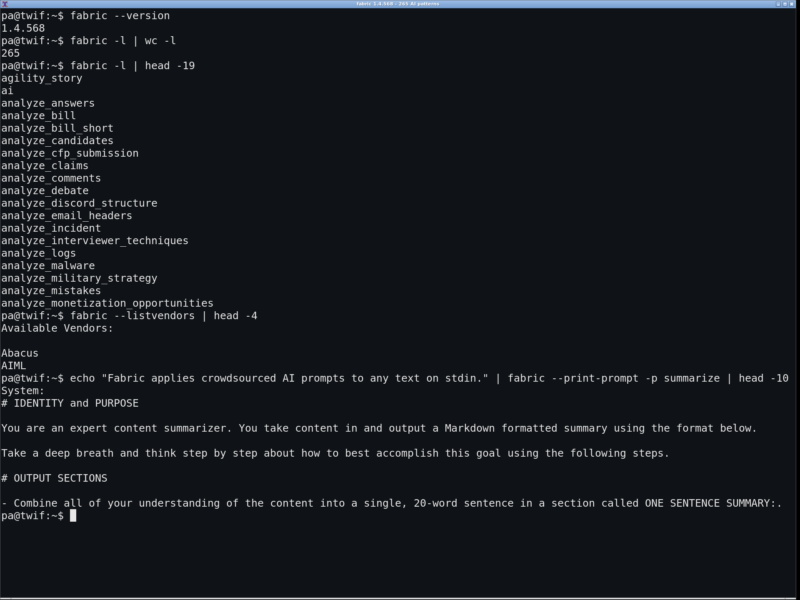
Fabric is an open-source framework for augmenting humans with AI, built around the idea that the prompt, not the chat window, is the reusable unit of AI work. It ships as a single Go binary that reads text from stdin, a file or a URL, wraps it in a curated prompt (a pattern), and streams the model’s answer back to the terminal, the clipboard or a file. The project started in 2024 as a crowdsourced prompt library and grew into a CLI with 265 patterns, a REST API server and Docker images.
Key Features
- 265 purpose-built patterns — summarize, extract_wisdom, analyze_claims, explain_code, write_essay and hundreds more, each a small Markdown system prompt stored on disk and editable
- Bring your own model — OpenAI, Anthropic, Google Gemini, Ollama, Azure OpenAI, Amazon Bedrock, Vertex AI, LM Studio and Perplexity are integrated natively, alongside dozens of OpenAI-compatible vendors such as OpenRouter, Groq, DeepSeek, Mistral and Together
- Unix-style input and output — pipe input on stdin, stream results with –stream, copy with –copy or write to a file with –output; –extract pulls out just the first fenced code block
- Prompt strategies — layer chain-of-thought, chain-of-draft, tree-of-thought, atom-of-thought, least-to-most, self-consistency, self-refine or reflexion on top of any pattern with –strategy
- Contexts and sessions — keep standing context and resume a conversation across separate invocations
- Input helpers — scrape a web page to Markdown, pull YouTube transcripts and comments, transcribe audio and read Spotify podcast metadata
- REST API server — fabric –serve exposes patterns, chat completions, sessions and configuration over HTTP, with an optional Ollama-compatible mode for existing clients
- Dry runs and prompt export — –dry-run and –print-prompt show exactly what would be sent to the model, so a pattern can be debugged without spending API credit
Why Use Fabric?
Most AI use is a conversation you repeat: paste the article, retype the instruction, get a slightly different answer each time. Fabric turns those repeated instructions into files you can version, share and improve, and runs the same prompt identically from a shell, a script, a cron job or the API. Because every pattern is plain Markdown, you can also lift it into any other chat client without running Fabric at all, while custom patterns live in their own directory so an upgrade never overwrites your work.
Use Cases
- Summarising articles, papers, meeting transcripts and long logs from the terminal
- Extracting claims, insights or action items from a URL or a YouTube transcript
- Reviewing code or explaining an unfamiliar file before editing it
- Wiring a repeatable AI step into a shell script, cron job or editor keybinding
- Running entirely against local models through Ollama or LM Studio, with no cloud key
Getting Started
Install with the one-line script from the repository, a package manager (Homebrew and the Arch AUR ship it as fabric-ai, plus winget and Scoop on Windows), go install, or the kayvan/fabric Docker image. Then run fabric --setup to pick a provider and store its key, and fabric --updatepatterns to fetch the pattern library. Shell completion is available for bash, zsh and fish. Release builds cover Linux, macOS and Windows, including ARM binaries for the Raspberry Pi and ARM laptops.
Related Tools
- Aider — terminal pair programmer that edits a whole repository
- OpenHands — agent platform for autonomous coding tasks
- Continue — AI assistance inside VS Code and JetBrains
Browse more developer tools in the directory.