Dockpeek
- Platform
- Docker Web
- Licence
- MIT Open source
- Source code
- github.com/dockpeek/dockpeek
Overview
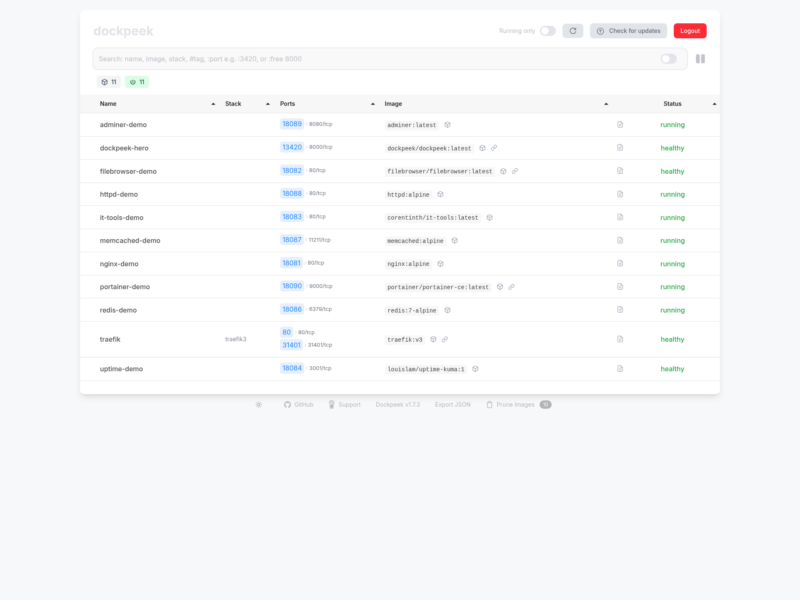
Dockpeek is a small self-hosted dashboard for the containers already running on a Docker host. Instead of remembering which host publishes which port, you get one table of every container with its published ports, image and health, and a click on a port opens that service’s web interface in a new tab. It is the practical answer to a homelab that has grown to a dozen compose stacks whose dashboards live on scattered IP:port addresses.
The app itself is a Flask application served by gunicorn inside a container, and the only thing it needs from the host is the Docker socket (read-write for updates, or a socket proxy if you prefer to limit access). Configuration is a handful of environment variables – a SECRET_KEY and one username/password pair for the dashboard login – so there is no database to back up and no first-run wizard.
What it does
- One-click web access – every published port is listed with a link, so a container’s dashboard opens directly instead of being hunted down.
- Automatic port mapping – detected from the Docker API, including multi-port containers and port-range grouping for stacks that publish long runs of ports.
- Live container logs – stream a container’s log from the same screen, without opening a terminal.
- Traefik integration – service URLs are extracted from Traefik labels, so containers published only through a reverse proxy are still reachable.
- Image update checks – compare running containers against their registry and pull the newer image, with a status of which containers are behind.
- Multi-host management – several Docker daemons (local socket, a TCP socket proxy, a Tailscale address) can be listed in one interface via numbered
DOCKER_HOST_n_URLvariables; remote hosts only need the Docker API exposed, not Dockpeek itself. - Labels for tidying –
dockpeek.tagsgroups containers,dockpeek.linkturns a name into a link,dockpeek.httpsforces HTTPS on a port anddockpeek.portsadds ports that Docker does not publish.
Who it is for
Dockpeek sits alongside tools such as Portainer, Yacht and Homepage, but deliberately does less: it reads the Docker API and shows what is exposed rather than trying to be a full container management console. If the need is to deploy stacks, manage volumes or handle RBAC, a heavier control panel is the right tool; if the need is a fast index of what is running on the box and how to reach it, this covers it.
Deployment
A single docker run or compose service is enough: mount /var/run/docker.sock, set SECRET_KEY, USERNAME and PASSWORD, and publish the web port (the documentation uses 3420). For anything exposed beyond localhost, the project documents a socket-proxy deployment so the app never holds the full Docker socket, and authentication is a single shared login rather than per-user accounts – it belongs behind a reverse proxy or on a private network.
Licence
Open source, MIT licensed. Self-hosted and free to use, modify and redistribute; the source is on GitHub and images are published on Docker Hub and ghcr.io.