Dockge
- Platform
- Docker Self-hosted Web
- Licence
- MIT Open source
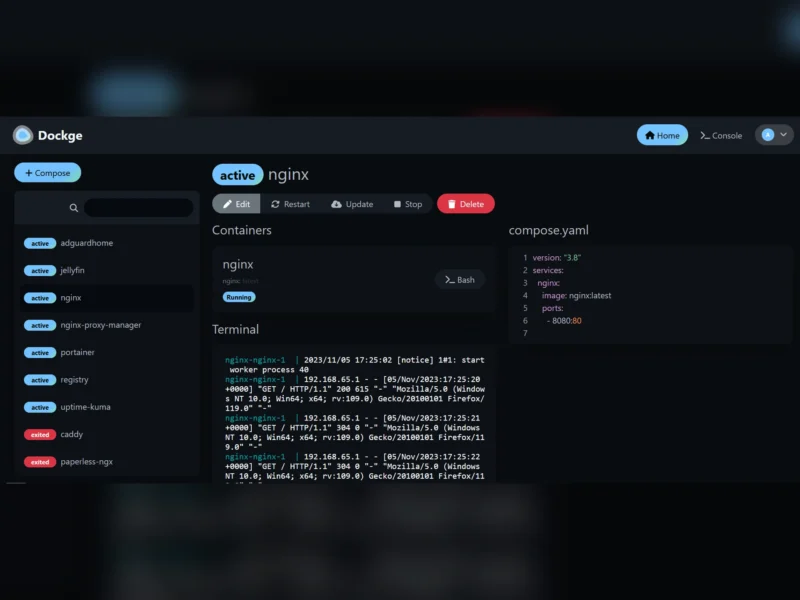
Dockge
Website: dockge.kuma.pet
Dockge is a self-hosted manager for Docker Compose stacks, from Louis Lam, the author of Uptime Kuma. It gives each stack a folder on disk with a normal compose.yaml inside, then puts a web interface in front of it for editing, starting, stopping and updating. Unlike tools that keep their own copy of your configuration in a database, Dockge reads and writes the files you already have, so docker compose from a shell and the web UI act on the same thing. It runs as a container itself, listens on port 5001 by default and expects your stacks under /opt/stacks unless you set DOCKGE_STACKS_DIR.
It is deliberately narrower than Portainer: the focus is compose stacks, with a reactive UI that streams pull, up and down output as it happens. If you need to manage single containers, networks or volumes without a compose file, the project’s own FAQ points you at Portainer or the Docker CLI instead. Version 1.4.0 added agents, so one interface can manage stacks across several Docker hosts. The 1.5.0 release updated the bundled Docker client to 28.0.4 and Compose to 2.34.0, and disabled the web console by default for security; you can turn it back on with DOCKGE_ENABLE_CONSOLE=true if you accept the risk. It needs Docker 20+ or Podman on Linux; Windows is not supported yet.
Key Features
- Compose file management: Create, edit, start, stop, restart and delete stacks, with the compose file stored on your own disk.
- Live terminal and progress: Pull, up and down output and an interactive web terminal update in real time rather than behind a spinner.
- YAML editor: An in-browser editor for
compose.yaml, so the file can be changed without leaving the interface. - docker run conversion: Paste a
docker runcommand and get an equivalent compose file. - Multiple agents: Manage stacks from more than one Docker host in a single interface.
- Existing stacks: Move a compose file into the stacks directory, scan the folder, and the stack appears without recreating it.
- Image updates: Pull newer images for a stack from the UI and restart it with the new image.
- File-based by design: Your stacks remain usable with ordinary
docker composecommands; Dockge does not lock them into its own store.
Licence
MIT. You can use it commercially, modify it and redistribute it, provided the copyright notice and permission notice are kept. There is no copyleft obligation on the stacks you manage with it.