DockFlare
- Platform
- Linux Web
- Licence
- GPL-3.0 Open source
- Website
- dockflare.app
- Source code
- github.com/ChrispyBacon-dev/DockFlare
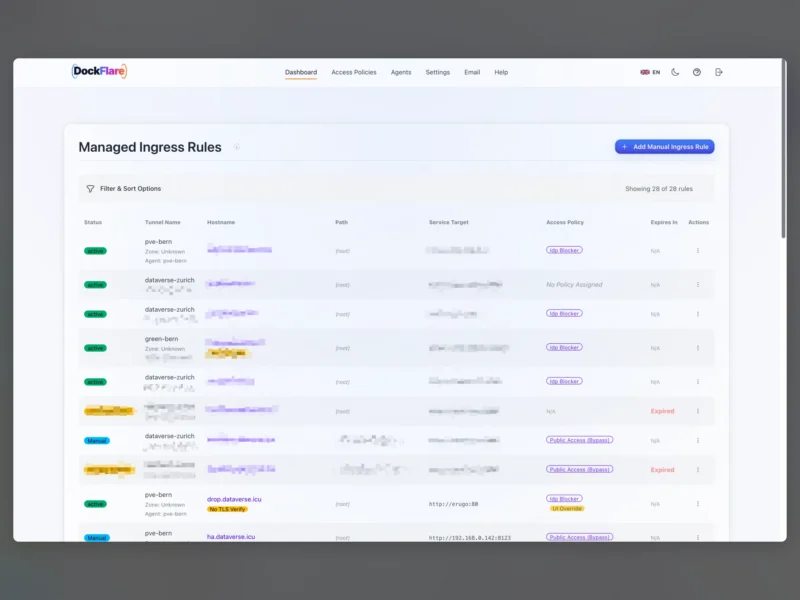
DockFlare is a self-hosted ingress and access-control plane for Cloudflare Tunnel environments. Instead of adding DNS records, tunnel ingress rules and Cloudflare Access applications by hand, you declare what each service should look like once — through a Docker label or a rule in the web UI — and DockFlare reconciles Cloudflare to match.
What DockFlare does
The project started as a way to strip the repetitive dashboard work out of exposing containers to the internet. A container carrying a label such as its hostname is discovered automatically, given a CNAME in the right zone, attached to the tunnel’s ingress configuration and, if configured, wrapped in a Cloudflare Access application. Remove the container and the related records are cleaned up.
Core capabilities
- Label-driven service discovery — containers are routed from Docker labels, with manual ingress rules available for workloads that do not run in Docker.
- Tunnel orchestration — manages the
cloudflaredconnector and the tunnel’s ingress list, including advanced origin options. - Access lifecycle — creates and maintains Cloudflare Access applications and reusable access groups with policy assignment.
- Zone-aware DNS management — places records in the correct Cloudflare zone, including wildcard and multi-domain setups.
- Multi-host operation — a master instance coordinates lightweight agents on other hosts over Cloudflare Zero Trust service tokens.
- Backup and restore — encrypted configuration, runtime state and email data can be exported and restored.
- Optional email profile — a self-hosted mail stack built on Cloudflare Email Routing, with a Vue 3 webmail client and DKIM handling.
- Localised UI — the web interface ships in 13 languages.
How it works
DockFlare collects the desired state from Docker labels, manual rules and agent reports, diffs it against both its stored state and the live Cloudflare configuration, applies the resulting changes to ingress, DNS and Access resources, and finally keeps the local cloudflared runtime aligned. Everything runs in a web UI backed by Python and Flask, with Redis providing shared cache and coordination between components.
Deployment
The reference install is a Docker deployment: alplat/dockflare runs the master, alongside containers for Redis, cloudflared and — if you enable the email profile — the mail manager and webmail. A one-line install script walks through the directory, UI port and optional tunnel for the UI itself; the alternative is a Compose file you maintain yourself. You need a Cloudflare account with a domain on Cloudflare and an API token scoped to the zones and Zero Trust resources you want DockFlare to manage.
Considerations
DockFlare is only as safe as the Cloudflare API token you give it: a wide token means a wide blast radius, so scope it to the zones and tunnel it actually needs. It also assumes Cloudflare as your tunnel provider — if you want host-local reverse proxying with no third-party control plane, a traditional proxy manager is the better fit.
Licence
Open source. GNU General Public License v3.0.
Alternatives
- Zoraxy — self-hosted reverse proxy manager with its own UI, no Cloudflare dependency
- OAuth2 Proxy — authentication proxy when you need access control in front of an existing service