Restreamer
- Platform
- Docker Web Linux Windows macOS
- Licence
- Apache-2.0 Open source
- Website
- datarhei.com
- Source code
- github.com/datarhei/restreamer
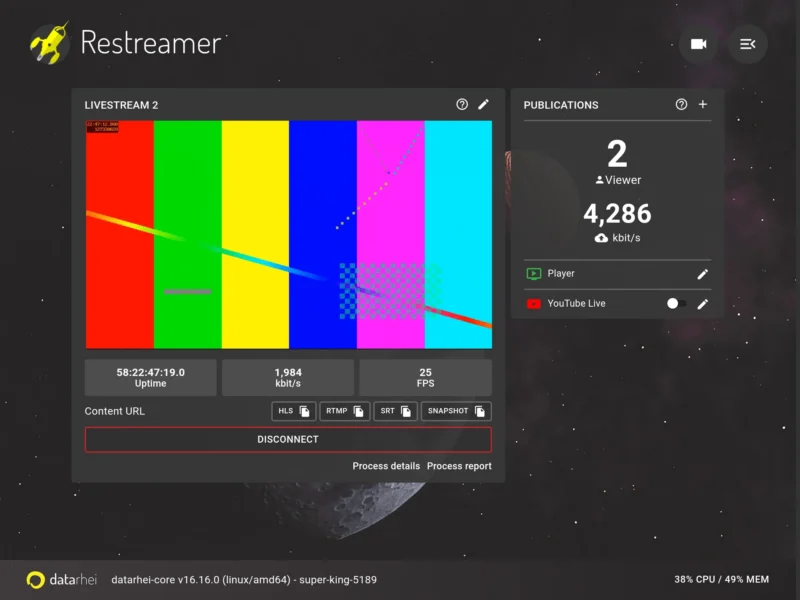
datarhei Restreamer is a self-hosted video streaming server that runs as a single Docker container. Point it at a webcam, an IP camera over RTSP, an encoder pushing into it, or a screen capture, and it encodes with FFmpeg and publishes the result to your own website or straight out to YouTube, Twitch, Facebook, Vimeo and the rest — without a per-minute transcoding bill and without an account at a streaming provider.
The project has been public on GitHub since 2015, and the current 2.x line bundles three parts in one image: datarhei Core, a Go backend that drives FFmpeg processes; a React web interface; and a custom FFmpeg build. Configuration happens in the browser — there is no command-line encoder to babysit and no config file to edit by hand, although the container keeps its state in two directories you can back up.
Key Features
- Many inputs, one dashboard. Network sources over RTSP (IP cameras), RTMP, HLS (m3u8) and SRT; USB and other hardware capture devices; a frame-buffer source for capturing a Linux screen; the Raspberry Pi camera module; and virtual test-signal sources for checking a publishing target before the real camera arrives. Several video sources can coexist as separate livestreams, each with its own settings.
- Publication services, not just restreaming. Every output is a publication service with its own settings and stream key, so one input fans out to YouTube Live, Facebook, Twitch, Vimeo, Instagram, TikTok, LinkedIn, Telegram, PeerTube and others; to CDN or OTT endpoints such as Akamai, CDN77, Brightcove, DaCast, Azure Media Services, restream.io and be.live; or to media servers including Wowza, Mist Server, Nimble Streamer, nginx with the RTMP module, Owncast, Icecast and Red5. Image2, RTSP, DASH, UDP, MPEG-TS and framebuffer are available as protocol outputs too.
- Its own streaming servers. An HTTP(S) HLS server (memory- or disk-backed), an RTMP/RTMPS server and an SRT server are built in, so OBS, a phone app or a hardware encoder can push to it, and every signal that arrives becomes another output you can distribute.
- Latency is a choice. The documentation puts SRT below a second, RTMP at one to two seconds, and HLS at the delay you configure (quoted as a minimum of ten to thirty seconds), so the same box can feed a low-latency studio link and a cheap public HLS page at the same time.
- Hardware encoding when the CPU is small. Separate image tags add NVIDIA CUDA, Intel VAAPI and Raspberry Pi (MMAL/OMX) acceleration — which is what lets a Pi or a small mini-PC hold several 1080p outputs without melting.
- The audience-facing parts are included. A publication website ships with the container (template modules, colours, imprint and terms in the footer, optional code injection) along with a VideoJS player you embed with an iframe, with configurable colour, logo and link. A Creative Commons licence can be attached to each livestream’s metadata.
- HTTPS without a certificate chore. Let’s Encrypt certificates are obtained automatically for the public ports, and the docs cover running it behind an existing reverse proxy when ports 80 and 443 already belong to another site.
- Monitoring, limits and logs. Viewer and bandwidth counters with limits, live CPU and memory readouts on the main screen, server and process logging, optional Prometheus metrics, and a “process report” that packages the FFmpeg diagnostics for a bug report.
- API-first. A JSON REST API, fully Swagger-documented (GraphQL is available in Core as well), can create and control streams — the web interface is itself just a client of that API, so provisioning and teardown can be scripted.
- No third party in the path. The project advertises GDPR compliance because nothing relays through datarhei’s infrastructure and no audience data is recorded.
Why Use Restreamer?
The usual reason is cost and control. A cloud restreaming service bills per hour of transcoding and per destination, and it ends up holding the credentials to your social accounts. Restreamer runs on hardware you already own or rent for a few pounds a month, keeps the stream keys on your own disk, and keeps working when a vendor changes its pricing. Because it is one container with a web UI, the whole install can be backed up by copying two directories and moved to a new server in minutes.
It is also unusually tolerant of cheap hardware: the ARM images run on a Raspberry Pi 3, a Pi 4 or another ARMv6/v7/v8 board, which is often the deciding factor for a small studio, a church, a school or a club that wants a permanent stream without a rack. The Docker image has been pulled more than 5.6 million times and the repository carries about 5,200 stars, so it is a well-trodden path rather than an experiment.
What it is not: a video editor and not a cloud service. It encodes, routes and publishes one or more live feeds. Where the source needs cutting, compositing or graphics, build that upstream in OBS or FFmpeg and feed the finished programme in.
Use Cases
- Multi-platform simulcast — one camera into YouTube, Twitch, Facebook and the organisation’s own site at once, from a single dashboard instead of a different tool per destination.
- IP camera to a web page — an RTSP camera at the back of a venue goes in, an embedded player on the venue’s site comes out, at the HLS latency the page can live with.
- OBS and software encoders — let OBS do overlays and scene switching, push into Restreamer over RTMP or SRT, and keep the destination keys in one place instead of in every operator’s OBS profile.
- Church, school and community broadcasts — a Pi and a camera in the corner, streamed to the two platforms the audience actually uses, with no recurring fee.
- Low-latency links between sites — SRT between two Restreamer instances for a feed that has to feel live, for example a commentary position and a mixing desk.
- Validating a publication target — a virtual test-signal source lets you check the stream key, bitrate and platform settings before the event, without booking a camera operator.
Requirements and Installation
Docker (or Podman) is the only real prerequisite; the host operating system matters less than having a container runtime. The official images cover x86-64 Linux, ARMv7/v8 boards including the Raspberry Pi (rpi-latest), NVIDIA CUDA (cuda-latest) and Intel VAAPI (vaapi-latest); macOS and Windows users run it through Docker Desktop, which the documentation covers explicitly. A typical start maps two volumes for configuration and data, HTTP and HTTPS on 8080 and 8181, RTMP and RTMPS on 1935 and 1936, and SRT on 6000/udp — the quick start is a single docker run command. The first login uses the shipped default credentials, so setting a strong unique password is job one, and an audience outside your network needs the public ports forwarded or a reverse proxy in front.
Worth Knowing
The newest tagged release is 2.12.0 (September 2024). The 2.x branch has continued to receive commits since, so read this as a stable, deliberately paced project rather than a fast-moving one: check the release notes before upgrading a production stream, and note that a migration page exists for version breaks. The interface expects a current browser — the last three versions of Chrome and Firefox, the last two of Safari and Edge. Settings supplied by environment variables appear marked ENV and are locked in the UI, which is expected behaviour rather than a bug.
Paid support, installation help and an enterprise arrangement exist alongside the free software, and there is a hosted datarhei Service; none of it is required to run your own instance.
Alternatives
- Owncast — a single-server livestream with its own chat and directory, closer to running a channel than to restreaming to other platforms.
- OBS Studio — the encoder and scene mixer most people feed into Restreamer; it can publish directly too, but without a multi-destination server.
- Jitsi Meet — for two-way meetings rather than one-way broadcast.
- Uptime Kuma — a natural companion: watch the publication page and the stream endpoints.
Project home: datarhei.com, with the documentation at docs.datarhei.com/restreamer and the source at github.com/datarhei/restreamer.