code-server
- Platform
- Web Linux macOS Windows Docker
- Licence
- MIT Open source
- Website
- coder.com/docs/code-server
- Source code
- github.com/coder/code-server
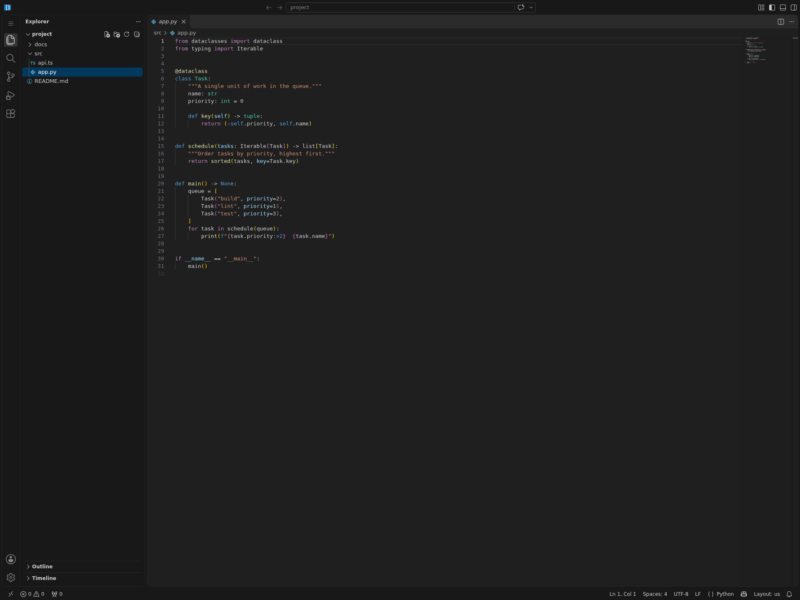
code-server runs Visual Studio Code on a machine you control — a home server, a VPS, a Raspberry Pi — and serves the whole editor to any browser. The editor process, the language servers, the terminals and the build tools stay on the server; the laptop, desktop or tablet you are sitting at only has to render a web page. That makes a cheap always-on box usable as the development machine from anywhere, and it keeps an editor session alive when you switch devices mid-task.
How it works
code-server is a Node process that serves the VS Code workbench over HTTP and talks to the browser over a WebSocket, which is why the host has to allow WebSockets. It binds to 127.0.0.1:8080 by default, writes its configuration to ~/.config/code-server/config.yaml, and is normally run as a systemd service (code-server@$USER). A /healthz endpoint and a heartbeat file are there for monitoring, and a configurable reconnection grace period keeps sessions and their terminals alive while the browser is closed.
What you get
- The complete VS Code workbench in the browser: editor, file explorer, integrated terminal, source control, debugger and settings — not a stripped-down text box.
- Extensions from Open VSX. code-server cannot use Microsoft’s marketplace, which is licensed for Microsoft’s own builds; you can also point it at your own marketplace or install a
.vsixby hand. - A port proxy (
/proxy/PORT/and/absproxy/PORT/) so a dev server, notebook or admin panel running on the same host is reachable through the same URL. - Password authentication by default with login rate limiting;
--auth nonewhen the port is already protected by an SSH tunnel or a reverse proxy that does the authentication. - Your existing VS Code configuration: settings, keybindings and snippets are read from the same files, so a copied profile behaves like the desktop editor.
Running it safely
The project’s own documentation is blunt about this: never expose code-server to the internet without authentication and encryption, because anyone who reaches the port has a shell on the machine through the web terminal. The supported routes are port forwarding over SSH (no extra setup beyond that sed to set auth: none), a Let’s Encrypt certificate in front of it with Caddy or NGINX, a self-signed certificate on a private network, or external authentication handled by the proxy. Password logins are rate limited to two attempts per minute plus twelve per hour.
Requirements and installation
The documented minimum is a Linux machine with WebSockets enabled, 1 GB of RAM and 2 vCPUs, although the real constraint is whatever your language servers and builds need. Installation is a one-line script for Linux, macOS and FreeBSD that picks the system package manager when it recognises one: .deb packages for Debian and Ubuntu, RPM for Fedora, RHEL, CentOS and openSUSE, AUR on Arch, Homebrew on macOS, and a standalone .tar.gz into ~/.local everywhere else. There is also an npm package for architectures without a release build, an official Docker image (codercom/code-server), a Helm chart, and documented paths for Raspberry Pi and Termux on Android.
Current release
v4.145.2 (November 2026) follows upstream VS Code 1.145.2. The project publishes a release for essentially every VS Code release, which is what keeps the browser editor in step with the desktop one. The code is MIT licensed, developed in the open on GitHub under the Coder organisation.
Who it is for
Developers who want their editor, dotfiles, extensions and terminals in one place that any browser can reach — a rented VPS, a NAS, a workstation that stays switched on — and teams or hobbyists who would rather not hand their source code to a hosted cloud IDE. If you need on-demand, per-developer environments provisioned on Kubernetes or VMs rather than one editor server, the same team’s Coder platform is the step up; for the Git hosting side, self-hosted Forgejo or Gitea pair naturally with it. More options sit in Developer Tools.