chkrootkit
Overview
chkrootkit is a lightweight, locally-run scanner that checks a Unix or Linux system for the tell-tale signs of a rootkit — a stealthy compromise that hides its own processes, files and network activity from the operating system. Written by Nelson Murilo with co-author Klaus Steding-Jessen and maintained by the AMS Foundation, it has been a standard item in the Unix administrator’s toolkit since the late 1990s.
The tool is deliberately simple: mostly a shell script plus a handful of small compiled helpers. There is no agent, no daemon and no network component — you run it as root on the host you want to inspect, and it reports what it found. The latest upstream release, 0.59, shipped in January 2026 and added checks for processes executed from memory, the nologin command, the XZ backdoor and the Bootkitty UEFI bootkit.
Key Features
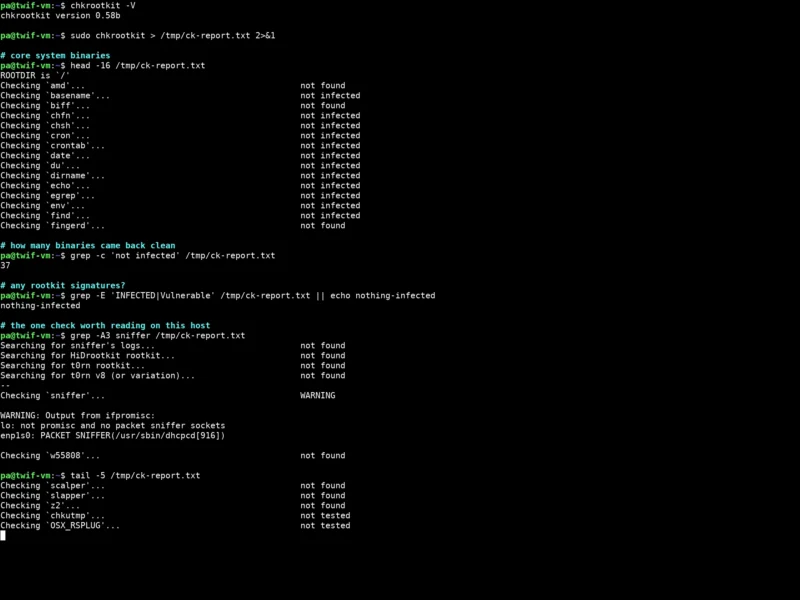
- Binary integrity checks — each core system binary (cron, sshd, ps, netstat, passwd, ls, find, top and dozens more) is examined for the signatures of a known trojaned replacement, and reported as not infected, not found or INFECTED.
- Rootkit signature scanning — searches the filesystem,
/procand kernel module tables for 70+ named rootkits, worms and LKMs, including t0rn, Ambient’s Rootkit, Ramen, Lion, Adore, knark, SucKIT, Scalper, Slapper, sebek, Umbreon, BPFDoor and the Operation Windigo / Mumblehard families. - Hidden process and directory detection —
chkprocandchkdirscompare a walk of/procagainst the output ofps, and look for Linux kernel module (LKM) trojan activity that a compromised process table would conceal. - Log-deletion forensics —
chklastlog,chkwtmp,chkutmpand (on Solaris)check_wtmpxdetect gaps left behind when an intruder editslastlog,wtmporutmpto erase their tracks. - Promiscuous-mode and sniffer detection —
ifpromiscflags interfaces running in promiscuous mode or holding packet-sniffer sockets, the classic network-tap symptom. - Independent ROOTDIR — you can point chkrootkit at an alternative directory (
-r) or run it from a rescue disc, so it uses its own copies ofstrings,grep,findand friends instead of the potentially compromised ones on the host. - No dependencies, no daemon — a shell script and a few small C helpers; package it, drop it on a host, run it, read the report.
Why Use It
Rootkits are designed to be invisible: a compromised ps hides the attacker’s processes, a trojaned ls hides their files, and an edited wtmp hides their logins. chkrootkit’s value is that it looks for exactly those tells and cross-checks them against each other, in a fraction of the time a manual audit would take. On a live host it is usually the first thing an administrator runs after a suspicious alert or an unexplained authentication failure, and it is small enough to keep on a rescue USB.
Two honest caveats. First, no signature-based checker can be relied on against a rootkit that already knows about the checker, so chkrootkit should be run from trusted media (or an alternate ROOTDIR) and combined with an independent file-integrity tool. Second, false positives are normal — the sniffer check in particular fires on legitimate daemons such as dhclient/dhcpcd, which do hold packet sockets. Read the WARNING output rather than treating it as a verdict.
Use Cases
- Incident triage — the first scan on a host that may have been compromised, before anything else is touched.
- Scheduled hygiene checks — a weekly cron run with the output mailed or shipped to a central log, so a change in the baseline stands out.
- Post-hardening verification — confirm a freshly provisioned server carries no known trojaned binaries.
- Forensics from rescue media — mount the suspect system read-only, point
-rat its root filesystem and scan with trustworthy binaries.
Platforms
chkrootkit targets Unix-like systems: Linux, FreeBSD, OpenBSD, NetBSD, Solaris/SunOS, HP-UX, Tru64, BSD/OS (BSDI), AIX and macOS. It is packaged by every major Linux distribution (Debian/Ubuntu, Fedora/RHEL, Arch and others), so installation is normally a single package-manager command; it must be run with root privileges to inspect the whole system.
Licence
Free and open source. chkrootkit is distributed under a BSD 2-Clause licence — the upstream COPYRIGHT file permits redistribution and use in source and binary forms provided the copyright notice and disclaimer are retained. Copyright is held by the AMS Foundation and contributors. A few bundled helper files carry their own permissive notices (for example the DFN-CERT helpers used by chklastlog/chkwtmp), which is what Debian’s own copyright analysis records for the package.
Alternatives
- Rootkit Hunter (rkhunter) — the closest peer: a broader signature database plus file-property checks such as permissions and hashes
- AIDE — file-integrity monitoring; keeps a baseline database so any modified system file is reported, whether or not it matches a known rootkit
- ClamAV — antivirus scanning for malware and known malicious files, complements rootkit signatures
- Lynis — system hardening and security audit; finds the misconfigurations that let a rootkit land in the first place
- Browse more security and privacy tooling in the directory