AdGuard Home
Overview
AdGuard Home is a free and open source, network-wide DNS server that blocks ads and trackers for every device on your network — phones, laptops, smart TVs and IoT gadgets — with no client-side software to install. It works as a DNS resolver: when a device looks up a domain that appears on one of your filter lists, AdGuard Home answers with a “black hole” address instead of the real one, so the advert or tracking script never loads.
It is developed by AdGuard and shares a large amount of code with the company’s public AdGuard DNS service, but AdGuard Home itself is fully self-hosted and GPL-3.0 licensed. Installation is a single static binary plus a web dashboard, and it runs comfortably on a Raspberry Pi or a small VPS.
Key features
- Network-wide ad and tracker blocking at the DNS level, so it also covers devices where you cannot install an ad blocker (consoles, TVs, IoT).
- Filter lists — understands Adblock-style rules and hosts-file syntax, updates them automatically, and ships with the AdGuard DNS filter enabled out of the box.
- Encrypted DNS — DNS-over-HTTPS, DNS-over-TLS and DNS-over-QUIC/DNSCrypt upstreams, and you can serve encrypted DNS to your own clients too.
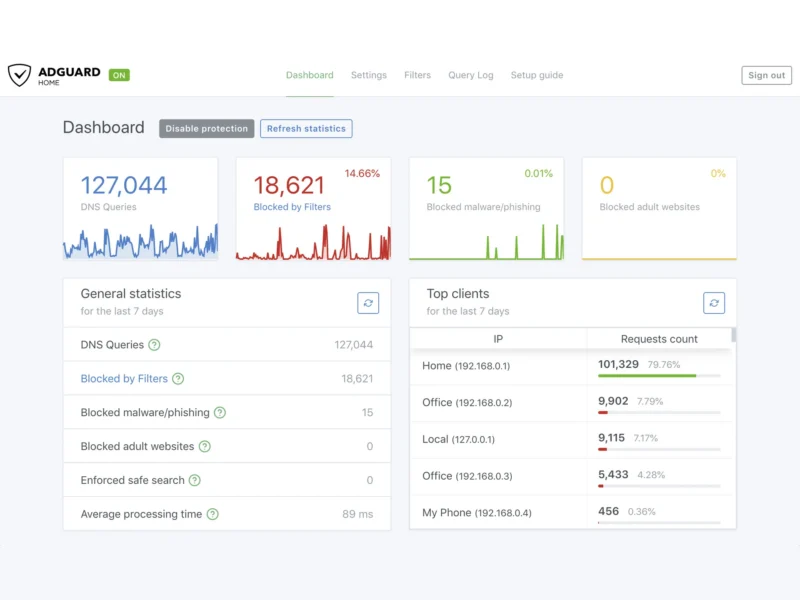
- Web dashboard — query statistics, top clients, top blocked domains, a searchable live query log and a one-click protection toggle.
- Per-client settings — give individual devices their own rules, blocklists and upstreams, identified by IP address, MAC address or client ID.
- Parental control and Safe Search — block adult domains and enforce safe search on the major search engines.
- Built-in DHCP server — hand out addresses on your LAN and automatically point every new device at AdGuard Home for DNS.
- DNS rewrites — local hostnames plus wildcard and regex rules for your internal services.
- Blocking modes — answer blocked requests with NXDOMAIN, REFUSED, a null IP or a custom IP address.
- Optional DNSSEC validation, a DNS cache, parallel and fallback upstream queries, and “fastest IP” selection for multi-address domains.
- REST API — everything the dashboard does is scriptable, with an OpenAPI specification in the repository.
Why use it
Ad blockers that live inside a browser cannot protect a smart TV, a games console or a phone app. Because AdGuard Home sits at the DNS layer, one installation cleans up the whole household: every device on the network benefits the moment you point your router (or the built-in DHCP server) at it. You also get the visibility that raw DNS normally hides — a live log showing exactly which domains each device is asking for, and how many requests were blocked — together with the privacy benefit of running your own resolver instead of handing every lookup to a third-party DNS provider.
Use cases
- Home network — replace your ISP’s DNS, block adverts and trackers on every device, and use per-client rules to keep children’s devices filtered while yours are not.
- Small office or lab — centralised DNS with logging, DHCP and local DNS rewrites, without a full enterprise appliance.
- Self-hosting stack — pair it with your reverse proxy for split-horizon DNS, so internal names resolve locally while everything else is filtered and forwarded upstream.
Platforms
A single binary is published for Linux (amd64, arm64, armv7 and more), macOS, Windows and FreeBSD/OpenBSD. Official Docker images and a Snap package are available, along with a Home Assistant add-on and a one-line automated install script for Unix-like systems.
Licence and website
GPL-3.0 (GNU General Public License v3.0) — verified in the project’s LICENSE.txt. Website: adguard.com/adguard-home · Source: github.com/AdguardTeam/AdGuardHome
Alternatives
- Pi-hole — the classic DNS-level ad blocker, with a similar feature set and a larger install base.
- Unbound — a validating, recursive DNS resolver; pair it with a blocker rather than replacing one.
Browse more free and open source tools in the directory.