Chitchatter
- Platform
- Web
- Licence
- GPL-2.0 Open source
- Website
- chitchatter.im/
- Source code
- github.com/jeremyckahn/chitchatter
Overview
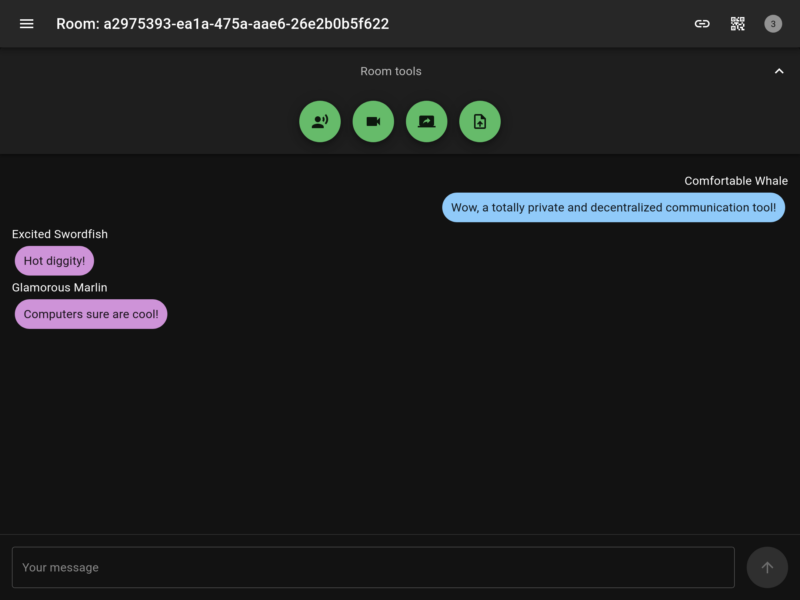
Chitchatter is a free, open-source peer-to-peer chat that runs entirely in the browser. There is no Chitchatter API server to deploy or trust: peers find each other through public WebTorrent trackers, fall back to a TURN relay when a direct connection is impossible, and then exchange messages, voice, video and files directly over WebRTC. Everything is end-to-end encrypted by the browser’s own WebRTC stack, and nothing is written to disk on either side — close the room and the conversation is gone.
It is built with Vite and React, uses Trystero for the peer networking, and ships as a static site, so the whole application can be forked and served wherever static files are hosted — GitHub Pages included.
Key Features
- Serverless, decentralized chat: no backend stores messages; the only third-party services involved are public WebTorrent trackers and TURN relays used to establish connections
- Ephemeral by design: conversation history lives in memory only, so it disappears when the room is closed or the tab is reloaded
- Public and private rooms: random UUID or four-word passphrase room names, with an optional password for private rooms
- Voice, video and screen sharing: calls and screenshare run peer-to-peer in the room, alongside text
- Direct messaging: side conversations with individual peers in the same room
- Encrypted file sharing: files of any size are encrypted before transfer with a per-share random key that only room peers receive
- Peer verification: each participant’s identity is checked client-side with public-key cryptography
- Markdown messages: chat renders Markdown, including syntax-highlighted code blocks
- Embeddable: drop a room into another web app with an iframe; light and dark themes are included
- No analytics: no tracking, telemetry or user accounts of any kind
Why Use It
Most chat tools ask you to trust a central operator with the conversation. Chitchatter removes the operator entirely: the public instance is handy for an ad-hoc encrypted conversation, and anyone who wants full control can fork the repository and serve their own build. Because nothing is persisted, it suits one-off exchanges — sharing a password, troubleshooting a machine over screenshare, moving a file between two devices — rather than a permanent team archive. If you want server-side history instead, a federated or self-hosted messenger such as BroadcastChannel is the closer fit.
Use Cases
- Quick, encrypted conversations with no account and no residue
- Screen-sharing an IT problem with a colleague without joining a vendor’s meeting platform
- Moving text or large files between devices and operating systems
- Embedding a private room inside another web application
Requirements and Caveats
Chitchatter runs in any modern desktop or mobile browser; on iOS Safari peers can fail to rejoin a room after the browser is closed and need a page refresh. Peer connections are bound to the instance’s domain, so a user of the public instance at chitchatter.im cannot join a room on a self-hosted fork, and vice versa. Some ad blockers, uBlock Origin among them, block the WebTorrent trackers needed to find peers — disabling the blocker or self-hosting fixes it. When a direct connection is impossible the free public TURN relay is used, and it carries no service guarantee, so connections can occasionally be slow or fail to establish. The project is feature-complete and effectively in maintenance mode: significant bugs get fixed and pull requests are welcomed, but large new features are not planned. Self-hosting means forking the repository, changing the tracker and relay configuration if you want to, and publishing the static build yourself.