ZipCaptions
- Platform
- Web
- Licence
- GPL-3.0 Open source
- Website
- zipcaptions.app
- Source code
- github.com/jptrsn/zip-captions
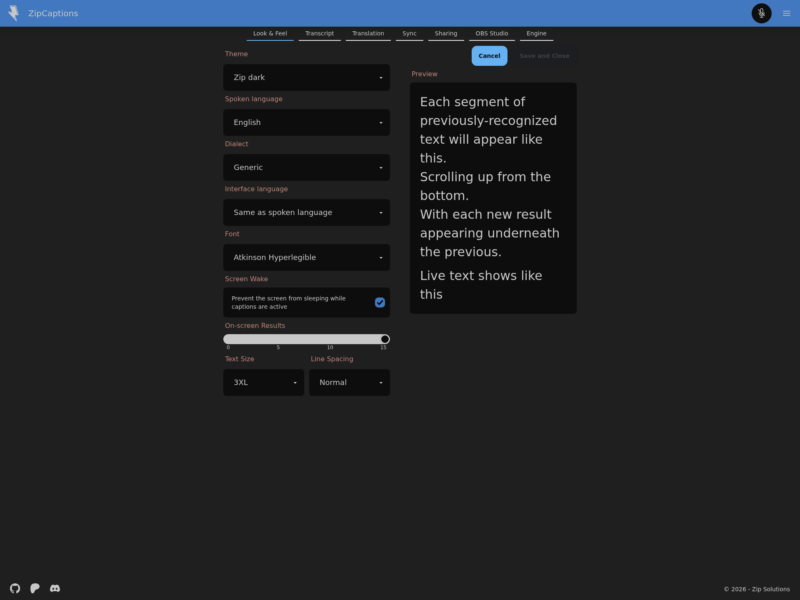
ZipCaptions is a free live-captioning web app that turns speech into on-screen text inside your browser. It is built around a single idea, stated on its own site: accessibility should be free. There is no account requirement to start captioning, no advertising, no paid tier, and the project says it does not capture, store or share transcript data.
How it works
Open the site in a desktop browser, allow microphone access and press the caption button. Recognition runs through the browser’s speech engine and the results scroll up the window as segments are recognised, newest at the bottom. The caption window is styled rather than fixed: you choose from a long list of themes, set the text size and line spacing, and pick a typeface such as Atkinson Hyperlegible, which is designed for low-vision readers.
Because the captions live in a web page, they can be reused outside it. A picture-in-picture window floats the same text over other applications, and the app can push captions to viewers of a broadcast or into OBS Studio, either through a browser source or as a stream caption track.
Features
- Live speech-to-text in the browser, with no plugin to install for the online version
- Around thirty interface themes, adjustable text size and line spacing, and a choice of accessible fonts
- Separate spoken-language and interface-language settings, with regional dialects
- On-device live translation from the browser’s Translator API, in a two-pane layout showing original, translation, or both
- Picture-in-picture caption window that stays on top of other windows
- Broadcast mode, so remote viewers read the same captions, including translations
- OBS Studio output, and a Bitfocus Companion add-on for hardware control
- Progressive web app install, plus a Chrome extension for persistent captions
Requirements
Speech recognition comes from the browser, not from a ZipCaptions server, so the browser matters more than the machine. Chrome and Edge on desktop give the fullest feature set, while Safari and mobile browsers are more limited and fall back on the browser’s own support. Live translation additionally needs the on-device Translator API, available in desktop Chrome 138 and later or Edge 148 and later, and the first use of a language pair downloads a small model in the background.
The source is a TypeScript monorepo published under the GPL-3.0 licence, so the client can be built and served from your own infrastructure; the hosted instance is the simplest way to use it, and the help site walks through the browser-specific steps.
Who it is for
Anyone who needs captions for a room or a stream without buying captioning hardware: classrooms and lectures, live events and conferences, places of worship, community meetings, and streamers who want readable captions over their video. Its usefulness rests on the speech engine of the browser, so accuracy varies with audio quality, accent and background noise; the project publishes guidance on improving recognition accuracy in its help pages.