BunkerM
- Platform
- Web Docker Linux
- Licence
- Apache-2.0 Open source
- Website
- bunkerai.dev/bunkerm
- Source code
- github.com/bunkeriot/BunkerM
BunkerM is a self-hosted MQTT management platform for Eclipse Mosquitto. It bundles the broker and a full web dashboard into a single Docker container: one docker run gives you a working MQTT 3.1.1 and 5 broker on port 1900 plus a management UI on port 2000, where client accounts, topic ACLs, live traffic, message history and alerting are handled from the browser instead of hand-edited Mosquitto config files. It is written in TypeScript and released under Apache-2.0.
Access control
- Client accounts with credentials, per-client enable/disable and group membership, driven by Mosquitto’s Dynamic Security plugin
- Roles carrying fine-grained topic rules with allow or deny permissions, wildcard topics (
#and+) and ACL types such aspublishClientSendandsubscribeLiteral - Groups that stack roles with priorities, so a fleet of devices can share one policy
- One-click JSON export and import of the whole security configuration, including password hashes; the broker reloads itself after an import
Broker visibility
The dashboard tracks connected clients, publish and receive rates, byte throughput, subscription and retained-message counts, and recent connect/disconnect events. An MQTT Explorer gives a live topic tree refreshed every three seconds with each topic’s latest value, message count, QoS, retain flag and last-updated time, and a publish panel that sends messages straight from the browser with RAW, JSON or XML payload validation.
Message history and replay
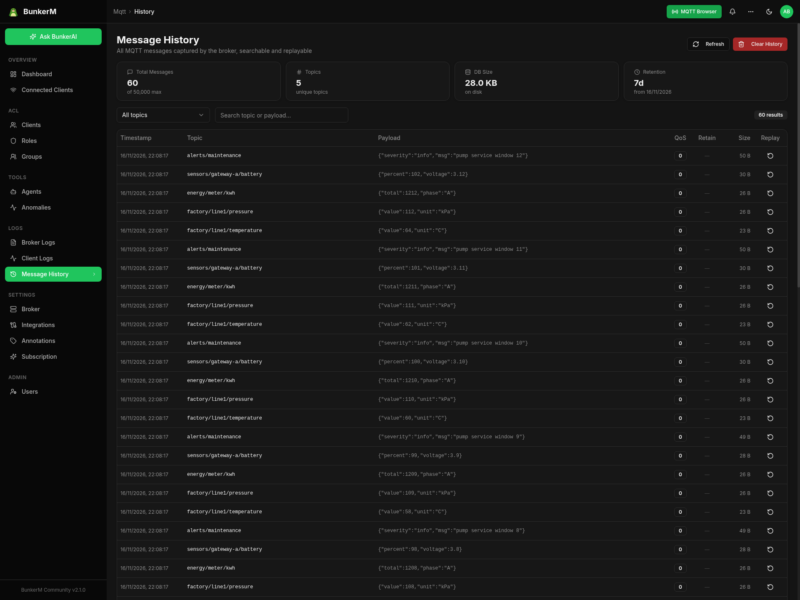
Every message published to the broker is captured into a local SQLite database with millisecond timestamps, topic, payload, QoS, retain flag and size, excluding $SYS/ diagnostics. History is searchable by topic or payload and retained for 7 days or 50,000 messages by default, both adjustable through HISTORY_MAX_AGE_DAYS and HISTORY_MAX_MESSAGES. Any row can be replayed back to the broker from a dialog pre-filled with the original topic and payload.
Anomaly detection and agents
A local statistical engine samples the broker every 10 seconds, builds 1-hour and 24-hour baselines and runs four detectors each minute: a z-score test beyond 3σ, an EWMA drift test, a spike test at more than three times the 30-minute baseline, and a silence test for topics that stop publishing for twice their normal interval. Alerts carry low, medium, high or critical severity. Scheduler and watcher agents add local automation, and an optional local LLM integration points at LM Studio for on-premise AI queries.
Licence and caveats
Open source. BunkerM Community is Apache-2.0 and self-hosted; the separate BunkerAI subscription adds a cloud assistant and Telegram/Slack channels but is not needed for the broker, ACL or history features. Community installs need a one-time free activation key to enforce a two-agent limit, verified offline after activation. The bundled broker ships with default credentials bunker / bunker, so change them before exposing port 1900.