firewalld
Overview
firewalld is the dynamically managed firewall daemon that ships as the default firewall on Red Hat Enterprise Linux, Fedora, CentOS Stream, Rocky Linux, AlmaLinux and the SUSE family, and is packaged by Debian, Ubuntu, Arch and others. Where a traditional firewall is edited by hand and reloaded as one static ruleset, firewalld keeps a live runtime configuration and a separate permanent one, organised into zones — named trust levels such as public, home, work, dmz and trusted that a connection is matched against. You tell it which services a zone allows, and it translates that into nftables rules for you.
The daemon exposes its whole configuration over D-Bus (org.fedoraproject.FirewallD1), so other software can add, query and remove rules on the fly without restarting anything. That is what lets NetworkManager automatically move a laptop interface into the right zone when you join a café Wi-Fi network, and it is why firewall changes made with firewall-cmd take effect immediately while the permanent copy is saved for the next boot. firewalld is written in Python, was created by Thomas Woerner at Red Hat and is now maintained by Eric Garver and a community of contributors. The current release is 2.5.2 (September 2026).
Key features
- Zones instead of one flat ruleset — every network connection is assigned a zone that defines its trust level, and the same machine can treat a wired LAN, a VPN and a public hotspot completely differently. Ten predefined zones ship in the box (
block,dmz,drop,external,home,internal,nm-shared,public,trusted,work) and you can define your own. - Runtime versus permanent configuration — change the running firewall at any moment and test it, then persist it with
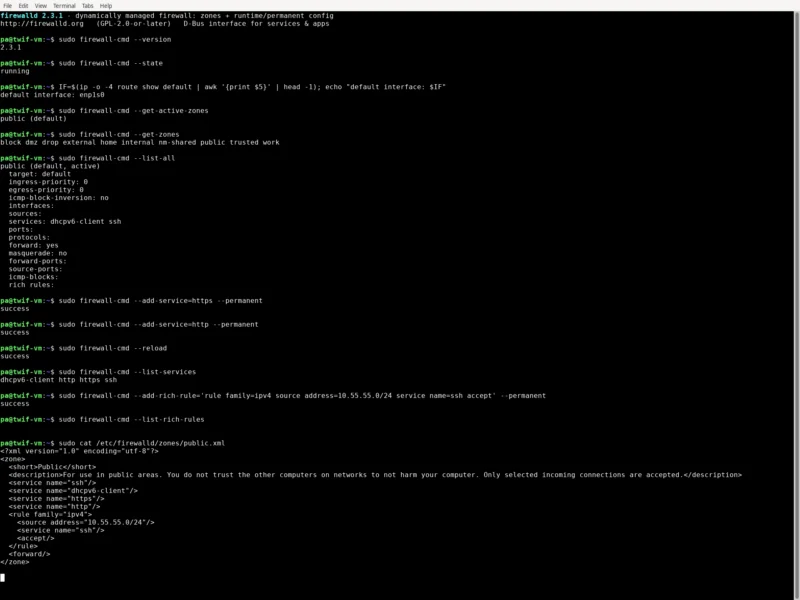
--permanentfollowed byfirewall-cmd --reload, or promote the whole runtime state in one go with--runtime-to-permanent. No downtime, no reboot, and a bad rule can be reverted by reloading. - Named services and applications — a service is a small XML definition (ports, protocols, modules, helpers), so you allow
ssh,httpsorsambaby name rather than by port number. Thecockpit,dhcpv6-clientandmdnsservices are ready out of the box, and services can be overridden per zone. - Rich rules — when a zone plus service is not precise enough, rich language rules add source and destination matching, logging, audit, rate limiting, port forwarding and more in one readable line, e.g.
firewall-cmd --add-rich-rule='rule family=ipv4 source address=10.55.55.0/24 service name=ssh accept'. - Policies (firewalld 1.0 and later) — the newer policy objects filter traffic between zones and for forwarded traffic, with ingress and egress zones,
masquerade,forward-portandtcp-mss-clampactions. This is the modern replacement for many hand-written rich rules on a router or hypervisor host. - D-Bus interface and NetworkManager integration — applications can react to firewall events and apply rules without shelling out, and interfaces are placed into zones automatically as networks change. A change made from a desktop GUI, Ansible or a container platform all ends up in the same configuration.
- Tools for every situation —
firewall-cmdfor scripted and interactive use,firewall-configas a GTK graphical front end,firewall-appletfor the desktop tray, andfirewall-offline-cmdto edit configuration during an installation or in a container where the daemon is not running. - Panic mode and direct rules —
firewall-cmd --panic-ondrops all inbound and outbound traffic instantly, and the direct interface lets you drop in raw nftables/iptables-style rules for the rare case the abstractions do not cover. - nftables backend, IPv4 and IPv6 — firewalld builds nftables rulesets (the older iptables backend is deprecated), handles IPv4 and IPv6 equally, supports ethernet bridges and ipset-style match sets, and can be driven entirely from configuration files managed by configuration management.
Why use firewalld
Most desktop firewalls make you choose between a friendly interface and real control. firewalld gives you both: the zone model is simple enough to explain to a colleague, while rich rules and policies reach the same depth as a hand-written nftables ruleset. Separating runtime from permanent configuration removes the usual fear of changing a firewall over SSH — you can try a rule, check that your session survives, and only then make it persistent. Because it is the default on the entire Red Hat and SUSE ecosystem, the documentation, SELinux integration and Ansible modules are already there, and because it is packaged everywhere else, the same skills transfer to Debian, Ubuntu and Arch servers.
Use cases
- Linux servers and workstations — allow only the services a host really needs, per zone, with a permanent configuration that survives reboots.
- Laptops on untrusted networks — NetworkManager switches the active zone as you move between the office, home and a public hotspot, tightening or relaxing rules automatically.
- Routers, hypervisors and gateways — policies and forward ports turn a Linux box into a stateful router between an internal network and the internet.
- Automated fleets — configuration lives in XML files under
/etc/firewalld/and in D-Bus calls, both of which Ansible, Kickstart and container images can manage without a human at the console.
Platforms
Runs on Linux, where it is the default firewall on Fedora, RHEL and its rebuilds (Rocky, AlmaLinux, CentOS Stream) and on openSUSE/SLES; it is also packaged for Debian, Ubuntu, Arch Linux, Gentoo and others. Debian 13 “trixie” ships it as firewalld 2.3.1. There is no Windows or macOS build — those platforms have their own firewalls — but firewalld can be installed in a container or a minimal image where only firewall-offline-cmd is used.
Licence and website
GPL-2.0-or-later (GNU General Public License v2 or later) — verified from the source headers (SPDX-License-Identifier: GPL-2.0-or-later) and the License: GPL-2.0-or-later field in the project’s RPM spec file, with the full GPLv2 text in the repository’s COPYING. Website: firewalld.org · Documentation: firewalld.org/documentation · Source: github.com/firewalld/firewalld
Alternatives
- ufw (Uncomplicated Firewall) — a much simpler front end for nftables/iptables, aimed at single hosts and newcomers.
- Fail2ban — not a firewall, but the usual companion: it watches logs and adds temporary blocks for brute-force attempts.
- CrowdSec — a collaborative, behaviour-based intrusion prevention engine that can drive nftables rules from community scenarios.
- OPNsense and pfSense — complete firewall distributions for a dedicated router or edge appliance rather than a per-host daemon.
Browse more free and open source tools in the directory, or see the Security & Privacy category for related tools.