Webmin
- Platform
- Linux
- Licence
- BSD-3-Clause Open source
- Website
- webmin.com/
- Source code
- github.com/webmin/webmin
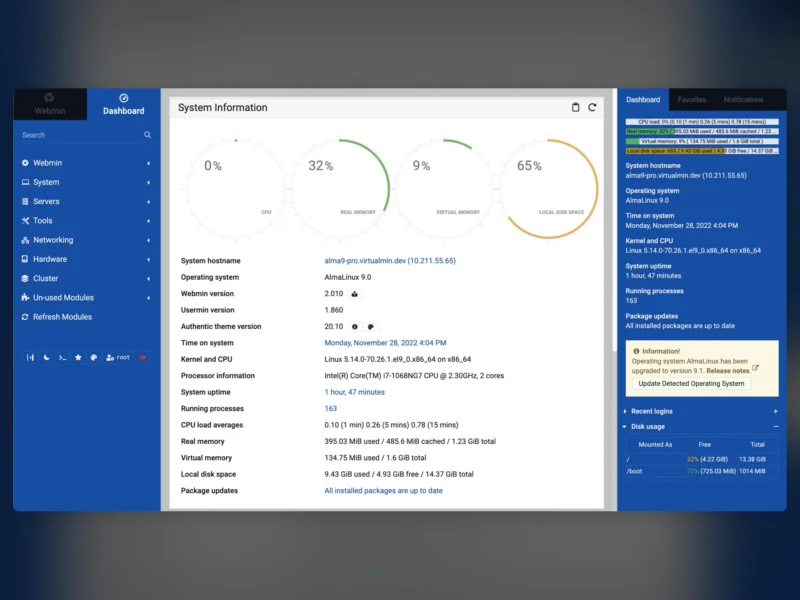
Webmin is a browser-based administration panel for Unix-like servers. Written in Perl and served from its own small web server on port 10000, it puts the jobs normally typed into a shell — users, packages, services, cron, firewalls, disks and logs — behind a point-and-click interface that behaves much the same way on Debian, Rocky, Alpine or FreeBSD. Development started in 1997 and continues today, which is why it is still the default answer for administering a single server, or a small fleet, without handing every operator an SSH account.
What it covers
Modules are grouped into categories, and each one works on the real system files rather than keeping a parallel copy of your configuration. The long-standing set covers:
- Users and groups, quotas, password ageing and scheduled cron jobs
- Software packages and updates through apt, dnf/yum, apk and the BSD package tools
- systemd services and boot targets, plus a process list with signals and nice levels
- Network interfaces, routes, DNS client settings, DHCP and host firewall rules
- Server configuration for Apache, nginx, BIND, MySQL and MariaDB, PostgreSQL, Postfix, Dovecot, Samba and Squid
- Disks and partitions, LVM, software RAID, NFS and Samba shares, filesystem backups
- Logs, scheduled backups, SSL certificates and a simple system monitor
The Cluster module copies a command or a configuration change across a group of servers at once, which is where a web panel starts to beat doing the same edit by hand on five machines.
Terminal, file manager and SSH
Since the 2.x series Webmin includes a Terminal module that gives a fully interactive shell inside the browser, alongside the older SSH and Telnet clients and a Java-free file manager for upload, download, permissions and archive extraction. For a server behind a VPN this is often enough to stay out of a separate SSH client for routine work.
Usermin, Virtualmin and the ecosystem
Two companion projects share the codebase: Usermin gives ordinary users a reduced panel for mail, password changes, quotas and files, and Virtualmin builds a multi-domain hosting control panel on top of Webmin. Both are installed from the same repositories and are independent of the panel itself — Webmin runs fine without either.
Requirements and installation
Webmin needs Perl 5.10 or newer on a Unix-like system: the major Linux distributions, FreeBSD, OpenBSD, Solaris, AIX, HP-UX or macOS. The project ships an official setup script that registers its own APT repository on Debian and Ubuntu or its YUM/DNF repository on RHEL-family distributions, after which the panel is an ordinary package that upgrades with the rest of the system. A self-contained tar.gz installer covers systems without a package manager. It listens on port 10000 over HTTPS with a self-signed certificate by default, so the panel should sit behind a VPN, a firewall rule or a reverse proxy rather than on the open internet.
Trade-offs
A Webmin session logged in as root is root: every module runs with full privileges, and a compromised account is equivalent to shell access on the host. The project’s own hardening advice — two-factor authentication, IP-based access control, and separate non-root users limited to specific modules — matters more here than with a command line, because the attack surface is a network daemon. The interface is functional rather than beautiful, some modules are thin wrappers over config files that assume a conventional layout, and heavily customised systems will occasionally need the terminal instead.
Alternatives
- YunoHost — a self-hosting distribution with a panel aimed at installing web apps rather than administering a general-purpose Unix host.
- Portainer — a web console for Docker and Kubernetes when container workloads are the whole job.
- Apache Guacamole — browser-based SSH and remote desktop access without the administration modules.