portracker
- Platform
- Web Docker
- Licence
- MIT Open source
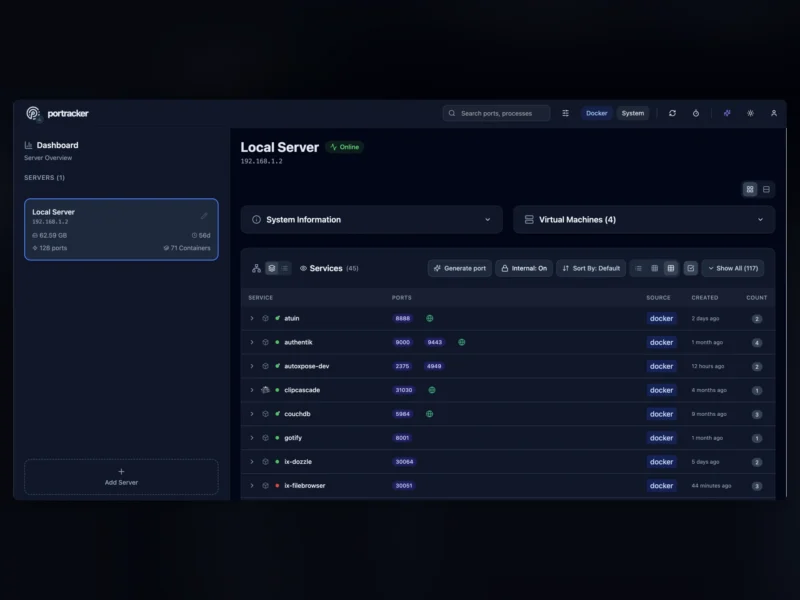
portracker is a self-hosted tool that works out which services are listening on which ports, and keeps that picture current. It scans the host it runs on, lists every service it finds with the ports it holds, and groups the results per server, so the answer to “is 8080 free on that box, and what is already using it” is a page rather than a spreadsheet someone forgot to update.
What it does
- Automatic discovery — collects running services and their listening ports from the host itself, with no manual entries to maintain.
- Container awareness — dedicated collectors for Docker and TrueNAS, and it separates container-internal ports from the ports published to the host, so the two are never confused.
- Peer instances — add other portracker installs as peers and see every server, container and VM on one dashboard.
- Server groups — servers sit in a parent-child tree, which lets a VM instance hang under the physical host that carries it.
- Live filtering and views — search across ports and processes, then read the results as a list, a grid or a table, in light or dark theme.
Running it
Deployment is a single Docker container (image mostafawahied/portracker) listening on port 4999. It needs host PID namespace, SYS_PTRACE and SYS_ADMIN capabilities, an unconfined AppArmor profile and the Docker socket mounted read-only, because reading other processes’ sockets is the whole job. State lives in an embedded SQLite database under /data, so there is no Postgres or Redis to run alongside it.
One caveat worth knowing before deploying on a workstation: under Docker Desktop for macOS and Windows the container sees the Linux VM, so it can read Docker container metadata and published ports but cannot enumerate listeners started natively on the desktop host. Host PID mode and the extra capabilities do not change that boundary.
Related
Dozzle covers the other half of the same question — what a container is saying — and NetBox is the documentation-of-record alternative when the inventory has to be curated by hand rather than discovered.