CyberChef
- Platform
- Web Docker
- Licence
- Apache-2.0 Open source
- Website
- gchq.github.io/CyberChef
- Source code
- github.com/gchq/CyberChef
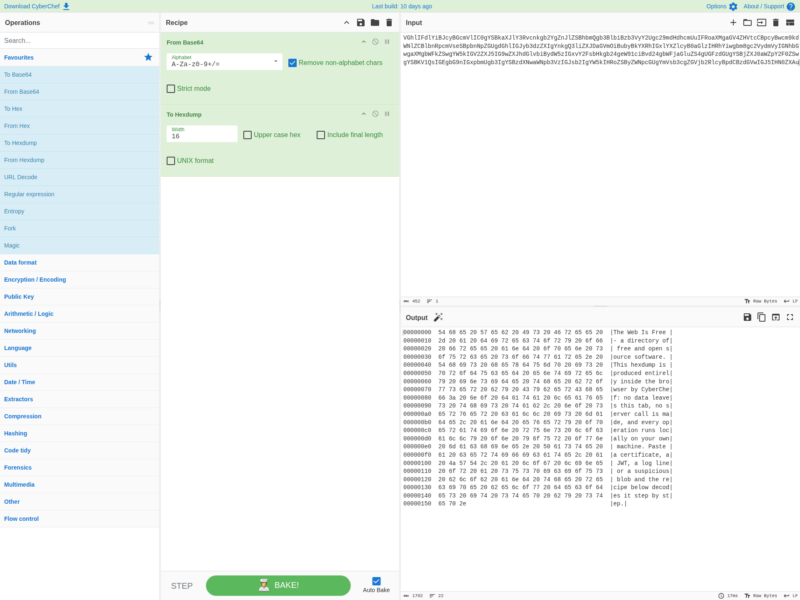
CyberChef is a browser-based workbench for encoding, decoding, encrypting, compressing and inspecting data — the project’s own nickname is “the Cyber Swiss Army Knife”. You drop data into an input pane, stack operations into a recipe, and the result appears immediately in the output pane. Everything runs inside the page, so a pasted certificate, token, log line or suspicious blob never leaves the machine you are sitting at.
How it works
A recipe is an ordered list of operations. Drag “From Base64” and “To Hexdump” into the recipe and CyberChef bakes the input through both, showing intermediate state and the final output side by side. Each operation exposes its own options — the alphabet and strict-mode flags on From Base64, the row width and upper-case setting on To Hexdump. The live build ships over 500 operations, grouped into categories: data format, encryption and encoding, public key, arithmetic and logic, networking, language, utilities, date and time, extractors, compression, hashing, code tidy, forensics, multimedia, flow control and more.
Key features
- Auto Bake — output follows input and recipe as you edit, with an option to switch to manual baking for very large inputs.
- Magic — automatic detection of what encoding or format your data is in, with a one-click icon in the output pane to apply the operation it finds.
- Breakpoints and step-through — pause a recipe at any operation and walk it a step at a time to see what the data looks like at each stage.
- Drag and drop up to 2 GB — drop a file onto the input box and it is loaded straight into the browser.
- Save and share recipes — saved recipes live in local storage, and copying the URL carries the whole recipe plus the input, which makes a decode reproducible for a colleague.
- Operation search — type a name or a related word and the matching operations filter immediately.
- Offsets on selection — highlighting text in input or output shows its byte offset and length.
- Broad operation coverage — from XOR and Base64 to AES, DES and Blowfish, hexdumps, compression, hashes and checksums, IPv6 and X.509 parsing, and character-set conversion.
Running it
The simplest route is the hosted build, which needs nothing but a modern browser. For offline or air-gapped work, run it yourself with Docker (no toolchain required) or build it from source with Node.js; the project also publishes a downloadable standalone build that runs from a local file. A Node.js API is available for scripted use, so the same recipes can be applied in a pipeline rather than by hand.
Who it is for
Analysts who need to unpick a payload without reaching for three languages and a scratch script: malware and incident responders decoding a blob, developers checking a JWT or a checksum, anyone comparing an X.509 certificate field by field. The interface assumes no cryptography knowledge — operations are named and configured in plain language — but the depth is there for people who want to chain twenty of them in a fork-and-merge flow.
Alternatives
- Hashcat — a GPU-accelerated password recovery tool; the right neighbour when the job is cracking a hash rather than decoding or transforming data.
- Commercial “online decoder” services and desktop hex editors cover fragments of the same ground; CyberChef is the free software option that keeps the data local and the recipe reproducible.
CyberChef is Apache-2.0 licensed and developed in the open by GCHQ with a long list of outside contributors; it was originally written by an analyst in their innovation time and has grown into a project with tens of thousands of GitHub stars.