SonarQube
- Platform
- Docker Linux macOS Windows
- Licence
- LGPL-3.0 Open source
- Source code
- github.com/SonarSource/sonarqube
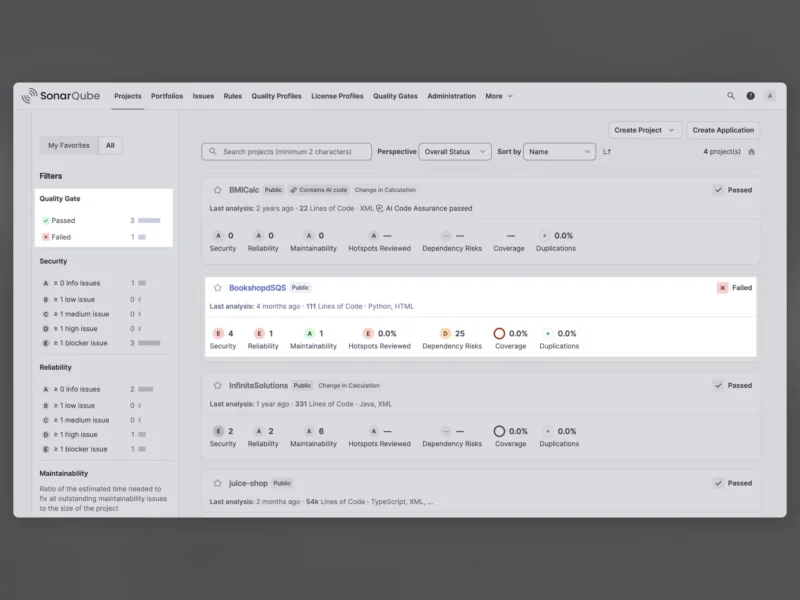
SonarQube is a static analysis platform that continuously inspects a codebase for bugs, security vulnerabilities and maintainability problems. SonarQube Community Build is the free, open-source edition: it runs on your own server and applies the same analysis engine that SonarSource uses across its commercial SonarQube Server and SonarQube Cloud products. You point a scanner at your project, the server ingests the analysis, and every issue is reported with the rule it broke, the exact line, and an explanation of why it matters.
What it finds
Analysis combines symbolic execution with data and control flow analysis, so the findings go past style nits:
- Reliability – bugs that break behaviour at runtime, such as null dereferences, resource leaks and unreachable branches.
- Security – vulnerabilities and security hotspots, each with the risk it carries and the fix it needs.
- Maintainability – duplicated blocks, excessive complexity and structural problems that make code expensive to change.
- Test coverage – coverage reports imported from your existing test tooling, tracked alongside the issues.
Quality gates
A Quality Gate is a pass-or-fail condition applied to new code. Define the threshold once – for example “no new blocker issues, at least 80 percent coverage on new code” – and every analysis is graded against it, so a project is either clean enough to merge or it is not. Ratings from A to E summarise security, reliability and maintainability per project, and the projects dashboard shows the gate status for everything you have analysed in one view.
Languages covered
The Community Build analyses Java, Kotlin, C#, VB.NET, JavaScript, TypeScript, CSS, HTML, Python, Go, PHP and XML out of the box. Infrastructure files are covered too – Dockerfiles, Kubernetes and Helm manifests, Terraform, CloudFormation and Azure Resource Manager templates. Ruby, Rust and Scala were removed from the Community Build in version 26.11 and are now provided as community-maintained plugins.
How it fits into a build
Analysis is driven by SonarScanner, with native integrations for Maven and Gradle and plugins for the usual CI systems, so the scan runs as a pipeline step and the gate result fails the build. Issues can be browsed and triaged in the web UI, and rules and quality profiles can be adjusted per language when a default does not fit the codebase. Because the Community Build does not decorate pull requests, the gate result is the thing your CI has to read – branch and pull-request analysis belongs to the commercial editions.
Running it
Deployment is a Java server plus a database, and the published Docker image is the quickest route to a working instance: start the container with port 9000 mapped and the web UI is immediately available, with the initial administrator login being admin / admin, which you are prompted to change at first sign-in. For a quick evaluation the container is enough; anything you intend to keep should run against PostgreSQL, which is the supported production database. Building from source requires Java 21 and native Git, and produces a ZIP distribution with launchers for Linux, macOS and Windows. Expect a server-side install rather than a desktop app: it is a central service that a team’s projects report into, not something you run per developer.
Community Build versus the commercial editions
The free edition is a genuinely usable code inspection server, but it is deliberately not the whole product line. SonarQube Server and SonarQube Cloud add branch analysis and pull-request decoration, software composition analysis for vulnerable dependencies, deeper taint analysis, secrets detection, infrastructure-as-code analysis, architecture rules, portfolio and executive reporting, and a remediation agent that opens fix pull requests. If you only need a self-hosted gate that blocks bad merges, the Community Build carries that job on its own; if you need the analysis wired into every pull request with reporting across teams, that is the paid tier.
Alternatives
The directory also lists lighter-weight tools that overlap with parts of what SonarQube does: