Open DroneLog
- Platform
- Linux Windows macOS Android Docker Web
- Licence
- AGPL-3.0 Open source
- Website
- opendronelog.com
- Source code
- github.com/arpanghosh8453/open-dronelog
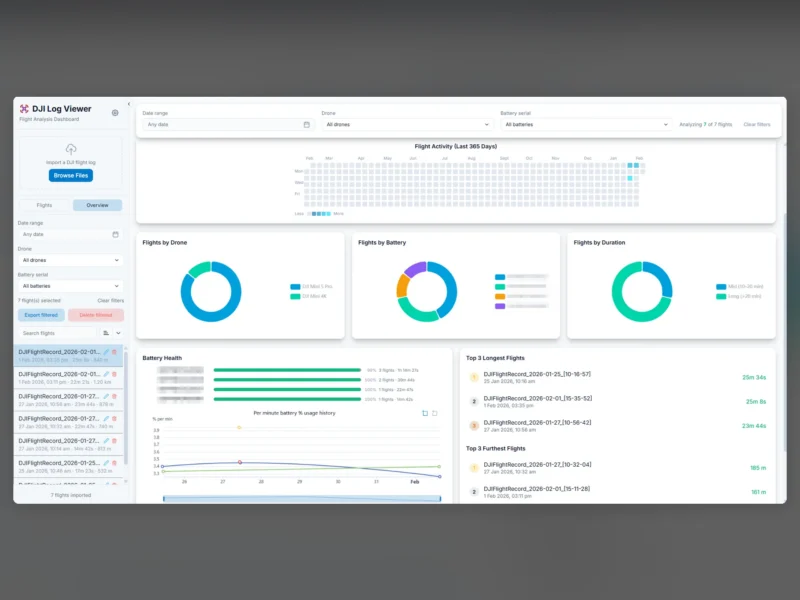
Open DroneLog takes the raw flight logs a drone leaves behind and turns them into something you can actually read: a searchable logbook of every flight, with the telemetry, the route on a map, and the numbers that show whether a battery is ageing or a flight was riskier than it felt at the time. It parses DJI’s own .txt logs plus Litchi and Airdata CSV exports, keeps everything in a local DuckDB database, and runs either as a desktop application or as a self-hosted web app in Docker.
Key capabilities
- Logbook with deduplication – imports are matched on drone serial, battery serial and start time, so re-syncing a folder does not double-count flights.
- Flight map and replay – satellite, topographic and OpenStreetMap layers, 3D terrain, and a replay with 0.5x to 16x speed control, a live telemetry overlay and a visualisation of the stick inputs.
- Telemetry charts – height, speed, battery level and cell voltages, attitude, GPS, RC signal, distance from home and velocity, in synchronised panels with drag-to-zoom.
- Overview dashboard – aggregate flight time and distance, an activity heatmap, per-drone and per-battery breakdowns, a time-of-day chart and a cluster map of where you have flown.
- Automatic tags – night flights, high-speed runs and low-battery returns are tagged on import, and locations are reverse-geocoded offline; manual tags and bulk operations sit on top.
- Filters across the whole logbook – date range, drone, battery, controller, duration, altitude, distance, tag and map area, with filter inversion.
- Local-first storage – one DuckDB file on your own disk; the only outbound call is the DJI key fetch on first import.
Where it fits
The project targets DJI aircraft and the apps commonly flown with them; other vendors’ logs need parser work, which the project allows through external parser plugins configured in parsers.json. The desktop build covers Windows, macOS and Android, and the same interface runs as a Docker-deployed web app on a home server, with profiles and optional password protection for a shared instance. The web UI is designed for a desktop-sized screen, so treat phone access as a convenience rather than the intended experience. A companion sync utility watches a local folder and pushes logs to a hosted instance, and the repository is mirrored on Codeberg with an alternative container image.
Related in the directory
- OpenTracks – records GPS tracks on Android when you want a second, independent trace of the same trip.
- OsmAnd – offline maps and track logging on a phone.