Letta
- Platform
- Linux macOS Windows Web
- Licence
- Apache-2.0 Open source
- Website
- letta.com
- Source code
- github.com/letta-ai/letta-code
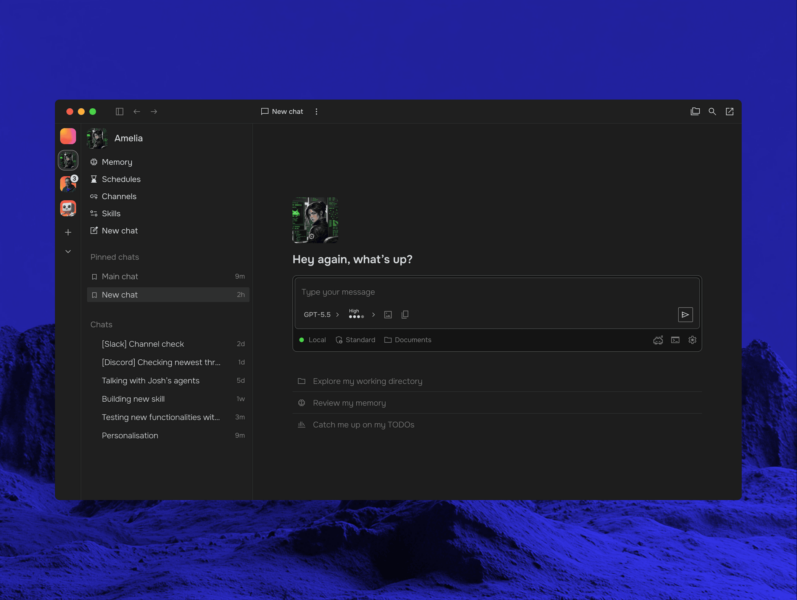
Letta is an open-source platform for stateful AI agents — agents that keep memory, identity and a working sense of experience across sessions instead of starting from a blank context every time. It is built by the team behind MemGPT, the research project that modelled an agent’s context window as an operating system paging memory in and out, and it now ships as Letta Code: a stateful agent harness that runs in a terminal, in the browser and inside chat platforms, backed either by Letta Cloud or by a fully local server.
Key Features
- Self-editing memory — agents rewrite their own memory blocks, skills and system prompts as they work, so what they learn in one session is still there in the next.
- Dreaming and reflection — a
/sleeptimeschedule lets an agent consolidate memory in the background between conversations, and/dreamand/reflectrun the same process on demand. - MemFS — an agent’s whole context, including its memory blocks, is tracked in git, so memory changes are diffable and can be synced to your own GitHub repository.
- Skills — reusable instructions loaded from a global folder, a project folder or the agent’s own memory, with a
/skill-creatorcommand for writing new ones. - Subagents and agent-to-agent calls — built-in general-purpose, forked and recall subagents run in the background, and any agent can call another agent, including itself.
- Message search — one search across every message and every agent, so an agent can look back through its own history or ask another agent what it knows.
- Channels — the same agent answers in a browser, including on mobile, in Slack, in Telegram, in Discord, or through a custom channel.
- Schedules, hooks and permissions — heartbeats and cron jobs let agents work across time, hooks run your scripts at points in a run, and permission modes decide what is auto-approved.
- Cloud or local backend — Letta Cloud keeps memory and conversations available across machines, while the local backend keeps everything on your own hardware.
Why Use Letta?
Most agent tooling treats a run as a transaction: the context is assembled, the model answers, the context is thrown away. Letta makes memory the durable artefact instead — versioned, inspectable and editable — which is what makes an agent useful over weeks rather than minutes. It is also honest about being a harness: you work from a terminal and configure model providers yourself, rather than composing agents in a drag-and-drop builder. If you want persistent memory without a hosted account, the local backend plus a self-configured model key does the job.
For stateless coding agents the directory already covers Aider and Cline; for sandboxed software-engineering runs see OpenHands and SWE-agent, and for a model-agnostic IDE assistant see Continue. Letta’s difference is continuity: the agent keeps a memory of the work.
Use Cases
- Long-running personal or coding agents whose value depends on remembering earlier decisions.
- An assistant reachable from Slack, Telegram or Discord that keeps one identity across all of them.
- Self-hosted agent memory where conversations must not leave your own infrastructure.
- Experiments in agent memory, continual learning and context management.
Requirements and Installation
Install with npm (npm install -g @letta-ai/letta-code) or, with Node bundled, with uv (uv tool install letta) or pipx. Python 3.9+ is required; wheels cover glibc Linux 2.28+ on x86-64 and ARM64, macOS 14+ on Intel and Apple Silicon, and Windows x64. Run letta in a project directory, choose Cloud or local on first launch (letta backend local makes it permanent), then add a model provider with /connect and pick a model with /model. Arch users have an AUR package and Nix users a flake. The older Python REST server from the MemGPT era is retired — it stays on the archive branch of the original repository, while active development happens in letta-ai/letta-code.