Poznote
MIT
- Platform
- Docker Web
- Licence
- MIT Open source
- Website
- poznote.com
- Source code
- github.com/timothepoznanski/Poznote
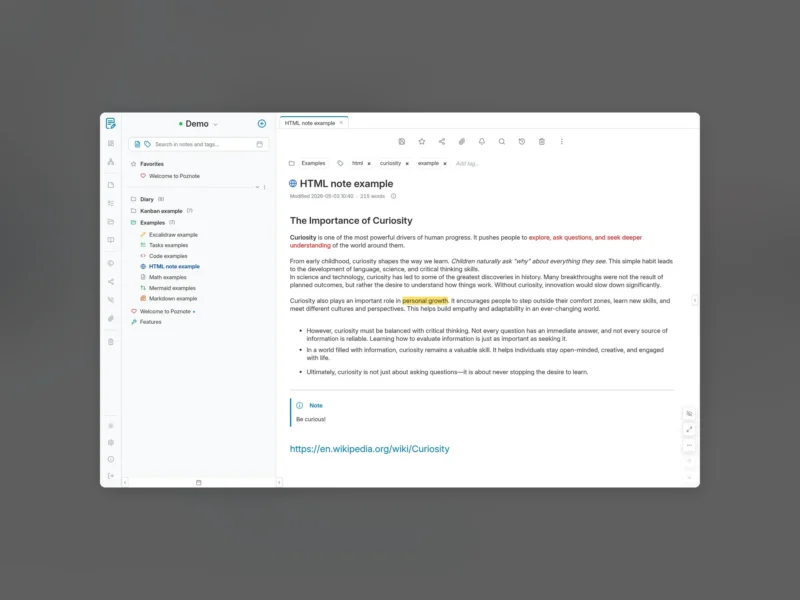
Poznote is a self-hosted note-taking and documentation app that positions itself as a free alternative to Notion, Obsidian, Evernote and OneNote. It installs as a Docker Compose stack — a web server container plus an optional MCP server — and keeps notes as plain .html or Markdown files in a user data directory, so the content stays readable outside the app and a backup is a copy of a folder.
Note types and the editor
- Rich text notes are edited WYSIWYG and saved as standard HTML files; Markdown is the second note format and the other note types build on those two.
- Kanban boards, task lists, Excalidraw drawings, Mermaid diagrams and KaTeX maths are all bundled and served from your own instance rather than pulled from a CDN.
- A tabbed editor with tags, favourites, folders and workspaces, plus a dashboard view over the whole instance.
- Revisions keep earlier versions of a note’s title, tags and content, grouped by day and labelled automatic, manual, before AI edit or before MCP edit, with a comparison and restore page.
Users, sharing and access
- Multi-user: every profile has its own notes, workspaces, tags, folders, attachments and settings, managed from Settings > Admin Tools.
- A workspace can be shared with the other users of the instance as read-only or editable.
- App passwords (
pzn_…) give a browser extension, a phone or a script its own revocable credential over ordinary HTTP Basic Auth, and the same REST API (/api/v1/notes) backs the Chrome extension and the Android share target. - Optional OIDC sign-in, and an activity log of sensitive operations — logins, account and quota changes, shares, backups, deletions, app passwords — that records what happened but never note content.
Automation and integrations
- Git Sync pushes and pulls each user’s notes to GitHub, GitLab (including self-hosted) or Forgejo through the provider’s REST API, token-based and configured per user.
- Attachments can move from local disk to any S3-compatible bucket — AWS S3, MinIO, Garage, Cloudflare R2, Backblaze B2 — with a migration tool that shifts existing files both ways.
- An AI assistant points at a local Ollama or LM Studio instance, Anthropic, OpenAI or any OpenAI-compatible server, and can search, read, create and rewrite notes inside the workspace the chat was opened in.
- An MCP server ships with the compose file and binds to
127.0.0.1, so Copilot or Claude CLI can create and search notes, and transcription hands audio to any self-hosted Whisper exposing the OpenAI audio API. - Outgoing webhooks, HMAC-SHA256 signed when a secret is set, for n8n, Zapier or your own scripts — note content is never sent.
Running it
- Docker Compose is the supported install on Linux, Windows and macOS through Docker Desktop; the image is multi-arch, so ARM64 boards like a Raspberry Pi or a NAS run it too.
- Notes modified in the last five days, plus favourites and the notes you pin, are cached in the browser, so the app still opens and edits offline.
- Everything is local by default: the only outbound call out of the box is a daily update check, and the features you switch on (Git Sync, S3, an AI provider, webhooks, SMTP, OIDC) are the only others.
- Hosted deployment is available through PikaPods and Caliber Node for anyone who would rather not run a server.