Jotty
- Platform
- Web Docker Self-hosted
- Licence
- AGPL-3.0 Open source
- Website
- jotty.page
- Source code
- github.com/fccview/jotty
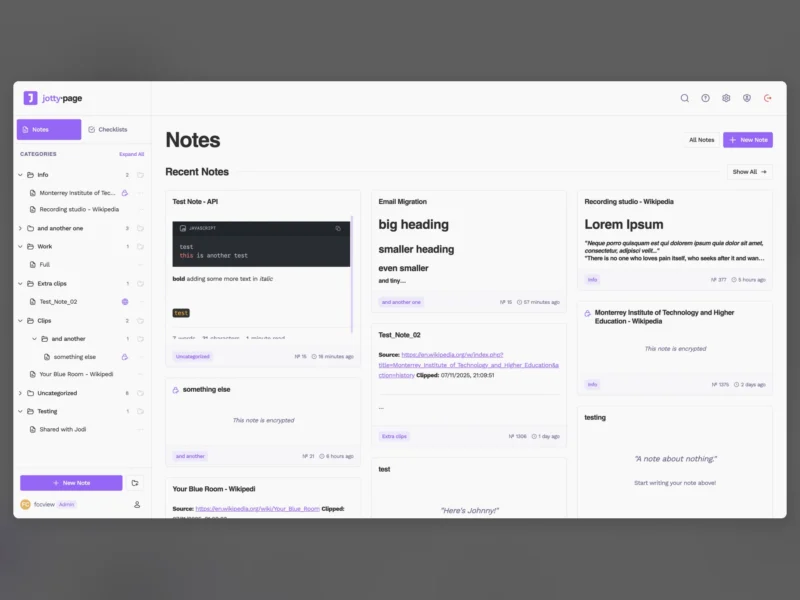
Jotty (formerly rwMarkable, and styled jotty.page) is a self-hosted workspace for notes and checklists that stores everything as Markdown and JSON files in a single data directory instead of a database. It runs as one Node.js process from a Docker image, and covers both everyday note-taking and task tracking: simple checklists with progress bars, and full task projects with Kanban boards and time tracking. The interface is mobile-first and installs as a PWA, so the same instance works on a desktop browser and on a phone.
Notes and checklists in one place
- Checklists support drag-and-drop reordering, progress bars and categories. Advanced task projects add Kanban boards and time tracking on top of the plain checklist.
- Notes use a WYSIWYG editor built on TipTap, with full GitHub Flavored Markdown support, syntax highlighting for code blocks, wikilinks and a graph view for links between notes.
- Items can be shared with other users on the same instance, or published through public share links.
- 14 built-in themes, plus custom themes, emojis and icons. Keyboard shortcuts cover both global navigation and the editor.
- An admin panel manages user accounts and tracks active sessions.
File-based, with no database
All content lives under data/: checklists and notes as .md files, users and sessions as JSON, and shared items in shared-items.json. Backing up the instance means copying that directory, and the notes stay readable outside the app. The README is explicit that feature releases may change the data structure, in which case an automatic migration script runs on first launch, and it recommends taking a backup before any feature update.
Encryption
Notes can be encrypted with PGP, using per-user keys stored in data/encryption/. Encrypted notes show a lock icon in the notes grid, and the instance admin cannot read them without the key.
API, SSO and MFA
- A REST API with authentication gives programmatic access to notes and checklists, for automation, integrations, scripts and dashboards.
- Single sign-on works with any OIDC provider, including Authentik, Keycloak, Auth0, Okta, Google and Entra ID.
- Multi-factor authentication is available per account from the profile settings.
- The interface is translated by the community, with translation files kept in the repository.
Running it
The recommended path is Docker: image ghcr.io/fccview/jotty:latest, port 3000 inside the container, and three volumes for data, config and the Next.js cache. Running from source or from the prebuilt tarball needs Node.js 24 or later. The project also ships a Proxmox VE community script and an Unraid Community Applications template. On first visit the app redirects to a setup page where the first account created becomes the admin.
Licence
AGPL-3.0. Free and open source, with the network-use copyleft that the AGPL adds to the GPL.