SonaShow
- Platform
- Docker Linux Web Self-hosted
- Licence
- MIT Open source
- Source code
- github.com/TheWicklowWolf/SonaShow
Overview
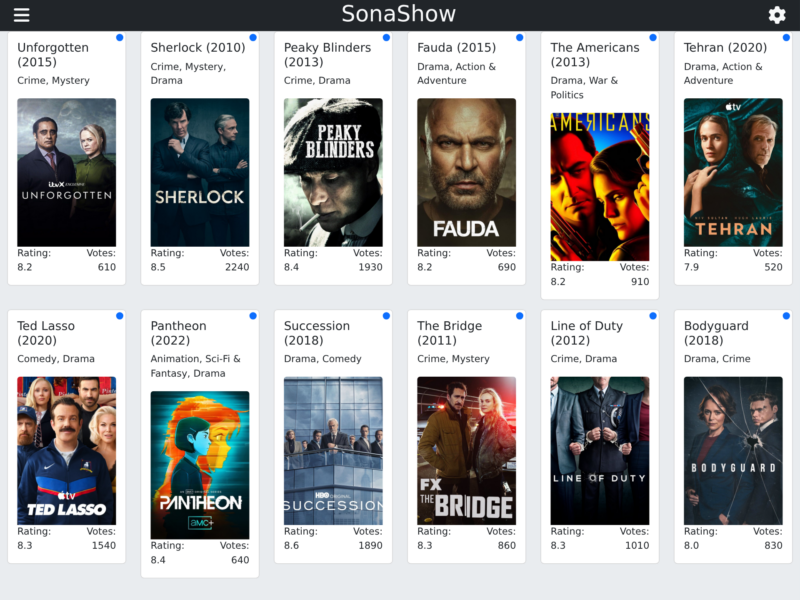
SonaShow is a small web app that answers a question every Sonarr user eventually asks: what should I add next? You pick the series already in your library that you actually liked, and SonaShow asks TMDB for shows similar to them, filters the results by rating and vote count, and lays them out as a poster grid. Anything that looks interesting can be pushed straight into Sonarr from the card, without copying titles into Sonarr’s search box one at a time.
It is deliberately narrow. There is no library management, no indexer configuration and no download client handling — Sonarr already does all of that. SonaShow is the discovery layer on top: a single page of recommendations, a sidebar listing every series Sonarr knows about, and one button per card to add the show. It is written in Python, ships as a Docker image (thewicklowwolf/sonashow) and is released under the MIT licence.
Key Features
- Recommendations from your own taste: tick the Sonarr series you want to use as seeds and SonaShow draws a random sample of them, looks up each one on TMDB and pulls its related-shows list, so the grid reflects what you already watch instead of a generic popularity chart.
- Quality filters: minimum rating and minimum vote count settings keep obscure or badly rated entries out of the grid, and a language filter (ISO-639 code, or
all) restricts results to the languages you watch. - One-click add to Sonarr: each card has an Add to Sonarr button that posts the show to Sonarr’s own API with your configured root folder, quality profile, metadata profile and optional season search — the card updates to show the result.
- Live grid over WebSocket: recommendations stream into the page as they are found through Socket.IO rather than arriving in one blocking request, so the grid starts filling immediately and keeps growing while the search runs.
- Continuous discovery: with auto-start enabled the app begins searching at boot after a configurable delay and keeps finding new candidates in the background, refreshing the grid for every connected browser.
- Dry-run mode:
dry_run_adding_to_sonarrlets you click through the whole workflow without writing anything into Sonarr, which is useful for trying the tool against a production library. - Light and dark themes: the interface ships both, and every setting can be supplied as an environment variable for a compose stack or changed in the in-app settings dialog.
Why Use SonaShow
The usual way to find a new series is to read a list written for everyone, then search for each title by hand. SonaShow inverts that: the pool of candidates is derived from the shows you already chose to keep, and adding one is a single click that lands in Sonarr with your existing quality and folder settings. For anyone running Sonarr with a large library, it turns “what next?” into a two-minute browse instead of an evening of browsing wiki pages. It also pairs naturally with the rest of the *arr stack, which keeps doing the acquisition work it is good at.
Use Cases
- Filling a quiet season: when the shows you follow are between seasons, seed a search from a handful of favourites and add two or three candidates in a sitting.
- Exploring a genre: select only the series of one kind (crime dramas, science fiction, sitcoms) and let the recommendations stay inside that neighbourhood.
- Family or shared libraries: set the language and rating floors once, then let other household members browse and add without touching Sonarr’s settings.
- Trying recommendations safely: run with dry-run enabled to see what would be added before letting the buttons write to Sonarr.
The documented install is the official Docker image, which needs a config volume and a port (5000 by default). It also needs a reachable Sonarr instance, a TMDB API key for recommendations and a TVDB API key for show matching.
Licence
Free and open source. SonaShow is released under the MIT licence (Copyright © 2024 TheWicklowWolf).