Cliparr
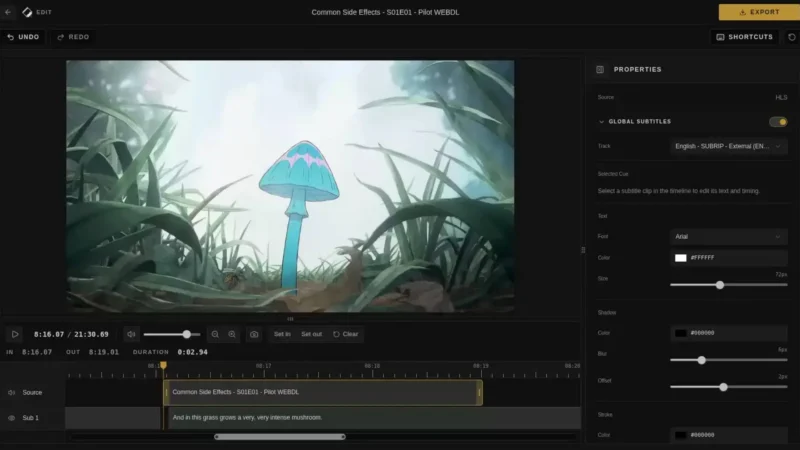
Cliparr is a self-hosted web app for making video clips straight from your personal media server. Connect a Plex or Jellyfin server, or open a local video directly in the browser, then trim the moment, add or style subtitles, and export a video, audio clip, or GIF — all processed locally in your browser, without turning your home server into a render box.
Key Features
- Live session discovery — follows active playback on connected Plex and Jellyfin servers and opens the current media automatically at the playback position.
- Local and URL video opening — clip local files without uploading them; direct media URLs work when the source allows.
- Timeline editor — trim, zoom, and fine-tune your clip range with a familiar non-linear editing interface.
- Browser-based export — video, audio-only (MP3, M4A/AAC, Ogg/Opus, FLAC, WAV), and GIF exports processed locally; no FFmpeg install needed.
- Subtitle authoring and burn-in — create captions from scratch or import subtitles, then style and burn them into the exported clip.
- Rich metadata — keeps artwork, credits, clip timing, and IMDb/TMDB/TVDB IDs in supported video and audio containers.
- PWA and mobile — installable on phones with touch-first controls and offline support for local videos.
- Docker self-hosting — runs with a single Docker command on port 7171.
Why Use Cliparr?
Clipping media usually means downloading the full file and re-encoding it separately. Cliparr works directly with the media you are already watching on Plex or Jellyfin, keeps exporting in the browser, and produces formats ready to share — without taxing your media server or requiring command-line tools.
Use Cases
- Snag and share a highlight from a Plex or Jellyfin movie or series.
- Pull an audio-only clip (soundtrack, quote, or sound effect) without running FFmpeg.
- Make a GIF from a favourite scene.
- Build and burn your own subtitles onto a clip for social sharing.
Platform
Web app (browser) · self-hostable via Docker · works on Linux, macOS and Windows clients
Licence
MIT