Notifiarr Client
- Platform
- Docker Linux Windows macOS
- Licence
- MIT Open source
- Website
- notifiarr.com
- Source code
- github.com/Notifiarr/notifiarr
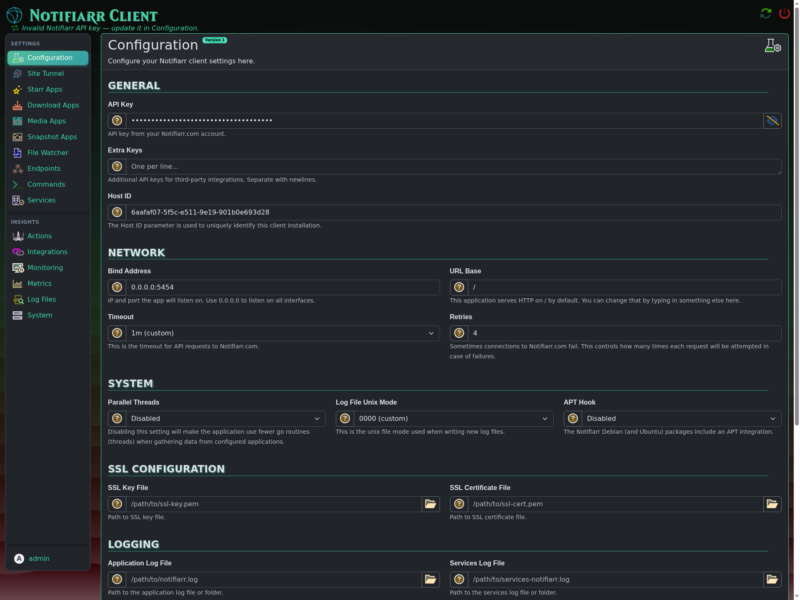
Notifiarr Client is the self-hosted companion application for Notifiarr, a hosted service that aggregates notifications from a media stack and delivers them to Discord. Written in Go with a Svelte web interface, the client runs on your own server or desktop, connects to your Sonarr, Radarr, Lidarr, Readarr, Prowlarr, Whisparr, Plex, Tautulli and downloader instances, and holds the API keys that let the website query them. It also does local work on its own: HTTP, TCP and process health checks, TRaSH Guides profile syncing, backup corruption checks, scheduled system snapshots and URL polling. Configuration is done in a web UI on port 5454 or in a single notifiarr.conf file.
Key Features
- Notification aggregation for the *arr stack — one client collects media and download activity, system health and service status, and sends it to Discord through the Notifiarr service instead of wiring a webhook per application.
- Discord actions — trigger scripts and shell commands, and place media requests, straight from Discord.
- Health checks — HTTP status, TCP port and running-process checks for the services on your network, with notifications when something stops answering.
- TRaSH profile sync — pushes TRaSH Guides custom formats and quality profiles to Radarr and Sonarr on a schedule.
- Backup corruption checks — verifies the database backups of every *arr application and warns before a restore is needed.
- Scheduled reports — system snapshots (CPU, memory, temperatures, SMART, IPMI, RAID), media and downloads dashboards, Plex sessions and finished-watching events, plus URL polling to custom notifications.
- Plex and Tautulli integration — finished-watching notifications, Tautulli user mapping, and automated emptying of the Plex trash.
- Library utilities — Radarr collection gaps, and MDBList plus Radarr and Sonarr library syncing.
- Single binary or container — multi-architecture Docker images on Docker Hub and GHCR, an apt and yum repository, native builds for Linux, FreeBSD, macOS and Windows, and install guides for Synology, TrueNAS, Proxmox and Home Assistant OS. A CUDA-tagged image adds NVIDIA GPU monitoring.
- Configuration you can version — the whole setup lives in
notifiarr.confunder/config, and the web UI exposes the same fields for editing.
Why Use Notifiarr Client?
Most media stacks end up with a handful of notification webhooks, a cron job for TRaSH updates and a separate uptime check for each service. The client consolidates that: it is the only process that needs your API keys, it can be driven from Discord, and it keeps the schedule in one place. It complements rather than replaces configuration-as-code tools: Configarr renders profiles from a versioned YAML file, while the client pulls TRaSH updates through the Notifiarr service. The client itself is open source, but the notification relay it talks to is a hosted third-party service, so a Notifiarr account is required.
Use Cases
- Get Discord alerts when a drive fills up, a service goes down or an *arr backup is corrupt.
- Let household members request media from Discord without giving them access to Radarr or Sonarr.
- Keep TRaSH custom formats and quality profiles in sync across several Radarr and Sonarr instances.
- Post Plex finished-watching events and Tautulli per-user statistics to a Discord channel.
Licence
MIT — the client is open source; source at github.com/Notifiarr/notifiarr. The notifiarr.com service it authenticates against is a separate hosted service and needs its own account.
Related Tools
Also in this category: Configarr for declarative TRaSH and quality-profile sync, and Cleanuparr for removing stalled downloads and bad files.