Meelo
- Platform
- Docker Linux Windows macOS Web
- Licence
- GPL-3.0 Open source
- Website
- github.com/Arthi-chaud/Meelo
- Source code
- github.com/Arthi-chaud/Meelo
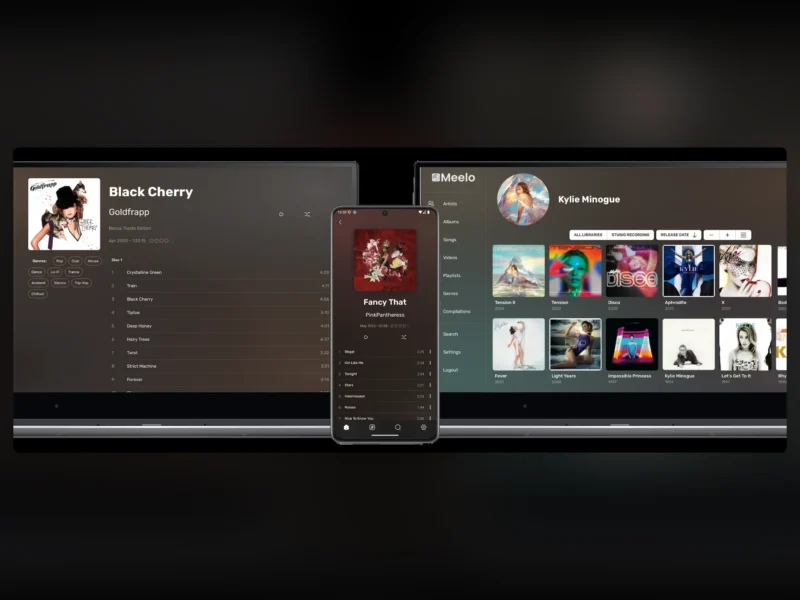
Overview
Meelo is a self-hosted music server built for people who collect music rather than stream it. It indexes a folder of audio and video files, reads metadata from the files or their names, enriches it from MusicBrainz, Genius and Wikipedia, and serves the result as a browsable web app and a native mobile client. It is written in TypeScript, distributed under the GPL-3.0 licence, and shipped as a set of Docker images with an official docker-compose.yml.
Out of the box, Meelo does what any music server does: playback, browsing, search, playlists, multiple libraries, and transcoding of formats the browser cannot play directly. What sets it apart is how it models a collection. Albums are separated from their releases, songs from their tracks and versions, so a library with three pressings of the same album, a bonus-track edition and a live recording does not collapse into a wall of duplicate entries. Music videos are treated as first-class items alongside audio, and oddities the collector cares about — B-sides, rare tracks, guest features — get their own place in the interface instead of being buried in a folder.
Key Features
- Music videos as first-class items — reach a video directly from an album, artist or song page, and distinguish promo videos from interviews, behind-the-scenes footage and trailers.
- B-sides and rare tracks — tracks that belong to an album but are not on it are surfaced on the album page, and rare songs are collected on the artist page so they are not forgotten.
- Featuring and duet detection — guest artists are parsed out of track metadata automatically and cross-linked across the library.
- Releases, tracks and versions — an album can hold several releases (pressings, editions, remasters), a song several tracks, and a track several versions; browsing shows the main version only, while every alternative stays reachable from the item page.
- Album and song types — flag instrumental tracks, live recordings, compilations and compilation-exclusive songs, and filter by them.
- Flexible metadata parsing — take metadata from the embedded tags, from the folder and file names, or both, with a configurable regex in
settings.json; embedded album covers are supported. - External metadata providers — pull genres, descriptions and ratings from MusicBrainz, Genius, Wikipedia and others, and refresh them per item.
- Scrobbling — push plays to ListenBrainz and Last.fm.
- Lyrics — read embedded or sidecar
.lrclyrics, or download synced lyrics. - Format coverage through transcoding — any audio or video format is accepted; files the browser cannot play are transcoded on the fly rather than rejected at import.
- Mobile apps — an Android APK on the releases page and an iOS build through TestFlight, talking to the same server.
- Accounts and access control — user accounts with roles, plus an anonymous-access mode for sharing a library without handing out logins.
Why Use Meelo
Most music servers assume the library is a flat list of files and a tag. Meelo assumes it is a collection with history: the same album bought three times, the single that carries the B-side, the live version that is better than the studio take. Because those relationships are modelled in the database instead of being flattened into separate albums, browsing stays clean without deleting anything, and the details a collector actually wants — which version is playing, where the guest vocal came from, which video belongs to this song — are one click away instead of lost in filenames.
Use Cases
- Large personal collections — keep multiple editions, remasters and regional pressings of the same album without turning the album grid into duplicates.
- Music video archives — catalogue promos, live footage and interviews next to the audio they belong to.
- Households and small groups — one server, several accounts, per-user playback and optional anonymous access.
- Metadata-heavy libraries — replace half-tagged files with data from MusicBrainz, Genius and Wikipedia, and keep the original tags as the source of truth where they are good.
- Mixed-format archives — FLAC, ALAC, MP3, Opus and video in one library, with transcoding handled by the server.
Requirements and Installation
Meelo is deployed with Docker Compose. The official docker-compose.yml runs the server, the web front end, a scanner, a metadata matcher, a transcoder and an nginx entry point, backed by PostgreSQL, Meilisearch and RabbitMQ; download the compose file, env.example and settings.json from the release page, fill in the required passwords and paths, and start the stack. The two host paths that matter are DATA_DIR, the root of the music library, and CONFIG_DIR, which holds settings.json and generated artwork. After the first start, create the admin account in the web interface and register the library path inside the container (for example /data/music); the scanner then indexes it and the matcher fills in missing metadata. A reverse proxy is expected in front of the nginx container if the server is exposed beyond the LAN, and the GPL-3.0 licence applies.
Related: Jellyfin and Navidrome cover general music streaming, Koel is a lighter web player for a personal library, and subscription services are not needed for any of them.