Medialytics
- Platform
- Web Docker
- Licence
- GPL-3.0 Open source
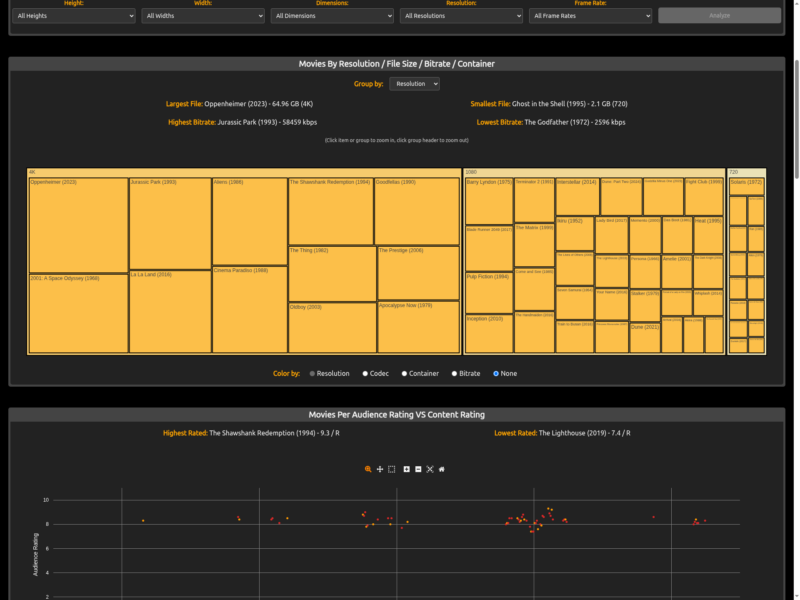
Medialytics is a browser-based analytics dashboard for a Plex Media Server library. Plex and similar tools report on viewing activity — what was watched, by whom, and when — but say very little about the media itself. Medialytics reads the server’s own XML feed and turns the contents of a movie or TV library into statistics about the files: production studios, genres, countries, decades, ratings, resolutions, containers, codecs, bitrates and file sizes.
Key features
- Treemap charts for TV (largest shows by episode count and audience rating) and movies (resolution, container, codec and bitrate cross-referenced)
- Movie attribute analysis to compare container, codec, resolution, bitrate, frame rate, dimensions and file size across a library
- Bar and pie charts for collections, genre, country, decade, studio, content rating, resolution, container, actors, writers and directors
- Scatter chart of audience rating against content rating
- Line chart of items added to the library over time
- Watched and unwatched comparison across the whole library and inside most charts
- Size and duration statistics for the library as a whole, plus the longest, oldest and most recently added items
- Detection of unmatched items, and CSV export of the underlying data
Why use it
A Plex library tends to grow without much quality control. Medialytics answers the questions that matter when you are tidying one up: which films are still sitting at 720p, which files carry an inflated bitrate for their resolution, whether the container and codec mix has drifted, and which items Plex has failed to match. Because it works from the server’s own feed, the answers reflect the real files rather than a separate catalogue.
How it runs
Medialytics is a static Vue application — there is no backend and no database. You give it the address of your Plex server and a Plex token, either by editing two variables in the script or by running the published Docker image with SERVER_IP and SERVER_TOKEN set, and open the page in a browser. It then calls the server’s library endpoints directly and does all aggregation client-side.
Things to know
The token grants administrator access to the server, so the project is explicit that Medialytics is for local or private use and should not be exposed publicly. Only movie and TV libraries are parsed; music and photo libraries are ignored. All content stays in the browser — nothing is uploaded anywhere.