Lidarr
- Platform
- Docker Linux Windows macOS Web Self-hosted
- Licence
- GPL-3.0 Open source
- Website
- lidarr.audio/
- Source code
- github.com/Lidarr/Lidarr
Overview
Lidarr is a music collection manager for Usenet and BitTorrent users, and the music branch of the Servarr family alongside Sonarr, Radarr and Prowlarr. You point it at the artists you follow, it checks their releases against an indexer’s RSS feeds, sends the matches to your download client, and then sorts and renames the finished files into a library layout your player understands. When a better quality copy of an album you already own appears, Lidarr can fetch it and replace the old one without being asked.
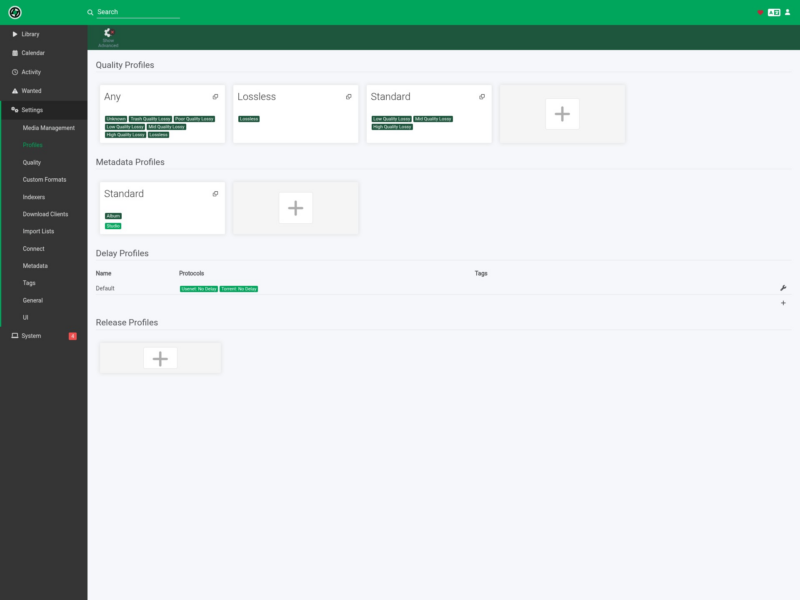
The interface follows the same model as Sonarr: a sidebar with Library, Calendar, Activity, Wanted and Settings, quality profiles that decide what a release has to be before it is grabbed, metadata profiles for what gets written into the tags, and a manual search for anything the automatic rules missed. Artist and album data comes from MusicBrainz, so a lookup gives you the canonical discography rather than whatever a tracker happened to name the folder.
Key Features
- RSS-driven monitoring: watches the feeds of the indexers you add and grabs new tracks from monitored artists, so a release day does not need anybody watching a tracker.
- Quality profiles and upgrades: defines the formats you accept — lossless, high quality lossy, or a stricter custom mix — and automatically upgrades files already in the library when a better release appears.
- Configurable renaming: track naming, album folder layout, illegal-character replacement and colon handling are all rules, so a whole library can be normalised to one convention.
- Existing library support: point it at a root folder and it scans what is already there, then works out which tracks are missing and hunts those instead of starting from zero.
- Failed download handling: a release that fails to import or download is rejected and another candidate is tried, which is the difference between an unattended queue and a babysat one.
- Manual search: any album can be searched by hand to pick a specific release, or to see why nothing was grabbed automatically.
- Usenet and torrent clients: full integration with SABnzbd and NZBGet, plus the torrent clients the Servarr apps support, and Prowlarr or Jackett for indexer management.
- Player integration: Connect settings notify Kodi and Plex and trigger a library update, so new albums show up in the player without a rescan.
- Specials and multi-album releases: handled as first-class cases rather than being dumped in the library root, which is where most hand-rolled music scripts fall over.
- Runs on the usual platforms: Windows, Linux, macOS and Raspberry Pi builds, or the LinuxServer Docker image if you would rather keep it in a container.
Why Use Lidarr
Music libraries are messier than film and TV libraries: albums arrive with inconsistent artist names, disc and track numbering varies between releases, and the same album exists in five different qualities. Lidarr’s value is the rule set — this artist is monitored, this quality profile applies, files are named like this — applied to every release, every time. The result is a library that stays consistent as it grows, and a Wanted list that tells you what is still missing instead of leaving you to remember.
It also fits an existing setup. If you already run Sonarr, Radarr and Prowlarr, adding Lidarr is the same install, the same indexer list and the same download clients; the only new concept is the music-specific profiles.
Typical Uses
- Keeping a music library current with new releases from a list of followed artists.
- Upgrading a library of mixed-quality rips to a consistent format, artist by artist.
- Filling the gaps in an existing collection by scanning a root folder and hunting only the missing albums.
- Normalising file and folder naming so players and music servers stop showing duplicate or unidentified albums.
- Running a headless music server on a NAS or Raspberry Pi with a web interface for the occasional manual search.
Running It
Lidarr is a packaged application rather than a Python script: install the build for your platform, or run the LinuxServer container and open port 8686 in a browser. First-run setup asks for a root folder and at least one indexer and download client before monitoring does anything useful, and the configuration pages mirror Sonarr’s — indexers, download clients, quality and metadata profiles, connect, then the library itself.
Two practical notes from the project: the metadata server has been rebuilding its cache, which can make adding artists and importing a library slower than usual, and the Servarr wiki at wiki.servarr.com/lidarr is the reference for installation, paths and settings.
Related Tools
For television the equivalent is Sonarr, and indexer management across the whole family is handled by Prowlarr. If your interest is books rather than music, LazyLibrarian applies the same wanted-and-hunt model to ebooks and audiobooks.