VueTorrent
- Platform
- Docker Linux Windows macOS Web
- Licence
- GPL-3.0 Open source
- Website
- vuetorrent.github.io/demo
- Source code
- github.com/VueTorrent/VueTorrent
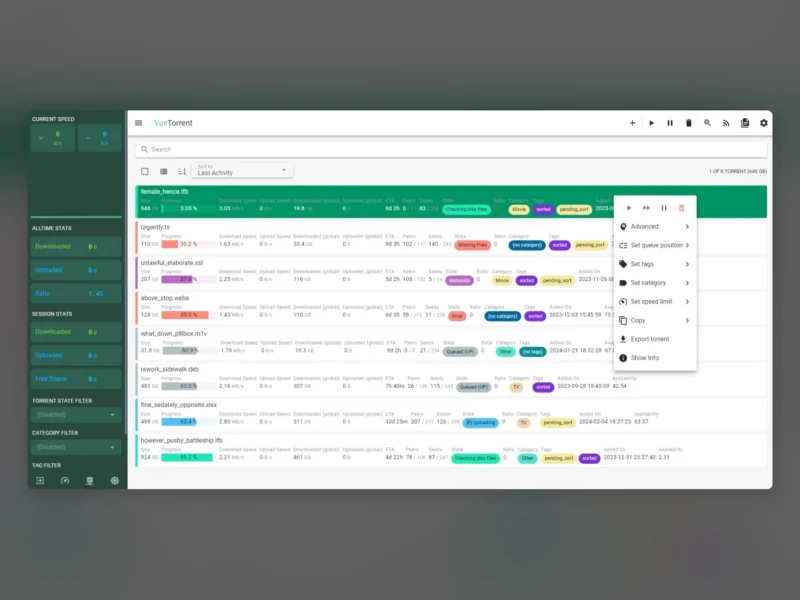
Overview
VueTorrent is an alternative web interface for qBittorrent, built with Vue 3, TypeScript and Vuetify. It does not replace the BitTorrent engine: it talks to qBittorrent’s own Web API and renders the same data as a modern card-based dashboard, so it behaves as a visual skin rather than a second client. Everything that works with the stock qBittorrent WebUI — the Arr stack, cross-seed tools, scripts hitting the API — keeps working with VueTorrent in place.
The interface puts the torrent list on top of a sidebar of live session statistics, transfer graphs and filters for state, category and tag, and adds features the stock WebUI does not have: a configurable dashboard, a layout that works on a phone as an installable PWA, and keyboard shortcuts for the whole list. It is released under GPL-3.0 and development is active on GitHub.
Key Features
- Full torrent control: add, remove, pause, resume and rename torrents, with selective file download and per-torrent speed limits.
- Detail views: inspect trackers, peers, files, tags and categories for any torrent from a side panel, without leaving the dashboard.
- Built-in search: run a search for new torrents from inside the WebUI through qBittorrent’s search plugins, instead of switching to the stock interface.
- Live statistics: current down and up speeds, all-time and session totals, free space and transfer graphs in the sidebar.
- Configurable dashboard: choose which properties appear on busy and completed torrent cards, so the list shows size, progress, ETA, ratio or seeds in the order you care about.
- Keyboard shortcuts: select all with Ctrl+A, jump to search with Ctrl+F, delete the selection with Delete, and multi-select with Ctrl-click or Shift-click, with a Mac keymap that swaps Command for Control.
- Mobile and PWA: a responsive mobile layout that can be installed on a phone’s home screen, with its own compact navbar.
- Settings in the UI: change the most common qBittorrent preferences without dropping back to the classic interface.
- Enhanced Edition support: exposes the extra preferences of qBittorrent Enhanced Edition when that build is behind it.
- Optional companion backend: a separate service that stores server-side settings and adds features; not required to use VueTorrent.
Why Use VueTorrent
The stock qBittorrent WebUI is functional but dated, and it is the view most people actually live in when qBittorrent runs on a server or seedbox. VueTorrent keeps the engine and the API, and replaces only the screen: the same torrents, the same automation, with a dashboard that shows throughput, session totals and queue state at a glance, that works on a phone, and that can be driven from the keyboard. Because nothing about the daemon changes, trying it costs one folder of static files and reverting is as easy as deleting it.
Typical Uses
- Modernising a headless qBittorrent on a home server, NAS or seedbox without touching the transmission engine.
- Checking the queue and adding torrents from a phone through the PWA layout.
- Keeping an Arr stack (Radarr, Sonarr, Lidarr) unchanged while giving the download client a readable interface.
- Watching session and all-time throughput in the sidebar instead of a separate monitoring page.
- Managing categories, tags and per-torrent limits on a large list with keyboard shortcuts and multi-select.
Getting Started
VueTorrent ships as static web assets: build or download the release bundle and drop it into qBittorrent’s WebUI folder (or use one of the community Docker images and mods that mount it there), then reload the WebUI. It targets qBittorrent 4.4 and newer, and qBittorrent’s host header validation has to be disabled for the alternative interface to load. A public demo with mocked data runs at vuetorrent.github.io/demo, so the layout can be tried before installing anything. Installation steps and troubleshooting live in the project wiki.