LazyLibrarian
- Platform
- Docker Linux Web Self-hosted
- Licence
- GPL-3.0 Open source
- Website
- lazylibrarian.gitlab.io/
- Source code
- gitlab.com/LazyLibrarian/LazyLibrarian
Overview
LazyLibrarian is a book-focused download manager in the mould of Sonarr and Radarr. You add the authors you follow, it builds their bibliographies from public metadata sources, you mark the ebooks and audiobooks you want, and it searches Usenet indexers and torrent trackers for a matching release and hands it to your download client. Finished books arrive with their cover art and a Calibre-compatible metadata.opf beside the file, so the result drops straight into an existing Calibre library. It is a Python 3 application, serves its interface on port 5299, and is released under GPL-3.0.
Metadata is the part that makes or breaks a book manager, and LazyLibrarian spreads the risk across several sources: Hardcover, OpenLibrary, LibraryThing and Goodreads, with Google Books as an optional extra. Goodreads closed its public API, so the project now points new installs at Hardcover and OpenLibrary. The same metadata pass fills in covers, series information, publication dates and author pages, which is what the library views are built from.
Key Features
- Follow authors, not individual files: add an author once, mark books as wanted, and LazyLibrarian keeps re-checking active authors for new releases instead of making you remember what is missing.
- Multi-source metadata: author and book data pulled from Hardcover, OpenLibrary, LibraryThing and Goodreads, plus optional Google Books, with per-provider toggles so a source can be switched off without losing its API key.
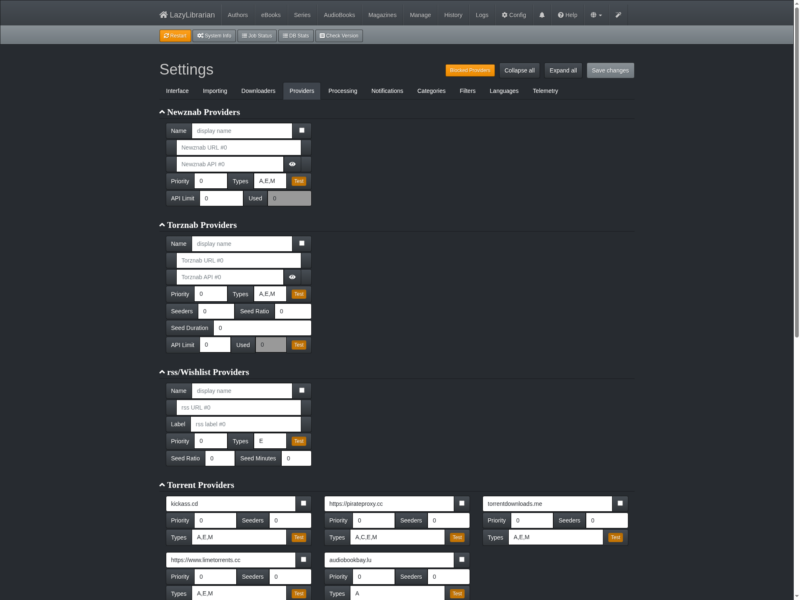
- Usenet and torrent search: Newznab indexers for Usenet and Torznab indexers (including Jackett) for torrents, plus plain RSS or wishlist feeds. Results are matched against the book you asked for before anything is sent to a downloader.
- Broad download client support: SABnzbd, NZBGet and Synology Download Station on the Usenet side; Deluge, Transmission, uTorrent, qBittorrent, rTorrent and Download Station for torrents and magnet links. A black-hole folder is available if your client prefers to watch a directory.
- Calibre integration: optionally import an existing Calibre library, write Calibre-compatible
metadata.opffiles next to every book, and use the AutoAdd feature for tools that insist on a flat directory structure. - Magazines and comics: the same wanted-and-hunt loop works for periodicals, including monitoring for new issues, and for comic collections.
- OPDS server: a built-in catalogue at
/opdsthat e-reader apps such as Aldiko, Moon+, FBReader and PocketBook can browse and download from. - Small JSON API: an API key unlocks commands such as
addAuthorandaddBook, so a script can feed the library without touching the web interface. - Notifications: email, Pushover, Pushbullet, Boxcar, Twitter and AndroidPN notifiers, each able to fire on snatch, on download, or both.
- Runs anywhere Python runs: source install with Python 3.7 or newer, or the multi-arch LinuxServer Docker image for x86_64, armhf and aarch64; the web interface is responsive for tablets and the UI is translated through Weblate.
Why Use LazyLibrarian
Book collections rot quietly. A series gets a new volume, an author you follow releases a short story, a magazine ships its monthly issue, and none of it appears unless somebody goes looking. LazyLibrarian turns that into a standing rule: these authors are active, these titles are wanted, this is the quality and format I accept. It also solves the tidiness problem — every book arrives with a cover and a metadata file that Calibre understands, so the library does not fill up with untitled files and missing artwork.
It is the natural fit for someone who already runs the Servarr stack and wants books treated the same way as television and film, and it works happily without Calibre if you only want the files organised on disk.
Typical Uses
- Keeping a Calibre library current with new releases from a list of followed authors, unattended.
- Adding audiobooks to the same workflow, so the ebook and the audiobook of a title are tracked against the same author record.
- Automating magazine subscriptions, with new issues picked up as they are published.
- Serving a library to e-readers and phone reading apps over OPDS instead of copying files around.
- Feeding a seedbox or NAS download queue while the library itself lives on another machine.
Running It
LazyLibrarian is a Python 3.7+ application: clone or extract it, install the dependencies with pip install ., then start it in daemon mode and open port 5299 to finish configuration in the browser. The Docker route is quicker — the LinuxServer image bundles ghostscript for magazine cover generation and can include calibredb through an optional variable. Either way you will want at least one indexer (Newznab or Torznab) and one download client configured before the wanted list can do anything, and the project’s documentation at lazylibrarian.gitlab.io walks through providers, downloaders, processing and notifications page by page.
Installations can update themselves from the interface, so a source or container install does not have to be rebuilt to pick up a new release.
Related Tools
If you already run Sonarr for television, LazyLibrarian slots into the same pattern for books. For comics specifically, Kapowarr is a narrower alternative worth a look.