StackKits (stackkit)
- Platform
- Linux macOS
- Licence
- Apache-2.0 Open source
- Website
- stackkit.cc
- Source code
- github.com/kombifyio/StackKits
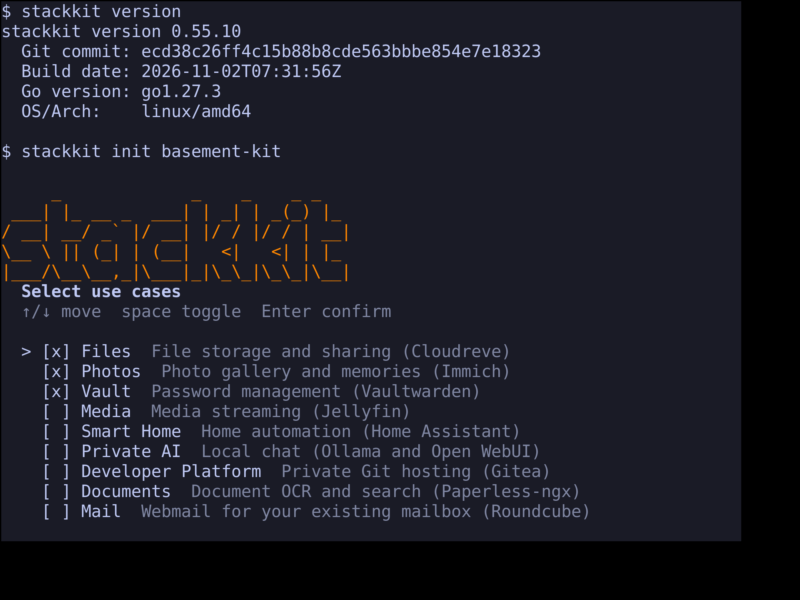
StackKits is an open-source infrastructure blueprint system for self-hosted homelab and small-server deployments. Instead of pasting shell snippets and hand-maintaining a Compose file, you pick a Kit, answer a short list of use cases, and the stackkit command line writes a portable, versioned definition of what the host should run — then plans, applies and verifies the deployment from that definition.
How a deployment runs
The lifecycle is deliberately linear and inspectable. stackkit init saves your desired configuration, stackkit validate checks it, stackkit generate writes the deployment artifacts, stackkit plan shows what would change, stackkit apply executes the admitted changes, and stackkit verify plus stackkit drift check the result afterwards. Nothing is installed by init: you always see the plan before anything touches the host, and applying requires an explicit owner approval recorded as local lifecycle evidence.
The kits
- Basement Kit — an existing Linux host at home, the supported one-command path.
- Cloud Kit — an existing VPS with your own domain, currently in preview.
- Modern Homelab — Home and Cloud joined by an explicit federation bridge; an alpha definition archive rather than a supported install target.
The Basement Kit use-case picker covers the usual homelab building blocks: file storage and sharing with Cloudreve, photos with Immich, passwords with Vaultwarden, media streaming with Jellyfin, home automation with Home Assistant, local AI chat, private Git hosting with Gitea, document search with Paperless-ngx and webmail with Roundcube. Defaults are checked for you and can be toggled before the configuration is written.
Execution and evidence
Deployments are executed and tracked by OpenTofu, while managed deployments are orchestrated by Terramate. Standalone Docker Compose remains the primary application experience: containers run as Compose workloads inside the tracked stack. A published release is evidence of source and distribution, not of runtime acceptance — each release ships a release-evidence.json, and a kit’s status only widens when a cited run exists. Drift detection compares the running deployment against the applied plan, and backups use the Kopia engine with owner-custodied keys.
Requirements and installation
A Linux host with Docker available; on a fresh host the Basement Kit installer can install Docker for you. Install the CLI with curl -sSL https://base.stackkit.cc | sh, then run the guided stackkit init in a dedicated deployment directory. The project is agent-native without depending on an AI service: the CLI embeds an MCP connector, and llms.txt, an OpenAPI description and JSON schemas are published for every release. No Kombify account, Techstack, Coolify or Komodo install is required for the standalone path, though Komodo and Coolify are opt-in integrations.
Alternatives
StackKits suits operators who want the deployment described as a reviewable artifact and a CLI lifecycle. If you would rather click through a container-management web UI on the same host, see the other self-hosting and container tools in the directory.