Spectacle
- Platform
- Linux
- Licence
- GPL-2.0 Open source
- Website
- apps.kde.org/spectacle/
- Source code
- invent.kde.org/plasma/spectacle
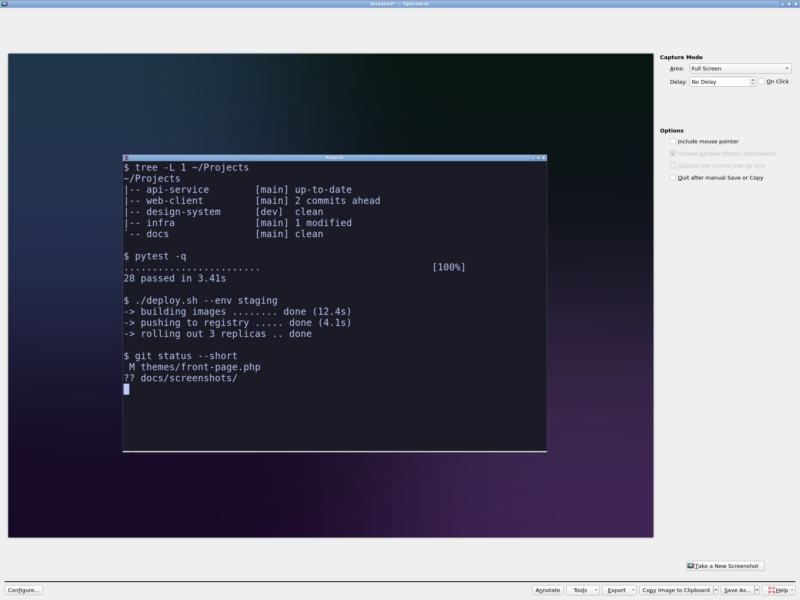
Overview
Spectacle is the screenshot utility that ships with the KDE desktop and, in practice, one of the most complete free screenshot tools on Linux. It is a small application with a single job: capture the whole desktop, one monitor, the active window, the window under the mouse, or a rectangle you drag out with the mouse – then hand the result on to the annotation editor, the clipboard, a file, the printer, or any program registered for PNG on the system.
Development happens inside KDE: the source lives in KDE’s GitLab instance, releases follow the KDE release service (three major releases a year, numbered YY.MM), and the current release is 6.8.1 from 20 October 2026. It is written in C++ with Qt 6 and KDE Frameworks 6, and although it is built for Plasma it also runs on non-KDE X11 desktops – a stated design goal in the project’s own README – so an Xfce, i3 or Openbox session can use it without dragging in a full Plasma desktop.
Two things are worth knowing before you install it. First, it is a desktop capture utility, not a screencast suite: it takes stills, and recording is left to other tools. Second, distribution packages lag badly – Debian 12, for example, ships Spectacle 22.12 even though upstream is at 6.8 – so the features below describe the current 6.x line, and an older packaged build will have a plainer interface.
Key features
- Five capture modes – entire desktop, current monitor, active window, window under the mouse, and rectangular region. The region selector shows a live size readout.
- Delay and On Click – a countdown before the shot, or the “On Click” option, which waits for your next click instead of a timer – the reliable way to capture menus, tooltips and pop-up dialogs that vanish the moment you move the mouse.
- Decoration and pointer control – include or exclude the mouse pointer, include or exclude window titlebars and borders, and restrict window capture to the current pop-up only.
- Built-in annotation editor – the Annotate button opens the image editor where you draw on the capture before exporting it. Versions from 22.12 onward use KDE’s KQuickImageEditor component for this.
- Save, copy, export, print – save to PNG/JPEG/WebP with a configurable default location and filename pattern, copy straight to the clipboard, open the shot in any PNG-associated application, print it, or send it through KIPI export plugins.
- Remembers your last save mode – if you always save as JPEG to a specific folder, Spectacle reopens with exactly that, and “Quit after manual Save or Copy” turns the whole thing into a two-click workflow.
- A real command line – the same binary works headless for scripts (see below).
Scripting and automation
Spectacle is unusually friendly to automation for a GUI utility. The same executable accepts the capture mode as a flag and can run entirely in the background, which makes it usable from cron jobs, hotkey daemons and shell scripts:
-ffull desktop,-mcurrent monitor,-aactive window,-uwindow under the cursor,-ttransient pop-up only,-rrectangular region-bcapture and exit without showing the window,-nsuppress the notification,-ddelay in milliseconds,-owrite to a given file,-ccopy to the clipboard instead
So spectacle -b -m -o /tmp/screen-$(date +%s).png is a complete timed capture in one line – no X automation, no extra dependency.
Why use it
Most Linux screenshot tools are either minimal (a region grab and nothing else) or part of a larger annotation suite that wants a document model and a project file. Spectacle sits in the useful middle: every capture mode a desktop user needs, a competent annotator behind one button, and a CLI that makes it scriptable – all under a GPL licence, maintained by the same team that maintains the desktop it runs on.
It is also the option that integrates cleanly with Plasma: it is invoked by the Print Screen key out of the box, and it is the tool KDE’s own screenshot shortcuts and bug reporters expect.
Typical uses
- Documentation and bug reports – grab one window with decorations, annotate the offending control, copy and paste into an issue.
- Capturing menus and hover states with “On Click” instead of racing a countdown.
- Repeatable scheduled captures (dashboards, kiosks, build monitors) through the CLI.
- Multi-monitor setups – capture the current monitor only, at the monitor’s native resolution.
- Quick region grabs for chat and email, then straight to the clipboard.
Spectacle runs on both X11 and Wayland sessions, and on non-KDE X11 desktops such as Xfce, MATE, i3 and Openbox as well as on Plasma. It is packaged as kde-spectacle in Debian and its derivatives, is available from most distributions’ repositories, and installs from Flathub and Snap.
Licence
GPL-2.0-or-later – free and open source. The KDE application page lists it as GPL-2.0+, and the source is developed in the open on KDE’s GitLab.
Alternatives in this directory
- Kazam – simple screencasting and screenshot capture for X11
- Kooha – minimal screen recorder built for Wayland
- Peek – tiny animated-GIF screen recorder
- SimpleScreenRecorder – full-featured desktop recorder
- VokoscreenNG – screencast and webcam recorder with a GUI
- GPU Screen Recorder – hardware-accelerated capture with a replay buffer
Browse the full directory of free and open source tools for more.