GPU Screen Recorder
Overview
GPU Screen Recorder is a screen recorder for Linux whose entire design goal is to stay out of the way: it captures your monitor, a single window, a region or a camera and encodes the result with the graphics card’s own hardware encoder, so recording a game or a desktop session costs very little CPU. Its author, dec05eba, bills it flatly as “the fastest screen recording tool for Linux”, and the ShadowPlay-style instant replay — a rolling buffer that keeps the last few minutes of gameplay in memory and writes them to disk on a keypress — is one of its two headline features, the other being live streaming without a second machine.
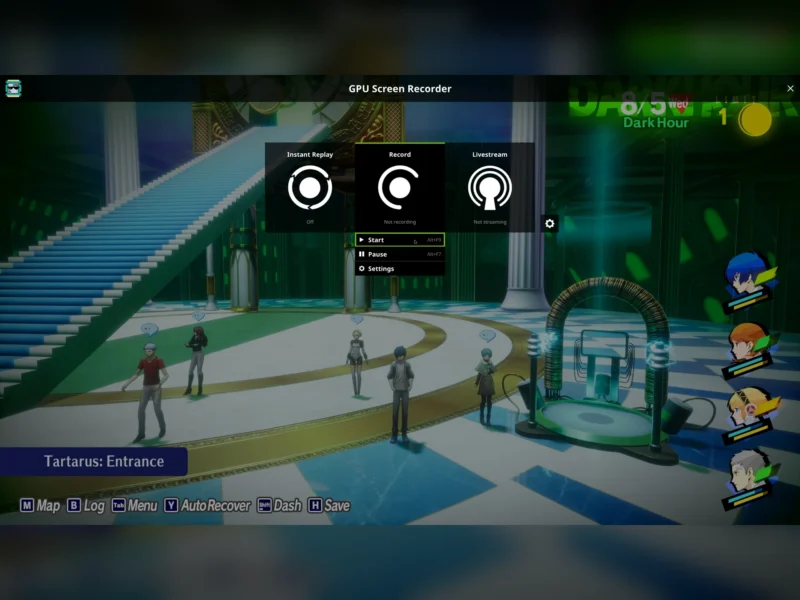
The project is deliberately small and self-contained. It is written in C (meson build, no runtime framework, no account, no cloud service), it is developed on its author’s own Git server rather than GitHub, and every option is a command-line flag, which makes it scriptable from top to bottom. Two optional front-ends sit on top of it: GPU Screen Recorder UI, a fullscreen overlay in the style of NVIDIA’s ShadowPlay (opened with Left Alt+Z), and the older GPU Screen Recorder GTK window, now in maintenance-only mode because it has been superseded. The current release is 6.1.4 (October 2026), packaged in Arch Linux’s extra repository and distributed as a Flatpak on Flathub.
What separates it from the general-purpose recorders is where the work happens. The capture path itself runs on the GPU — NVENC on NVIDIA, VAAPI through Mesa on AMD and Intel, with experimental Vulkan video encoding as a third path — instead of pulling every frame through the CPU and the compositor. On a mid-range gaming desktop that is the difference between recording at 60 fps and recording at 23 fps, and on modern hardware it is often the difference between “I can record this” and “recording is not worth the frame rate”.
Key Features
- GPU capture and encoding only — the frame never has to make a CPU round trip. Video codecs: H264 (default), HEVC (optionally HDR), AV1 (optionally HDR), VP8, VP9, plus 10-bit HEVC/AV1 variants. Audio: Opus (default for mp4/mkv), AAC and MP3. Encoders: NVIDIA NVENC, AMD/Intel VAAPI (Mesa), and experimental Vulkan video encoding (
-k h264_vulkan,hevc_vulkan,av1_vulkan), which is also a workaround for the CUDA “p2 state” downclocking that affects NVENC on older NVIDIA drivers. - Anything as a capture source —
-w screenor a named monitor (-w DP-1) for the whole screen, a specific X11 window (-w $(xdotool selectwindow)), the currently focused window, an arbitrary region (-region, designed to take output fromslopon X11 orslurpon Wayland), the desktop portal over PipeWire on Wayland (-w portal), or a V4L2 camera device such as/dev/video0. Sources can be combined with|— screen plus webcam, two monitors side by side — and each one accepts placement and scaling (x, y, width, height, percentage values, halign/valign, hflip/vflip).--list-capture-options,--list-monitorsand--list-v4l2-devicesreport what is available. - Instant replay —
-r 30keeps a rolling buffer of the last 30 seconds (2 to 86,400 seconds) and writes it to disk only when asked. The buffer lives in RAM by default, or on disk with-replay-storage disk; fixed saves of the last 10 s, 30 s, 60 s, 5 min, 10 min and 30 min are available as signals, and the IPC socket can save an arbitrary number of seconds.-df yesfiles replays into date-based folders, and-restart-replay-on-savecontrols whether the buffer is cleared afterwards. - Record while replaying or streaming — the
-rooption names a directory for ordinary recordings taken from the same capture-and-encode pipeline, toggled withSIGRTMIN. Only one pass over the screen is made, so this is more efficient than running two recorders at once. - Live streaming — point
-oat any destination FFmpeg can reach: RTMP to Twitch or YouTube (-c flv -bm cbr -q 8000 -o "rtmp://live.twitch.tv/app/<key>"), or WHIP for millisecond latency with a local mediamtx server on FFmpeg 8.0 or later.-keyinttrades bitrate for latency,-authpasses a bearer token (or ausername:passwordpair), and the token can be kept off the command line in theGSR_AUTHenvironment variable. - Audio, including per-application capture — record the default output, the default input, a named device, or the audio of specific applications over PipeWire (
-a app:firefox, orapp-inverse:for everything else), combining sources with|so desktop sound and microphone land in the same file. Audio-only recording is a first-class mode: leave-wout and write an.mp3or.mkv. - Screenshots from the same pipeline —
gpu-screen-recorder -w screen -o screenshot.jpgcaptures a still frame to JPEG or PNG, with libjpeg-turbo used for fast JPEG encoding. - Scriptable control — signals (SIGINT stop-and-save, SIGUSR1 save replay, SIGUSR2 pause/unpause, SIGRTMIN toggles recording, SIGRTMIN+1…+6 save fixed replay lengths) for shell one-liners, or an IPC socket (
-ipc) driven by the bundledgsr-cli, whose commands (save-replay,set-paused,start-replay-recording,stop,status…) report success or the reason for failure instead of being fire-and-forget. The-scoption runs a script after every save, handing it the file path and the type (regular,replayorscreenshot) — the hook people use to show a notification or file the clip under the name of the game that was running. - Runs in the background from start-up — source and AUR builds install a systemd user service (
systemctl enable --now --user gpu-screen-recorder) configured through~/.config/gpu-screen-recorder/gpu-screen-recorder.env, and the repository shipsscripts/start-replay.sh,save-replay.shandstop-replay.shso a hotkey in any window manager can start replay and save the last minute. - Crash-safe output files — with FFmpeg 8.1 or later,
.mp4and.movare written in hybrid fragmented mode, so the file is still playable after a crash or akilland is converted to a normal non-fragmented file when recording stops..mkvalways behaved this way. - Plugin system for overlays —
-p plugin.soloads C plugins (interface published inplugin/plugin.h, installed to the system include directory) that draw extra graphics on top of the captured frame; several can be chained, and a worked example (hello_triangle) ships with the source. - Tuning knobs that matter for real use — quality presets (medium/high/very_high/ultra) in constant-quality mode or an explicit bitrate in CBR/VBR mode; frame-rate modes variable (default), constant (for editors) or content-synced (smoothest when a game runs at or below the recording frame rate); resolution limit
-s; cursor on/off; limited or full colour range; NVIDIA performance/quality tune; AMD low-power mode; raw passthrough of extra FFmpeg options; and-exclude-metadatato strip personal metadata such as audio track titles.--infoprints the GPU, codecs and capture devices in machine-readable form, and a CPU H264 fallback (-encoder cpu/-fallback-cpu-encoding yes) exists for systems where no hardware encoder is usable.
Why Use GPU Screen Recorder?
Because it removes the usual trade-off between recording and playing. The project publishes its own before-and-after numbers, and they are worth quoting as the author’s measurements rather than as independent benchmarks: on an i5-4690K with a GTX 1080, capturing The Legend of Zelda: Breath of the Wild at 4K dropped from 30 fps to 7 fps under OBS Studio with NVENC, while GPU Screen Recorder kept it at 30 fps; in GTA V at 4K on maximum settings the frame rate fell from 60 to 23 fps with obs-nvfbc plus NVENC, but only to 58 fps with GPU Screen Recorder. On a Ryzen 9 5900X with an RX 7800XT the author reports no frame-rate loss at all, even recording 4K at 60 fps in AV1 with 10-bit colour. The comparisons published alongside those numbers also claim smoother output than OBS when GPU utilisation is close to 100%.
The second reason is honesty about scope. There is no scene editor, no browser-source compositor and no plugin marketplace — this records the screen, encodes it on the GPU, streams it if you want, and stops. For a lot of people that is exactly the missing piece: something light enough to leave running in the background so the last 60 seconds of a game are always available, driven from a hotkey or a script, storing nothing in the cloud, with the source code (GPL-3.0-only) on your own disk. It is also the closest thing Linux has to NVIDIA ShadowPlay and AMD ReLive, and unlike those it is not tied to one vendor — the same command works on AMD, Intel and NVIDIA.
The honest caveats are worth stating. Recording a monitor on AMD, Intel or Wayland needs access to kernel mode-setting, so a small helper (gsr-kms-server) runs with those privileges — isolated in a separate program precisely so that nothing else does; a first-run password prompt on the Flatpak build is the visible consequence. On NVIDIA a package-supplied gsr-nvidia.conf is needed to stop CUDA breaking after suspend/resume, and the default variable-frame-rate MP4 output occasionally upsets video editors (record .mkv or use constant frame rate). Finally, the project itself has no GitHub repository and no corporate sponsor — updates come from one maintainer’s own Git server, which is a fair thing to weigh alongside the technical fit.
Use Cases
- Record gameplay at the frame rate you are actually playing at, on a single-GPU desktop, instead of choosing between frame rate and footage.
- Keep instant replay armed all evening and press a hotkey when something worth keeping happens — the classic last-minute highlight clip.
- Capture a Wayland desktop through the xdg-desktop-portal (
-w portal) when direct monitor capture is not permitted on your compositor. - Stream to Twitch, YouTube or a self-hosted mediamtx server (WHIP) without a capture card or a second PC.
- Record one window or a region — a video call, a bug reproduction, a tutorial — with no toolbar in shot.
- Harvest audio only: a system-output or per-application capture written straight to MP3.
- Grab a screenshot of the current screen from the same GPU path, for documentation or a quick share.
- Automate a capture workflow: systemd user service at login,
-scscript on save to notify and file clips by application name,gsr-clicommands from a desktop hotkey or a stream deck.
Similar
- OBS Studio — the full production suite: scenes, sources, filters and streaming destinations. GPU Screen Recorder exists for the cases where OBS costs too many frames; its own documentation suggests closing OBS before recording, since an idle OBS still affects performance.
- SimpleScreenRecorder, Kazam, VokoscreenNG and Kooha — the established Linux desktop recorders, all CPU-encoding. They are perfectly good for windows and desktop capture, and they are not built for 4K gaming footage or instant replay.
- wl-screenrec and wf-recorder — compact Wayland-only GPU-accelerated recorders; they cover a slice of the same ground but have no replay buffer, no streaming layer and no X11 support.
- NVIDIA ShadowPlay / AMD ReLive (Windows) — the proprietary originals of the idea. GPU Screen Recorder is the vendor-neutral Linux equivalent, with the source available.
- Green Recorder, Peek — lightweight GUI recorders aimed at GIFs and short clips rather than long sessions or streaming.
- Kdenlive and Shotcut — the editors you hand the footage to; they also explain the odd rough edge of variable-frame-rate MP4 files.
Platform
Linux only, on both X11 and Wayland, with AMD, Intel or NVIDIA graphics — an OpenGL ES 3.0 capable driver is the baseline (2012 vintage or newer), with Mesa plus VAAPI for AMD/Intel and CUDA plus NVENC (and nvfbc for X11 capture) for NVIDIA; Vulkan video encoding needs a current Vulkan driver. PipeWire is required for per-application audio, and FFmpeg 8.1 or later for crash-safe MP4 output. Official install paths are the source tree (meson, or install.sh), Arch Linux’s extra repository (gpu-screen-recorder and gpu-screen-recorder-ui) and Flatpak on Flathub (com.dec05eba.gpu_screen_recorder). The Flatpak is the easiest route on other distributions and ships with a patched FFmpeg — NVIDIA encoding works down to driver 470.57.02 (Kepler) while still supporting AV1 and the RTX 50-series — and with all the vendor encoder drivers included. There is no Windows or macOS build. Community packages exist for Alpine, Debian/Ubuntu (as gpu-screen-recorder-cli, currently 5.13.8 in Debian unstable, so some way behind upstream), Fedora (Copr), Guix, NixOS, Nobara, OpenMandriva, openSUSE and Void, plus an AppImage; the project warns that only the three official sources are kept in step.
Licence
GPL-3.0 (GPL-3.0-only), free and open source with no paid tier, no account and no telemetry. The badge is set from the LICENSE file in the project repository (a verbatim copy of the GNU General Public License version 3), which the project’s README and man page both state as “GPL-3.0-only”, and which Flathub’s metadata for the same application confirms.
Website
git.dec05eba.com/gpu-screen-recorder · README · manual page · Flathub · Arch package · GPU Screen Recorder UI · GTK front-end (deprecated)