dnscrypt-proxy
Overview
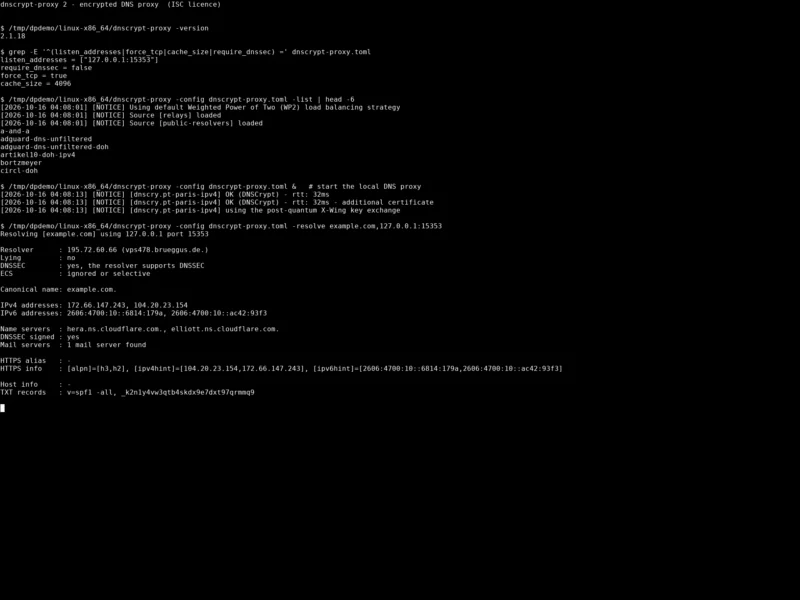
dnscrypt-proxy is a flexible DNS proxy that encrypts and authenticates the DNS lookups your computer makes. Plain DNS is sent in the clear, so anyone on the path — your ISP, a hotel Wi-Fi operator or a network attacker — can read every domain you visit and silently forge the answers. dnscrypt-proxy inserts itself between your devices and the upstream resolver, speaking modern encrypted DNS protocols: DNSCrypt v2, DNS-over-HTTPS (DoH), Anonymized DNSCrypt relays and Oblivious DoH (ODoH).
It is a single self-contained static binary written in Go by Frank Denis (jedisct1), the author of the DNSCrypt protocol itself, and it is the reference client implementation of that protocol. Configuration lives in one TOML file and the resolver list is refreshed in the background, so once it is running there is nothing to maintain.
Key features
- Encrypted, authenticated DNS — DNS-over-HTTPS (HTTP/2 and HTTP/3 over QUIC, TLS 1.3), DNSCrypt v2 including Post-Quantum DNSCrypt, Anonymized DNSCrypt and ODoH, all from one client.
- No certificate authorities — DNSCrypt resolvers are pinned by IP address and public key, so encryption starts with the very first packet and there is no CA to compromise or coerce.
- Client IP anonymisation — hide your address with Tor, a SOCKS proxy or Anonymized DNSCrypt relays, so the resolver never sees who asked.
- Filtering and blocking — block ads, malware and other unwanted names with plain, wildcard and regex rules in host- and domain-list formats, with allowlists for exceptions.
- Time-based rules — a flexible weekly schedule decides when a given filter set is active, useful for parental controls on a home network.
- Cloaking — a
HOSTSfile on steroids: return fixed addresses for specific names, resolve one name to another, and enforce Safe Search on Google, Yahoo, DuckDuckGo and Bing. - Load balancing — pick a set of resolvers and dnscrypt-proxy continually measures their latency, spreading queries across the fastest ones available.
- DNS caching — with a minimum TTL, cutting latency and reducing the number of lookups that leave your machine.
- Query monitoring — separate log files for regular and suspicious queries, and an optional blocklist of resolver names excluded from the pool.
- Automatic updates — resolver lists and filter lists are refreshed in the background on a schedule you set.
- Transparent redirection — send selected domains to specific resolvers or over plain DNS, and forward chosen upstreams through a proxy.
- Local DoH server — serve DoH on localhost so browsers can use Encrypted Client Hello (ECH/ESNI) end to end.
- Small operational footprint — statically linked, no dependencies, IPv6-to-IPv4 handling for stub resolvers, optional hot-reloading of the config file, and it runs happily on a router, a Raspberry Pi or a VPS.
Why use it
Most people who want encrypted DNS end up trusting a large cloud provider by default, because that is what a browser’s “Secure DNS” toggle does. dnscrypt-proxy takes the opposite approach: it keeps the choice of resolver in your hands (and its resolver list is community-maintained, covering dozens of independent operators rather than a handful of CDNs), hides your IP address from whichever resolver you pick, and lets you clean up the whole network’s DNS in one place instead of per browser and per app. Because it is a local proxy, it also serves devices that cannot do encrypted DNS themselves — a smart TV, a console or a container — and it gives you a log of what those devices actually asked for. And unlike DoH, DNSCrypt needs no certificate authority, so there is nothing in the chain that can be impersonated with a mis-issued certificate.
Use cases
- Privacy on untrusted networks — encrypt and anonymise DNS on a laptop that moves between cafés, hotels and conferences.
- Home network resolver — point your router’s DHCP at one dnscrypt-proxy instance and every device on the LAN gets encrypted DNS, ad blocking and Safe Search for free.
- Bypassing DNS blocking — Anonymized DNS relays and DoH over QUIC make the traffic hard to block or profile when plain DNS is tampered with.
- Self-hosting stack — pair it with a local authoritative resolver or a Pi-hole style blocker: dnscrypt-proxy does the encrypted upstream transport, the other tool does local policy.
- Per-device policy — run a second instance on a different port for guest or children’s devices with a stricter, time-scheduled filter set.
Platforms
Upstream publishes pre-built binaries for Linux (x86_64, x86, arm, arm64, mips/mipsle/mips64/mips64le), macOS (Apple silicon and Intel), Windows (32-bit, 64-bit and ARM), Android (arm, arm64, x86, x86_64) and the BSDs — FreeBSD, OpenBSD, NetBSD and DragonFly BSD. Most distributions package it (Debian, Ubuntu, Fedora, Arch, Alpine), there are official Docker images, a Snap package and a Home Assistant add-on, and releases are signed with minisign for verification.
Licence and website
ISC (Internet Systems Consortium licence) — a short, permissive, OSI-approved licence, verified in the project’s LICENSE file. Website: dnscrypt.info · Source: github.com/DNSCrypt/dnscrypt-proxy (latest release 2.1.18, July 2026).
Alternatives
- Pi-hole — a network-wide DNS blocker with a web dashboard; pair it with dnscrypt-proxy for the encrypted upstream half.
- AdGuard Home — DNS-level ad and tracker blocking plus a dashboard, DHCP and per-client rules, with encrypted DNS built in.
- Unbound — a validating, recursive DNS resolver: use it when you want to resolve names yourself rather than forward them encrypted.
Browse more free and open source tools in the directory.