Unraid Config Guardian
- Platform
- Docker Web
- Licence
- MIT Open source
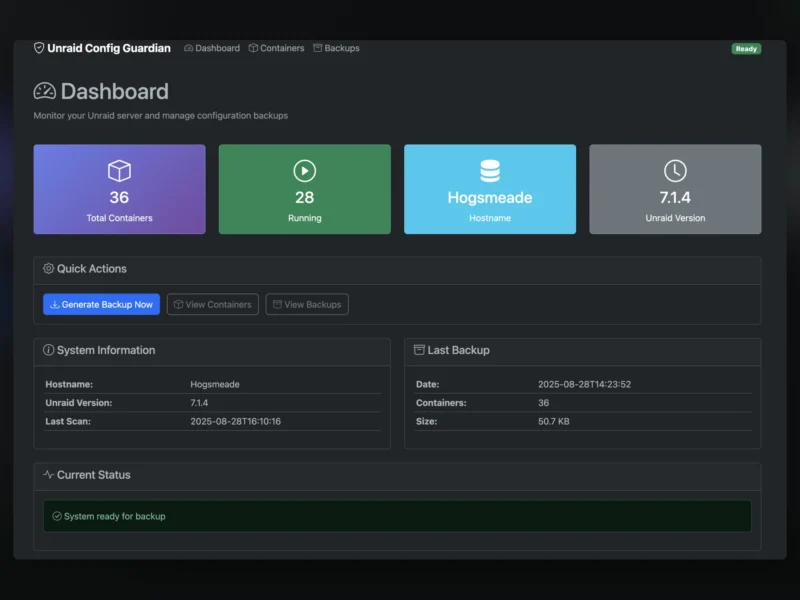
Unraid Config Guardian is a self-hosted web app that documents an Unraid server’s configuration so you can rebuild it after a flash-drive failure. It reads the running Docker containers and the Unraid system configuration, then writes a dated backup folder containing the native container templates, a docker-compose file, the system settings, a restore.sh script and a step-by-step recovery guide.
How it works
Point the container at the Docker socket (read-only) and at /boot, give it a config volume and an output volume, and it exposes a dashboard on port 7842. Press Generate Backup Now, or leave the built-in schedule (SCHEDULE="0 2 * * 0" for a weekly Sunday run) to do it for you. Each run writes a new folder with the current container definitions, a changes.log diff against the previous run, and the reconstruction material: deploy the templates back through Unraid’s Docker tab, or use the compose file and restore script if the array has to be rebuilt from scratch.
Key features
- Container capture — reads every running container through the Docker API and writes native Unraid XML templates plus an emergency
docker-compose.yml. - System configuration — copies the Unraid settings, user shares, disk settings and plugin configuration from
/boot/config. - Restoration scripts — a generated
restore.shand README recovery guide walk you through rebuilding a fresh Unraid install. - Change tracking —
changes.logshows what changed since the last backup, so an unexpected container edit stands out. - Web dashboard — container counts, hostname, Unraid version, last scan and last backup in one screen, with a Generate Backup Now button.
- Scheduled backups — a cron expression controls automatic runs; no external scheduler needed.
- Community Apps install — available from the Unraid Community Applications store, or as a plain Docker container for emergency setup.
- Small and portable — Python, one container, output as ordinary files you can copy off the array.
Requirements
- An Unraid host — the tool reads Unraid-specific paths, so it does not work on a generic Linux server.
- Read-only mounts for
/var/run/docker.sockand/boot, plus a writable output directory for the backups. - This backs up configuration only, not data: appdata and media still need their own backup tool (the project points to Kopia, Duplicacy, Rustic or Unraid’s Appdata Backup plugin).
Licence
Open source — MIT licence. Free to self-host and modify.
Related
- Portainer — container management UI for Docker and Kubernetes, if what you want is day-to-day container control rather than configuration documentation.