SpendSpentSpent
- Platform
- Web Docker
- Licence
- AGPL-3.0 Open source
- Source code
- github.com/lamarios/SpendSpentSpent
Overview
SpendSpentSpent is a self-hosted expense tracker whose single design goal is speed of entry: recording a purchase should take seconds rather than a form-filling session. The front end is a Flutter web application backed by PostgreSQL, released under the AGPL-3.0, and it keeps the spending history on your own server instead of in a commercial budgeting service. A demo instance runs at sss.ftpix.com if you want to try the interface before deploying anything.
Three screens, one job each
The application divides its interface into a centre, a right and a left page.
Spend – the centre page
Pick a category icon and enter an amount. Categories are created by the user from a grid of pictograms, each with an optional share of the monthly budget, and an expense can carry the device location when the browser permission is granted. Recurring expenses are set up from the same screen.
Spent – day-by-day history
The right page lists the selected month’s expenses day by day, with the recorded location where one exists, and lets individual entries be deleted.
Statistics – monthly and yearly views
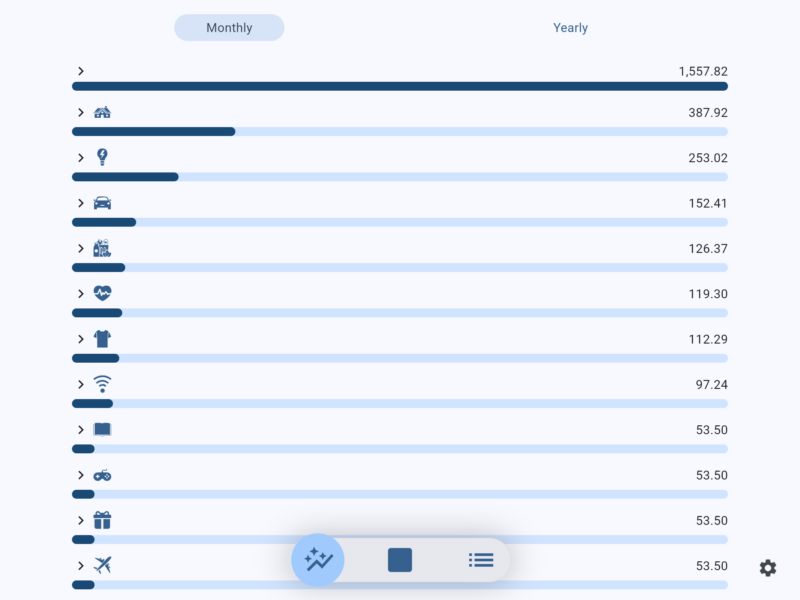
The left page shows monthly and yearly totals and graphs, comparing overall spending and per-category spending across months or years. Every category bar is scaled against the total, which makes the biggest drains on the month obvious at a glance.
Self-hosting
A deployment is a small container pair: the application image gonzague/spendspentspent from Docker Hub next to a PostgreSQL database with a persistent volume. One instance serves one household or one person, and the data never leaves that server. Installation steps, configuration and upgrade notes are kept in the project documentation.
Things to know
The interface is deliberately icon-first: category grids show pictograms rather than names, which is what makes entry quick but means the icon layout is worth learning first. The UI is built for a phone, so in a wide desktop browser it renders as a centred column rather than stretching full width. Setting a monthly budget share per category is optional, but the statistics bars only tell you something once you do.
Similar tools
If you need double-entry accounting and bank imports rather than quick expense logging, Firefly III is the fuller option, while Actual Budget takes an envelope-budgeting approach instead.