Sharry
- Platform
- Docker Linux
- Licence
- GPL-3.0-or-later Open source
- Website
- eikek.github.io/sharry
- Source code
- github.com/eikek/sharry
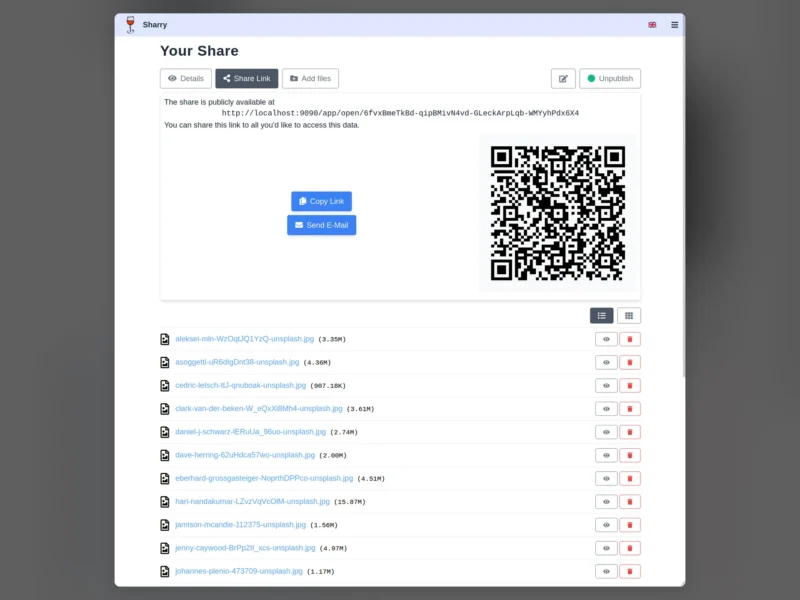
Sharry is a small, self-hosted web application for one specific job: getting a file to somebody else over a URL. Rather than being another full cloud suite, it implements two directions of sharing and nothing more — you upload files, hand out a link that is hard to guess, and optionally protect it with a password and an expiry date; or you publish an alias page so other people can drop files into your account without needing an account of their own.
Two directions of sharing
A signed-in user creates a share, adds files, sets an optional password and a validity period, and gets back a public address for the download page. The page is open to anyone with the link, which is deliberately unguessable rather than indexed. The reverse flow matters just as much: each user can maintain alias pages, each behind its own hard-to-guess URL, where anybody can upload files to that user. An alias can carry a description, can notify its owner by email when something arrives, and can be disabled or deleted at any time — which makes it usable as a drop box for a client, a printer queue for scans, or a way to collect files from people you would rather not give accounts to.
Resumable uploads on a small stack
- Uploads go through the tus resumable-upload protocol, so a dropped connection does not restart a large transfer — re-sending the same file continues from the last received chunk.
- The backend is Scala on the typelevel stack (cats, fs2) in a functional style; the frontend is written in Elm, which is why the UI is a single small bundle rather than a JavaScript framework with its own build pipeline.
- Shares expose a QR code alongside the link, a copy-to-clipboard button and a “send by email” action, and the interface adapts to phones for the upload side.
- Files can be organised into folders inside a share, published or unpublished with one toggle, and deleted from the share view.
Installing it
There are four supported routes and the project documents each one: a Debian package attached to every release, a zip with a launcher script for other systems, a Nix package with a NixOS module, and a Docker image. It stores its data in a directory you choose and needs a database for account and share metadata, so it is a modest deployment rather than a single static binary. The documentation site carries the quick start, configuration reference and the Nix and Docker walkthroughs.
Where it fits
Sharry is not trying to replace Nextcloud or Seafile, and it does not offer sync clients or a document editor. It is the tool for the moment when someone asks you to “send me that file” and email attachments, WeTransfer links or a cloud account are the wrong answer: it keeps the transfer on your own server, gives you an expiry date, and lets the other person upload back. If you want a browser front end over storage you already have, Filestash is the closer neighbour in this directory; for quick command-line transfers, transfer.sh covers the shell side.