Posterizarr
- Platform
- Docker Linux Windows macOS Web
- Licence
- GPL-3.0 Open source
- Source code
- fscorrupt.github.io/posterizarr/
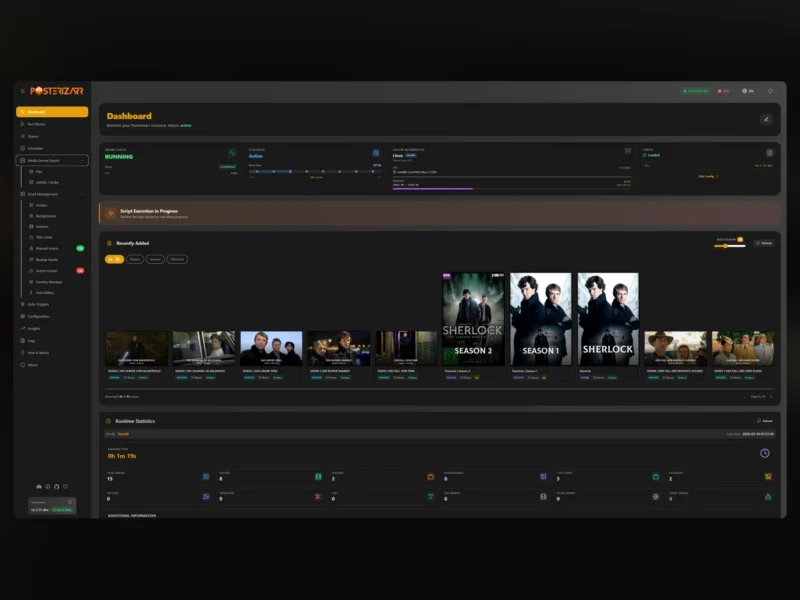
Overview
Posterizarr is an automated asset maker for Plex, Jellyfin and Emby libraries. It builds the artwork a media server does not generate for itself — posters, season posters, backgrounds, title cards and Clearlogos — by pulling textless images from Fanart.tv, TMDB, TVDB, Plex and IMDb, then applying your own overlays and text on top so the whole library looks like one collection instead of a pile of unrelated uploads.
Under the hood it is a PowerShell script wrapped in a full web UI, shipped as a Docker image that runs on Linux, Windows, macOS and ARM. The UI is where the work happens now: you configure providers and overlays, watch a run in progress, review the assets it produced, swap a Clearlogo by hand, and re-run the parts that came out wrong — all from the browser, without editing scripts or re-running a container by hand.
Key Features
- Textless artwork from several providers: Fanart.tv, TMDB, TVDB, Plex and IMDb are searched for the cleanest available image, with a configurable search order per asset type.
- Custom overlays and text: your own overlay files and text templates are applied to posters, seasons and backgrounds, so a library keeps a consistent look.
- Full web UI: a dashboard with instance status, scheduler, runtime statistics and live logs, plus pages for posters, backgrounds, seasons, title cards, manual assets, backups and an overlay manager.
- Manual asset control: the Action Center collects items that need a decision, and Clearlogos can be searched, previewed and replaced from the UI without touching the library by hand.
- Three media servers: separate export paths for Plex and for Jellyfin/Emby, with plugins for both.
- Kometa-compatible output: assets can be organised in a folder structure that Kometa picks up directly, so the two tools can be used together.
- Trigger integrations: runs can be started from Tautulli, Sonarr and Radarr instead of waiting for the next schedule, and a built-in scheduler and queue handle the rest.
- Title cards: per-episode title cards are generated for TV libraries, with a queue and a review screen for the ones that need attention.
- Backup and restore: assets are copied to a backup directory before being replaced, so a bad overlay run can be undone.
- Multi-language UI: the interface is translated, the library data stays as it is.
Why Use Posterizarr
A media library looks finished or unfinished depending on its artwork, and doing that artwork by hand does not scale past a few dozen titles. Posterizarr automates the repetitive part — find the textless poster, apply the same overlay, write the same title card, export it where the media server expects it — while leaving a way to intervene on the individual items that the automation got wrong. Because it writes into the library’s own asset folders and produces a Kometa-compatible structure, it slots into an existing Plex, Jellyfin or Emby setup without becoming another library manager; the server still owns the metadata, Posterizarr only supplies the images.
Typical Uses
- Giving a mixed Plex library a consistent poster set with the same overlay and rating text on every item.
- Generating per-episode title cards for a TV library that has none.
- Replacing missing or low-quality Clearlogos without hunting through image sites by hand.
- Keeping artwork in step with new arrivals by triggering a run from Sonarr or Radarr on import.
- Handing a Kometa setup a ready-made asset folder tree instead of building it manually.
- Backfilling seasons and backgrounds on a collection that was assembled over years.
Getting Started
The supported path is Docker: the published Compose file uses ghcr.io/fscorrupt/posterizarr:latest, runs as 1000:1000, publishes port 8000 and mounts four directories — /config for configuration, /assets for generated artwork, /assetsbackup and /manualassets. Environment variables cover the essentials: TZ, RUN_TIME (set disabled to rely on the scheduler or on triggers instead of a timed run), APP_PORT if you move the UI off 8000, and DISABLE_UI=true for headless deployments. Unraid and the other platforms are covered by the project’s documentation site. After the first start, open http://localhost:8000, add the media server and the provider API keys, set the overlays, and run a first pass on a single library before letting it loose on everything. From v2.2.50 the project collects anonymous usage statistics (an anonymous GUID, OS, target media server and app version — no IP, no paths); it can be turned off with "telemetry": false in config.json.
Licence
Free and open source, licensed under the GNU General Public License v3.0 (GPL-3.0); the full text is in the repository’s LICENSE file.