Localess
- Platform
- Web Self-hosted
- Licence
- MIT Open source
- Website
- localess.org
- Source code
- github.com/Lessify/localess
Overview
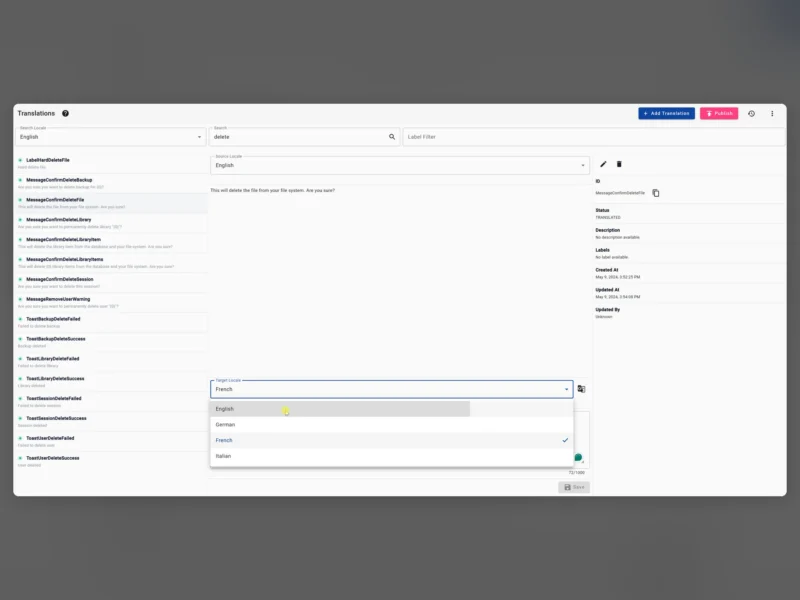
Localess is a translation management tool and content management system for the strings and copy inside an app or a website. It is built with Angular and runs on Firebase, so the editor, the API and the delivery endpoint are Google-hosted pieces of one product: you edit localisation content in a browser, publish, and the app reads the new strings from Firebase Hosting behind a CDN without a rebuild or a deploy.
Beyond translation it can double as a small CMS. Content is shaped with schematics — define the fields and their validation once, then create hierarchical content that the same API serves to web, mobile and server clients. The AI-assisted translation is Google Translate, offered as a draft you correct rather than as an autonomous translator.
What it does
- Live translation editing — change localisation content in the browser and see the result without building the application, which removes the usual edit/build/redeploy loop from copy changes.
- AI translation draft — translate with Google Translate as a starting point, then edit by hand in the same editor.
- Schematics for content shape — define the fields of a content type and the validation that keeps the data usable, instead of storing untyped blobs.
- Hierarchical content — model nested structures (pages, sections, items) and fetch them through the API rather than flattening everything into a spreadsheet.
- Fast delivery through a CDN — the project quotes around 20 ms to serve 5,000 translations, because responses are cached at Google’s edge rather than hitting a database per request.
- API for any client — one HTTP interface consumed by browser apps, mobile apps and Node, Java/Kotlin, Python, Rust or Go services.
- Users and granular permissions — separate accounts for translators and editors so that not everyone can publish.
- Import and export — take your content out and back in, which is also the path to moving between environments.
Deployment and requirements
Localess is a Firebase application, so the infrastructure is a Google Cloud project: Firebase Authentication for sign-in, Firestore for data, Storage for assets, Cloud Functions for the API and Firebase Hosting behind the CDN. You deploy the app into your own project and pay Google for the usage — the software itself is free, and the project is explicit that infrastructure is the only cost. The setup guide in the wiki covers the Firebase project, the build and the deploy; a self-hosted install is also supported, and content moves between the two one space at a time through the migration API: generate a token in Admin → Settings → Migration, enter the source URL and token in the destination install under Admin → Spaces → Import from Firebase, then revoke the token.
Two things to plan for before committing: the stack ties you to Firebase, so a migration away from Google is a real project rather than a config change; and the AI translation sends source strings to Google Translate, which matters if the content is under confidentiality obligations.
Who it is for
Teams shipping a web or mobile app in several languages who want translators working in a browser without touching code or waiting for a release, and small teams who need a typed content store for marketing copy on the same API. It suits a project already comfortable on Google Cloud — if the requirement is to keep everything on your own servers, a self-hosted translation platform is the more natural fit.
Related tools
- Weblate — self-hosted translation platform with Git integration, the obvious alternative when translations must stay on your own infrastructure.
- Directus — open-source data platform and CMS if you need typed content management without Firebase.
- Ghost — a lighter publishing CMS for the editorial side of a site.