GTK
- Platform
- Linux macOS Windows
- Licence
- LGPL-2.1 Open source
- Website
- gtk.org
- Source code
- gitlab.gnome.org/GNOME/gtk
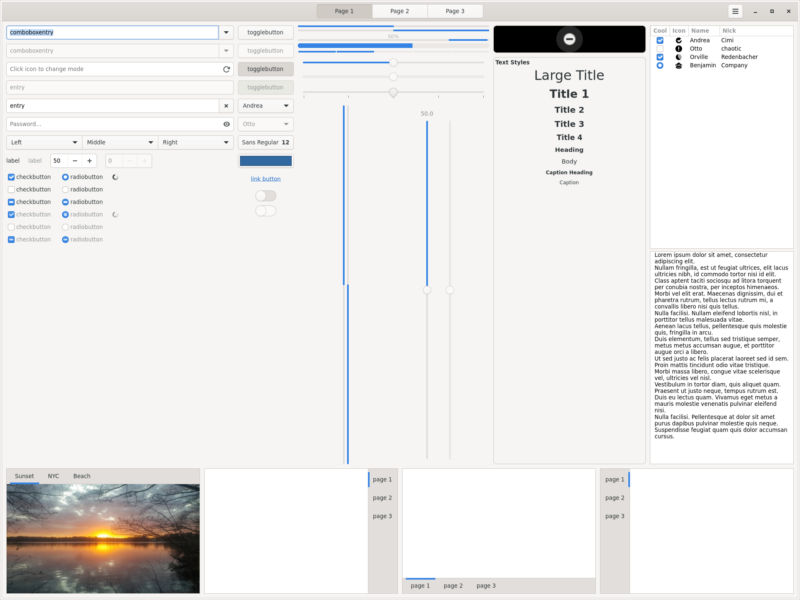
Overview
GTK (formerly GTK+) is a free and open-source widget toolkit for building graphical user interfaces. It began in 1997 as the widget set written for GIMP by Peter Mattis and Spencer Kimball, which is why the name started life as the GIMP Toolkit. The choice of the GNU Lesser General Public License at that time was deliberate: Qt, the other serious free toolkit of the era, was then only available under the GPL, and the LGPL let commercial applications link against GTK without opening their own source.
Nearly three decades later GTK is the toolkit behind GNOME and a long list of desktop applications, including GIMP, Inkscape, Pitivi and Firefox’s Linux interface. GTK 4, released in December 2020, rebuilt the drawing stack around GSK, a scene-graph renderer with Vulkan, OpenGL and Cairo backends, and made Wayland a first-class platform rather than an add-on. The stable line is currently 4.24 (4.24.1, 1 October 2026), with 4.25 in development; GTK 3 remains maintained for applications that have not yet ported.
GTK is written in C on top of GObject and GLib, so it is usable from C directly and from almost every other language through bindings. It is developed by the GNOME project with contributions from Red Hat, the GNOME Foundation and an active community, and it is released under the GNU Lesser General Public License version 2.1.
Key Features
- A complete widget set — windows, dialogs, notebooks, list and tree views with model/view separation, text views with syntax-highlighting hooks, menus, popovers, drag-and-drop, and layout containers that adapt to window size.
- GSK renderers — a scene graph drawn through Vulkan, OpenGL (the NGL renderer) or Cairo software rendering, with automatic fallback, GPU-accelerated transforms and a Cairo path that keeps GTK usable on machines without working 3D drivers.
- Declarative interface files — GtkBuilder XML describes a window’s widget tree and properties, and GTK CSS styles widgets at runtime; the separate Blueprint language compiles to the same representation for people who prefer a terser syntax.
- Accessibility built in — GTK 4 exposes widgets to assistive technology through its own accessibility API and an AT-SPI bridge, and ships the Orca screen reader’s expected roles, states and keyboard navigation.
- Wayland and X11, plus macOS and Windows — native backends for Wayland compositors and X11 servers on Linux and the BSDs, and supported backends for macOS and Windows, which is what makes GTK usable for cross-platform desktop applications.
- Input for real hardware — pointer, touchscreen and tablet input with pressure and stylus handling, high-DPI scaling, and gesture controllers for pan, zoom, swipe and long-press.
- Bindings for most languages — PyGObject for Python, gtkmm for C++, gtk-rs for Rust, Vala and GJS for JavaScript, plus Perl, Ruby, C# and other community bindings that sit on the same GObject introspection data.
- libadwaita as a companion — the GNOME design library layered on GTK 4, providing adaptive layouts, header bars, toasts, navigation stacks and the Adwaita style, which is the practical starting point for a modern GNOME application.
Building and Requirements
GTK 4 is built with Meson and Ninja from source, and it needs GLib, Pango, GDK-Pixbuf, Graphene, Cairo and their development headers; building from git also pulls in the documentation tools. Most people should not build it at all — distribution packages exist for Debian and Ubuntu (libgtk-4-dev), Fedora (gtk4-devel), Arch, openSUSE and the BSDs, and Flatpak applications can use the org.gnome.Platform runtime, which ships GTK and libadwaita already built. The API reference, tutorials and the Getting Started guide are at docs.gtk.org/gtk4, and the source, issue tracker and merge requests live on GNOME’s GitLab.