Donetick
- Platform
- Linux Docker
- Licence
- AGPL-3.0 Open source
- Website
- donetick.com
- Source code
- github.com/donetick/donetick
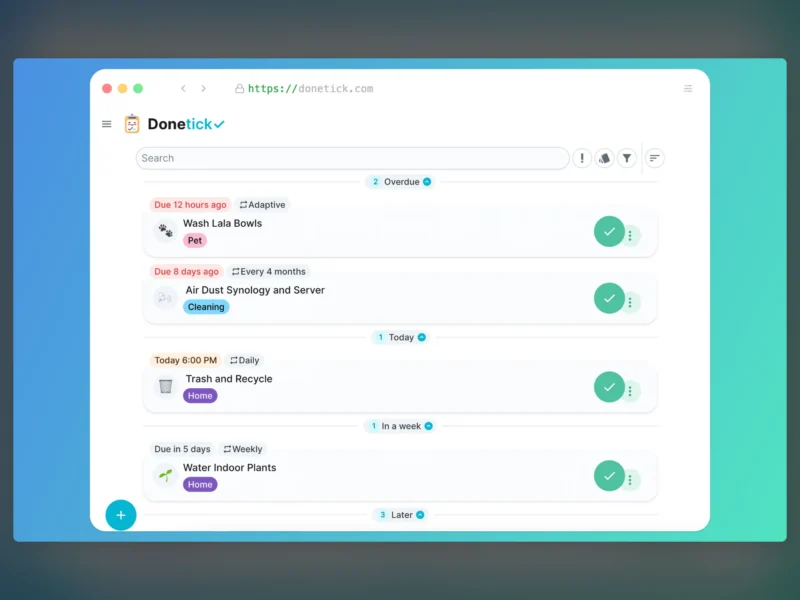
Donetick is a self-hosted task and chore manager built for households and small groups rather than for enterprise project planning. It runs as a single Go binary in a container with an embedded SQLite database, and combines recurring chores, shared assignment, reminder notifications and a wall-mount dashboard in one lightweight web app.
What it does
The core loop is deliberately simple: create a task, say who it belongs to and how often it repeats, then tick it off. What separates Donetick from a plain to-do list is the scheduling engine underneath. Recurring tasks can be scheduled daily, weekly, monthly or yearly, on specific days of a month or week, or adaptively — where the app learns from your completion history and suggests the next due date instead of drifting from a fixed cadence. You choose whether the next occurrence counts from the previous due date (a steady rhythm) or from the moment you actually completed it (better when chores slip).
Features
- Natural-language task entry — type “Take the trash out every Monday and Tuesday at 6:15 pm” and the date, time and recurrence are parsed for you
- Flexible recurrence: daily, weekly, monthly, yearly, specific days, or adaptive scheduling based on completion history
- Assignee rotation — hand chores out in round-robin order, at random, or to whoever has completed the fewest
- Nested subtasks that reset automatically when a recurring parent task is completed
- Custom labels and five priority levels (P1 to P4 plus unprioritised) for filtering and sorting
- Groups so family members or friends can share a list and take individual tasks
- Points, completion restrictions and analytics to keep shared chores moving
- “Things” — track non-task values such as a number, text or boolean, and complete tasks automatically when one changes
- NFC tag support: write a tag, scan it, and the matching task is marked done
- Time tracking per task, including across multiple sessions
- Reminders over Telegram, Discord, Pushover and mobile apps, plus realtime sync across devices
- Home Assistant integration that exposes each user’s tasks as a separate to-do list
- Dashboard view for a wall-mounted tablet showing the task list, calendar and recent activity
- MFA via TOTP and OIDC/OAuth2 single sign-on (Keycloak, Authentik, Authelia)
- REST API and webhooks for automations
Deployment
Donetick ships as the donetick/donetick Docker image. A runnable install needs a selfhosted.yaml config file mounted at /config, a data directory mounted at /donetick-data, and port 2021 published; the SQLite database path is set with DT_SQLITE_PATH and the environment with DT_ENV=selfhosted. Docker Compose works the same way with a health check against /api/v1/health. Optional extras — S3-compatible object storage for task photos, or Home Assistant — are configured in the same file. There is no external database or message broker to run.
Who it is for
Donetick fits a household or small team that wants recurring chores to be visible, fairly shared and reminded automatically, without standing up a project-management suite. If you need boards, sprints and dependencies, look at a project-management tool instead; if you want “the bins go out on Tuesday and it is someone else’s turn”, this is the shape of tool you want.