Chatto
- Platform
- iOS
- Licence
- MIT Open source
- Source code
- github.com/badoo/Chatto
Overview
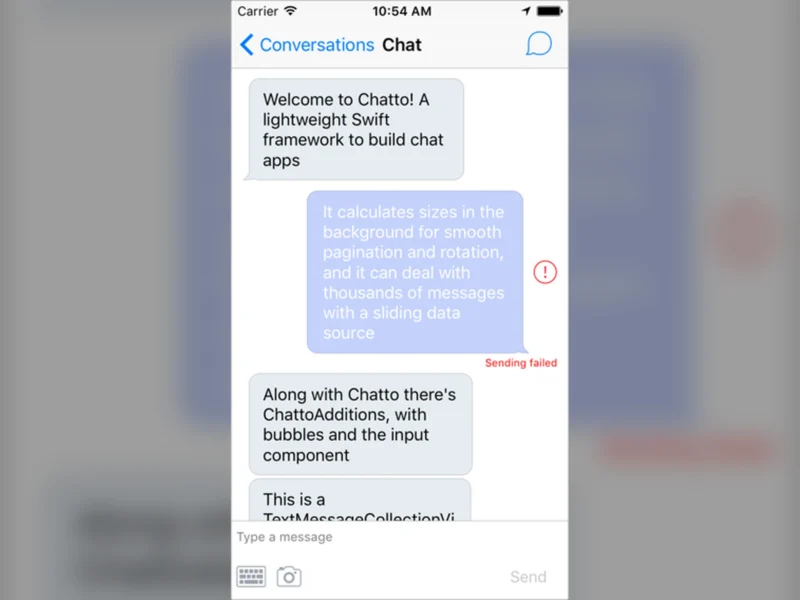
Chatto is a lightweight Swift framework for building chat interfaces inside iOS apps, released by Badoo under the MIT licence. It is a UI layer, not a messaging service: Chatto owns the collection view, the diffing and the scrolling, while your app keeps its own message model, transport and storage.
The framework exists to solve the parts of a chat screen that are easy to get wrong. Collection-view changes are calculated in the background and applied in batches, so a conversation with thousands of messages still pages smoothly in both directions. A companion framework, ChattoAdditions, adds ready-made text and photo bubbles plus an extensible input bar, so a working chat screen is a few dozen lines of glue code rather than a bespoke UIKit project.
Because it is a developer library rather than an application, Chatto is something you add to an existing Xcode project. There is no server, no hosted component and no account: the messages, the backend and the persistence are entirely yours to implement.
Key Features
- Background layout and diffing: collection-view changes are calculated off the main thread and applied in batches, keeping long conversations responsive
- Two-way pagination with autoloading: older history loads as the user scrolls up and newer messages load at the bottom without manual triggers
- Built for large histories: message-count contention handling keeps paging and device rotation fast even with thousands of messages loaded
- Swipe-in accessory view: a detail panel revealed by swiping from the right edge
- Interactive keyboard dismissal: drag-to-dismiss keyboard behaviour that follows the scroll gesture
- Message bubbles: text bubbles and photo bubbles ship in ChattoAdditions, with hooks for custom cell types
- Extensible input bar: a pluggable text input, send button and attachment area that can be replaced or extended
- MIT licensed: permissive terms for commercial and closed-source apps alike
Requirements and Installation
Chatto targets iOS apps written in Swift with UIKit; version 4.1.0 is the Swift 5 release, while older tags cover Swift 4.2, 4, 3 and 2.x projects. It is distributed as source through CocoaPods, Carthage or a manual checkout rather than through the Swift Package Manager.
With CocoaPods, add use_frameworks! to your Podfile and pin both pods to the same version:
pod 'Chatto', '= 4.1.0'
pod 'ChattoAdditions', '= 4.1.0'
With Carthage, add github "badoo/Chatto" to your Cartfile. To install manually, clone or download the repository and drag the Chatto and ChattoAdditions projects into your workspace, then add them to Embedded Binaries. ChattoAdditions is optional: it supplies the default bubbles and input component, and can be left out if you write your own cells.
Why Use It
Most chat toolkits either stop at a bare collection view or pull you into someone else’s backend. Chatto sits in the middle: it is opinionated about the hard UI problems — background diffing, bidirectional paging, keyboard handling — and silent about everything else, which makes it a good fit for a product that already has its own message store and real-time transport.
The trade-off to know before adopting it is pace. The newest tagged release is 4.1.0 from May 2021, and although the repository’s default branch still receives commits, there has been no newer version since; teams starting today should pin the released version and expect UIKit-era APIs rather than SwiftUI. For a UIKit app that needs a solid chat screen without building one from scratch, that is still a reasonable bargain — and if you want a batteries-included alternative, a snapshot-testing-friendly framework such as MessageKit covers similar ground with a more active release cadence.