AutoGPT
- Platform
- Docker Linux macOS Windows Web
- Licence
- Polyform Shield 1.0.0 (platform); MIT (classic agent)
- Website
- agpt.co
- Source code
- github.com/Significant-Gravitas/AutoGPT
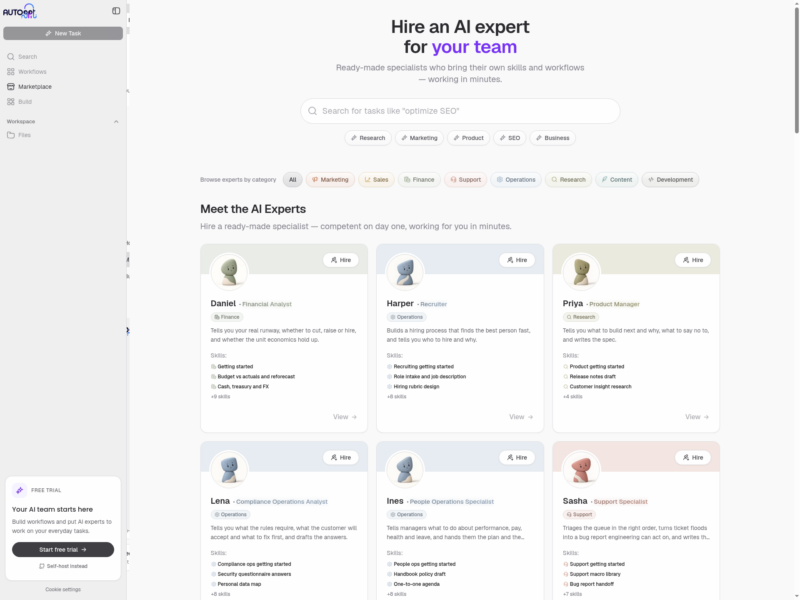
AutoGPT is the project that put autonomous LLM agents on the map — a repository published in March 2023 that ran a model in a loop, letting it plan its own steps, call tools, read the results and decide what to do next. It has since grown into the AutoGPT Platform: a system for building, deploying and running agents that keep working without a person driving every step. An agent there is a workflow of blocks laid out on a visual canvas — an input block that declares what the run needs, a chain of action blocks that call models, search the web or talk to other services, and an output block that declares what comes back. A run starts on demand, on a recurring schedule, or when a webhook fires.
There are two ways in. The hosted Platform at platform.agpt.co is a paid service with a trial, organised around four ready-made experts — Otto coordinates the work, Maria handles SEO content, Max does sales research, Frankie prepares briefings — alongside AutoPilot, an assistant inside the app that can run agents, draft new ones from a description, and execute individual blocks. Or you self-host: the platform ships as a single Docker image (or a Docker Compose stack) and takes your own model credentials.
Source-available, not open source. The repository is dual-licensed: everything under autogpt_platform/ — the platform whose interface is shown here — is under the Polyform Shield License 1.0.0, which is free for personal and internal business use but forbids selling it as a competing hosted service. The rest of the repository, including the original standalone agent, Forge and the benchmark, stays under the MIT License. The single-container image also bundles third-party services under their own terms — FalkorDB, for example, is SSPL-1.0 — so a redistributed deployment carries those obligations too.
Key Features
- Visual agent builder — design workflows on a canvas by dragging blocks and wiring their typed output pins to input pins; data flows along the connections when the agent runs.
- Blocks as integrations — the catalogue covers hundreds of actions across model providers, search, social platforms, CRM and issue trackers, media generation, developer tools and control flow, so most of an agent is assembled rather than coded.
- Input, action, output and trigger blocks — input and output blocks become the form a user fills in and the result they see; trigger blocks invert that, turning the agent into something a webhook starts.
- Scheduling and webhook triggers — run an agent on a weekly, weekday or per-day schedule at a chosen time and timezone, with the inputs pre-filled, or expose it as a webhook endpoint for other systems.
- Marketplace and Agent Library — browse community and first-party agents, add one to your library in a click, then duplicate it to edit; agents you build can be published back to the marketplace.
- AutoPilot — a conversational assistant that runs agents from your library, builds new ones from a description, and executes supported blocks directly (research, image generation, image editing) without a workflow around them.
- REST API and MCP server — the same v2 API on cloud and self-hosted installs lets code create, version and run agents, and an MCP server exposes that to Claude Code, Codex, Cursor or VS Code.
- Bring your own model — OpenAI, Anthropic, Groq, Llama, Google Gemini and AI/ML API are supported as providers, and a local model through Ollama keeps a self-hosted install free of per-token API keys.
- One-container self-hosting — the image bundles the frontend, backend, PostgreSQL, a three-node Valkey cluster, RabbitMQ, FalkorDB and nginx behind a single port, with all durable state under
/data.
Who It Is For
- Teams automating recurring knowledge work — research digests, outreach drafting, content briefs — on a schedule rather than by hand.
- Developers who want agents as an API surface: build the workflow in the builder, then trigger it from code or an AI coding agent over MCP.
- Anyone who needs agent runs on their own infrastructure, with their own credentials and data staying in-house.
- People learning agent design, for whom a canvas of blocks is a faster way to see how a prompt, a tool call and a branch fit together than a framework’s source tree.
Running It
The quickest self-host is the official single-container image, significantgravitas/autogpt on Docker Hub. Give it a private env file with the public URL and the email allowed to sign up, then start it with a named volume and a raised shared-memory limit (the bundled PostgreSQL and browser tooling both need it):
docker run -d --name autogpt --restart unless-stopped
  --shm-size 2g --ulimit nofile=65536:65536
  --env-file autogpt.env
  -p 127.0.0.1:3000:3000
  -v autogpt-data:/data
  significantgravitas/autogpt:latest
First boot runs database migrations and takes several minutes; the project measures 5–6 GiB of memory in use, so plan for more than that. Open http://localhost:3000, create the first account, promote it with docker exec autogpt autogpt-admin promote you@example.com, and close signup with AUTH_ALLOW_NEW_ACCOUNTS=false once you are in. A Docker Compose setup for one service per container, and an installer for Linux, macOS and Windows, are documented as alternatives.
Hosted or Self-Hosted
The hosted Platform is the paid route: plans plus usage pricing, no infrastructure to manage and no model keys to supply, with a trial to start. Self-hosting moves the cost to your own machine and your own model bill, and it is the only option that keeps prompts, credentials and run data on your infrastructure. What self-hosting does not give you is the hosted team experience out of the box — the four named experts and their ready-made routines are the productised layer on top of the same engine.
Classic AutoGPT
The original standalone agent is still in the repository under MIT, alongside Forge (a library of agent building blocks extracted from it) and a benchmark suite. It needs a terminal and a model key rather than a browser, and it is the smaller, more readable codebase if you want to study or extend the agent loop itself.
Related Tools
- LangGraph — a code-first framework for the same stateful-agent idea, when the workflow belongs in source control rather than on a canvas.
- AutoGen — multi-agent conversation patterns from Microsoft Research, with a studio UI for prototyping teams of agents.
- Letta — stateful agents with persistent memory as the central abstraction.
- OpenHands — an agent that works in a sandboxed development environment rather than a general workflow canvas.
- n8n — visual automation with a much larger integration catalogue, if the task is plumbing rather than agent reasoning.