ARA Records Ansible
- Platform
- Linux macOS Docker
- Licence
- GPL-3.0 Open source
- Website
- ara.recordsansible.org
- Source code
- github.com/ansible-community/ara
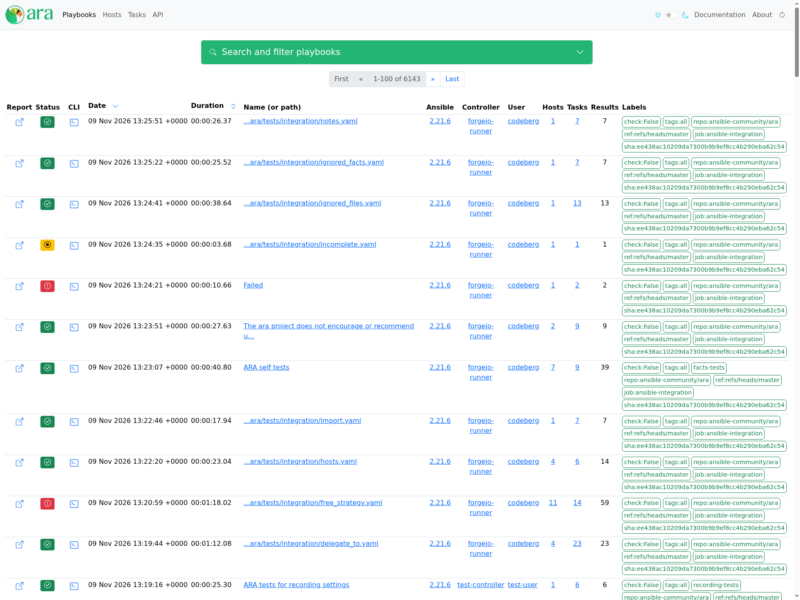
ARA Records Ansible is a reporting companion for Ansible that records every ansible and ansible-playbook run and makes the results easy to read, search and troubleshoot afterwards. Instead of scrolling back through terminal output or digging through logs, you get a browsable record of what each playbook did, host by host and task by task, in a self-hosted web interface with its own REST API and CLI.
How it works
A standard Ansible callback plugin gathers data while a playbook runs and sends it to a Django REST API server, which stores it in SQLite, MySQL or PostgreSQL. Because recording happens through a callback plugin, it works no matter how Ansible was started: from a terminal, a shell script, a cron job, ansible-pull, ansible-navigator, AWX or Automation Controller, Molecule, Semaphore, or a pipeline on Jenkins, Rundeck or Zuul.
Recording without a server
Recording to a local SQLite database is the default and needs no persistent service. Install Ansible alongside the ara[server] extra, point ANSIBLE_CALLBACK_PLUGINS at arasetup.callback_plugins, and run playbooks as usual; the CLI (ara playbook list, ara host list, ara task list) and ara-manage runserver then read the same database. This is handy on a laptop or in a one-off debugging session.
Sharing results through an API server
A persistent server aggregates runs from many machines, jobs and CI systems into one dashboard that a team can share. The project publishes container images (recordsansible/ara-api on Docker Hub and quay.io/recordsansible/ara-api) plus an Ansible collection role for deploying it; clients only need the lightweight ara package together with ARA_API_CLIENT=http and ARA_API_SERVER. Authentication and per-user data separation can be enabled, and playbook recording can be scoped so that noisy or secret-bearing tasks are skipped.
Requirements and installation
The package is installed with pip and needs Python 3.10 or newer, on the same interpreter as Ansible itself (any recent Linux distribution or macOS). The server component adds Django and its dependencies, or you can run the published container instead. A live demo of the reporting interface, fed with recorded runs, is available at demo.recordsansible.org, and the documentation covers the CLI, the API, the callback plugin options and deployment best practices. The project is developed in the open and released under the GNU General Public License v3.0.