Ackify
- Platform
- Docker Self-hosted
- Licence
- AGPL-3.0 Open source
- Website
- ackify.eu
- Source code
- github.com/kolapsis/ackify
Overview
Ackify is a self-hosted web application for proving that a document has actually been read. You register a document by URL, file path or a plain identifier, hand the link to the people who must acknowledge it, and each acknowledgement is stored with an Ed25519 cryptographic signature, a checksum of the file and a timestamp that cannot be edited afterwards. The result is an audit trail you can show to an auditor rather than a spreadsheet of signatures.
It targets the paperwork side of compliance: security-policy sign-off, GDPR and RGPD acknowledgements, training attestations and contractual acceptances. The server is written in Go with a PostgreSQL database and a Vue 3 front end, and ships as a distroless Docker image under 30 MB, so the whole stack fits on a small VPS.
Features
- Ed25519 signatures with a database constraint of one signature per user per document, so a confirmation cannot be duplicated or overwritten
- Two authentication routes: OAuth2 through Google, GitHub, GitLab or a custom provider, and MagicLink passwordless sign-in by email; either can be enabled, or both at once
- Expected-signers tracking, with the reminder emails sent by a built-in email worker
- Document integrity checks with SHA-256, SHA-512 or MD5 checksums recorded alongside each signature
- Optional document storage on the local filesystem or on any S3-compatible bucket, so the files themselves stay on your infrastructure
- An immutable audit trail: timestamps are written by PostgreSQL triggers and cannot be altered by the application
- Embeddable widgets for Notion, Outline and Confluence through iframe and oEmbed, plus Open Graph unfurling in Slack and Teams
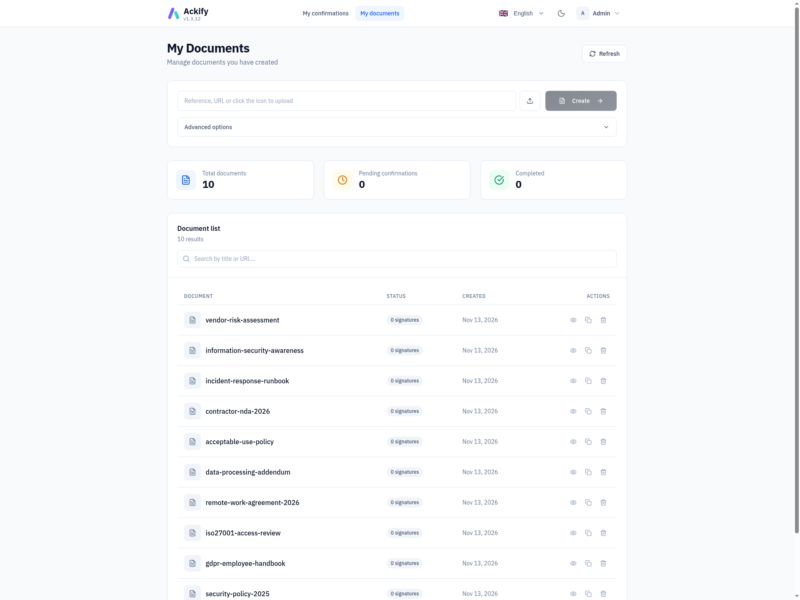
- Admin dashboard and a personal documents view, built in Vue 3 with a dark mode
- Interface available in French, English, Spanish, German and Italian
- REST API for scripting document creation and reading confirmations
Setup
The project publishes a Docker Compose stack and an installation script that generates the session-cookie secret and the database password for you. Before starting, at least one authentication method has to be configured: OAuth2 client credentials, or an SMTP server for MagicLink. The admin accounts are named in ACKIFY_ADMIN_EMAILS, and the confirmation page is then reachable at https://your-domain/?doc=document-id.
Set ACKIFY_BASE_URL and APP_DNS to the public hostname and put the service behind TLS: the session cookies are only marked secure when the base URL is HTTPS. The health endpoint at /api/v1/health reports both the application and the database connection.
Alternatives
- DocuSeal – open source document signing with a form builder, for filled-in signatures rather than a simple read receipt
- Documenso – open source e-signature platform in the DocuSign mould, with templates and multiple signers
- Paperless-ngx – document archive with OCR and indexing, for storing the policies Ackify asks people to confirm