Moocup
- Platform
- Web Linux Docker Self-hosted
- Licence
- MIT Open source
- Website
- moocup.jaydip.me/
- Source code
- github.com/jellydeck/moocup
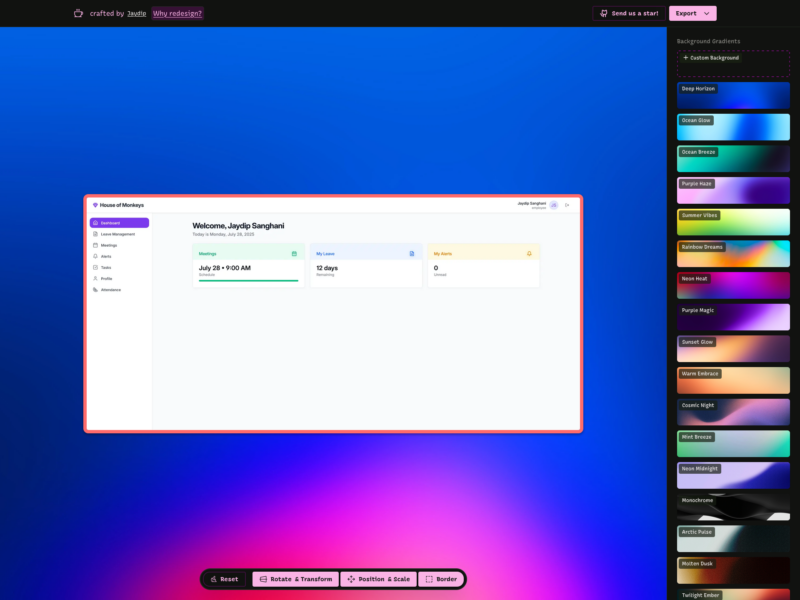
Moocup
Website: moocup.jaydip.me
Moocup is a browser-based visual editor for turning a plain screenshot into a presentable mockup. It solves a narrow problem well: a README, a portfolio entry, a slide deck or a documentation page needs a screenshot to look deliberate, and opening a full design application to add a background, a border and a shadow is more work than the image deserves. Moocup applies a base style as soon as an image arrives, then leaves the adjustments in a small set of panels rather than a layer stack.
The workflow is short. Drop a screenshot into the canvas, or paste one from the clipboard, and it appears on a gradient background with a border, rounded corners and a shadow. The border colour is sampled from the screenshot itself, so the frame tends to match the image instead of fighting it. From there you move, scale, rotate or skew the screenshot, pick another gradient or upload your own background, and export as PNG, JPEG or WebP. The project is completely free to use, MIT-licensed, and maintained by a single developer; the whole editor is a static site, so a self-hosted copy is a Docker command or a static deploy away.
Key Features
- Drag, drop or paste: drag an image onto the canvas or paste one from the clipboard; JPG, PNG, WebP and other browser-readable formats are accepted.
- Seventeen gradient presets: named backgrounds such as Deep Horizon, Ocean Glow and Twilight Ember, plus an upload for a custom JPG or PNG background up to 10 MB.
- Automatic frame colour: the border takes its colour from the dominant colour of the screenshot, with a grey-green fallback when the sample fails; opacity, width (0–20 px) and corner radius (0–50 px) are adjustable.
- Placement and scale: a nine-position grid snaps the image around the canvas, a slider covers 0.1× to 3× zoom, and margin presets set 20, 35 or 50 px of space.
- Rotation and skew: separate Rotate X, Rotate Y, Rotate Z and Skew sliders, plus six ready-made angle presets for a quick tilt.
- Client-side export: PNG, JPEG and WebP output at Standard, High or Ultra quality (roughly 2×, 4× and 6× the canvas), rendered in the browser.
- No account or upload for editing: the editor is a static application and the image work happens in the browser, which suits screenshots of internal systems.
- Self-hosting: run the official
jellydeck/moocupDocker image, deploy the repository to Vercel, Railway or Netlify, or build the Vite project and upload the static output.
Licence
MIT. You can use, copy, modify, merge, publish, distribute, sublicense and sell copies of the software, provided the copyright notice and permission notice are included; it comes with no warranty. For a directory of free software that means the tool itself costs nothing, and a self-hosted copy can be changed without asking the author.