Cap
- Platform
- macOS Windows Linux Web Self-hosted
- Licence
- AGPL-3.0, with MIT crates; binaries and commercial use under separate terms Open source
Cap
Website: cap.so
Cap is an open-source screen recorder and a direct alternative to Loom. The desktop app records a full display, a single window, a selected area or just the camera, with microphone and system audio, then either gives you a share link or opens a local editor. Personal use is free and the code is AGPLv3, so you can also self-host it. Commercial use is not free: that needs the paid Desktop licence or a Cap Pro subscription.
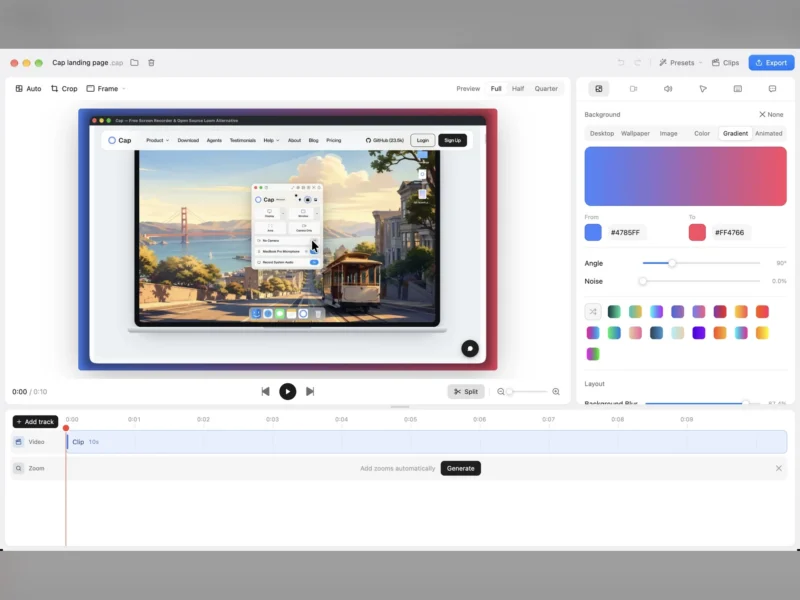
There are two recording modes. Instant Mode uploads the video while you record and returns a shareable link as soon as you stop, which suits bug reports and quick updates. Studio Mode saves a local .cap project and opens a timeline editor for trimming, backgrounds, zooms, captions and cursor treatment before you export or share. Native builds exist for macOS on Apple Silicon and Intel, 64-bit Windows, and x86_64 Linux as a Debian package. Recordings can live in Cap Cloud, in your own S3-compatible bucket or Google Drive, on your machine, or on a self-hosted instance run with Docker Compose.
Key Features
- Instant Mode: uploads footage while recording, so the share link is ready when you stop rather than after a separate upload.
- Studio Mode editor: a local project with timeline trimming, split, background styling, zooms, captions and cursor treatment, with export to MP4 or GIF.
- Flexible capture: record a display, window or selected area, camera-only video, or a still screenshot, with microphone and system audio where the OS allows.
- Cross-platform desktop app: native builds for Apple Silicon and Intel macOS, 64-bit Windows, and x86_64 Linux as a Debian package.
- Your storage: Cap Cloud, an S3-compatible bucket such as AWS S3, Cloudflare R2, Backblaze B2, MinIO or Wasabi, Google Drive, local storage, or a full Docker Compose self-host (custom buckets and Drive are Cap Pro or self-hosted).
- Sharing controls: public and private links with embeddable players; Cap Pro adds password protection and a custom domain, and signed-in viewers can leave timestamped comments and reactions.
- Teams and analytics: workspaces, folders and organisation roles separate a team’s recordings, while Cap Pro adds viewer analytics for views, engagement and watch time.
- AI and imports: Cap Pro generates titles, summaries, clickable chapters and transcripts, and its Loom importer moves an existing library across.
Licence
Most of the source is AGPLv3; the cap-camera* and scap-* crates are MIT. Distributed desktop binaries and commercial use have separate terms: personal use of the free app is allowed, commercial work requires the Desktop licence or Cap Pro, and self-hosting the AGPL code is free. Check the commercial licence page before using it for client work.