OpenReader
- Platform
- Web Docker Linux Windows macOS
- Licence
- MIT Open source
- Website
- openreader.richardr.dev
- Source code
- github.com/richardr1126/openreader
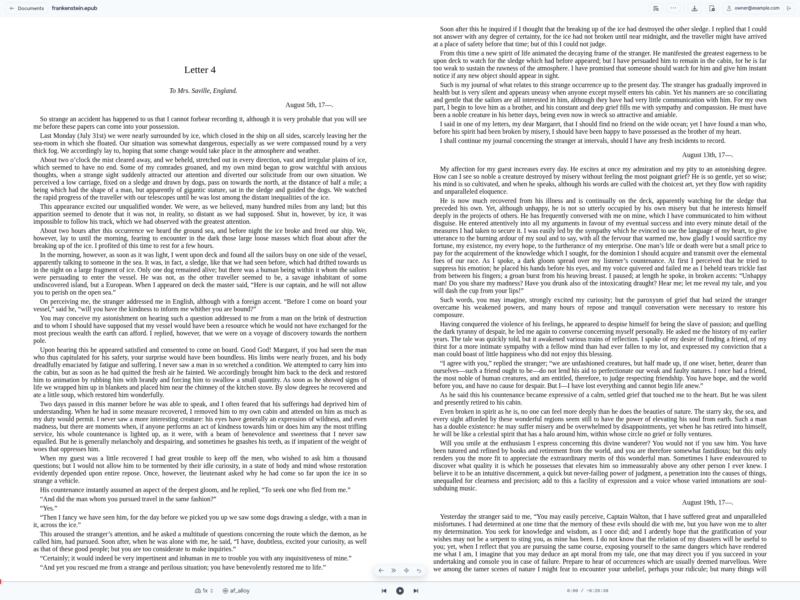
OpenReader is an open-source text-to-speech document reader you run on your own server. Upload an EPUB, PDF, TXT, Markdown or DOCX file and it narrates the text while highlighting each word on the original page as it is spoken, using a voice provider of your choice. Everything — documents, generated audio, reading position and settings — stays on your hardware.
Key Features
- Read-along highlighting — Word-by-word synchronisation on the original page, driven by local Kokoro phoneme durations or ONNX Whisper alignment for other providers
- Five document formats — EPUB, PDF, TXT, Markdown and DOCX, with layout-aware PDF parsing that detects structured blocks across pages
- Multiple TTS providers — Local Kokoro with no API key, self-hosted OpenAI-compatible servers (Kokoro-FastAPI, KittenTTS-FastAPI, Orpheus-FastAPI, Supertonic), or cloud APIs such as OpenAI, Replicate, Google AI Studio, Fish Audio and OpenRouter
- Progressive playback — Starts narrating as soon as the first segment is ready while a worker keeps generating ahead, and reuses cached audio across seeks, reloads and exports
- Audiobook export — Assembles M4B or MP3 audiobooks from the same playback cache, so an hour of listening is not generated twice
- Voice cloning — Record or import a short sample and narrate with it through Fish Audio or a voice-cloning OpenRouter model
- Reading preferences — Typography, highlight colours, follow-or-browse narration, skipped citations and brackets, and added pauses, set globally with per-book overrides
- Flexible storage and database — Embedded SeaweedFS or any S3-compatible storage, with SQLite or PostgreSQL
- Built-in auth and OAuth — Session support for multiple users and scoped OAuth sign-in for connected apps, so no API keys need copying
- REST API and MCP server — Lets approved AI assistants and scripts add documents and build audiobooks
- Docker and desktop builds — Container images for amd64 and arm64 with automatic startup migrations, plus a desktop app for macOS, Windows and Linux
Why Use OpenReader?
Most read-aloud tools are tied to a subscription and send your documents to someone else’s servers. OpenReader puts the whole pipeline — parsing, narration, synchronised highlighting and audiobook export — inside your own deployment, and it does not require a paid API key: a local Kokoro server is enough to get started. If you already have a library server such as Audiobookshelf for audio, OpenReader covers the adjacent job of turning written documents into listenable audio while keeping the text on screen.
Licence
MIT License. The source code, including the desktop app, is open source.