Datasette
- Platform
- Web Docker Linux macOS Windows
- Licence
- Apache-2.0 Open source
- Website
- datasette.io/
- Source code
- github.com/simonw/datasette
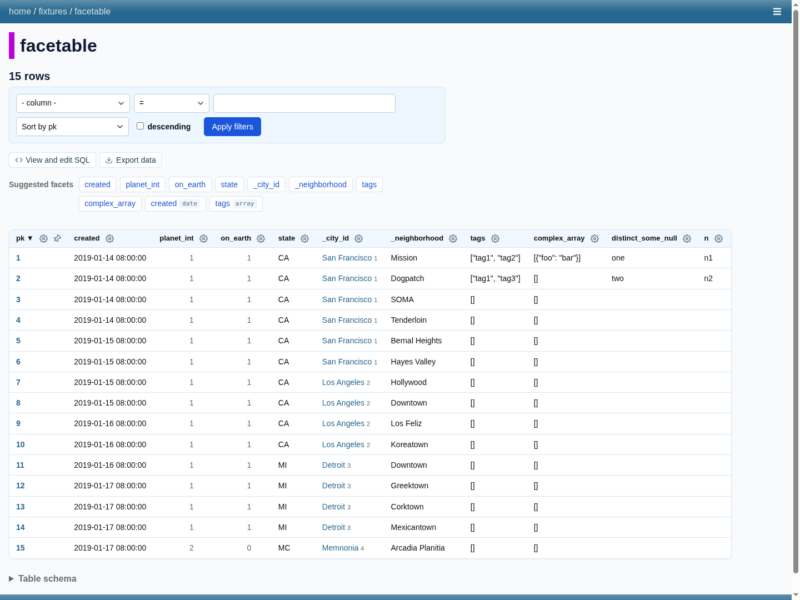
Datasette is a tool for exploring and publishing data, created by Simon Willison and surrounded by a large plugin ecosystem. Point it at one or more SQLite database files and it serves an interactive, browsable website for that data, with a JSON API for every table, row and saved query at the same URLs.
What it does
- Instant exploration — browse databases, tables and individual rows in the browser without writing any application code.
- Faceted filtering — turn any column into a facet and narrow thousands of rows down in a few clicks; useful facets are suggested automatically.
- Automatic API — every table and query is also available as JSON, with CSV export, so a published dataset doubles as a read-only API.
- Full-text search — SQLite FTS tables are exposed as a search box on the table page.
- Canned queries and arbitrary SQL — save SQL as named queries with forms, or let trusted users run read-only SQL of their own.
- Write support — the 1.0 series adds write queries, stored queries and a stable, fully documented JSON API, and Datasette Apps hosts small custom HTML applications inside an instance.
Publishing and sharing
datasette publish builds a container that holds both the application and your databases and ships it to Google Cloud Run, Heroku or Vercel in a single command, so a CSV can become a public, explorable dataset in minutes. For smaller jobs, Datasette Lite runs the whole thing in the browser through WebAssembly with no server at all.
Plugins and ecosystem
Datasette is designed to be extended: the project lists 154 plugins and 44 companion tools covering maps and clustering, authentication, exports, visualisation, editing and data import. Plugins are installed next to Datasette and configured in metadata, and the same plugin hooks power the write and API layers of recent releases.
Requirements and installation
Datasette is a Python application and needs Python 3.11 or newer. The quickest installs are brew install datasette on macOS or pip install datasette elsewhere; an official Docker image (datasetteproject/datasette) covers deployments that would rather not manage a Python environment. Starting it is one command — datasette serve path/to/database.db — which serves the interface on port 8001. Data can come from existing SQLite files, imports from CSV or JSON, or the sqlite-utils family of tools.
Caveats
Datasette is read-only by default, but publishing an instance exposes every row in the databases it serves unless authentication and the permission system are configured — review the authentication plugins before pointing it at anything sensitive. The stable line is 0.65.x while the 1.0 series is still in alpha, so plugins written for one may need updating for the other.