Invoice Builder
- Platform
- Windows Linux macOS Docker
- Licence
- MIT Open source
- Source code
- github.com/piratuks/invoice-builder
What Invoice Builder is
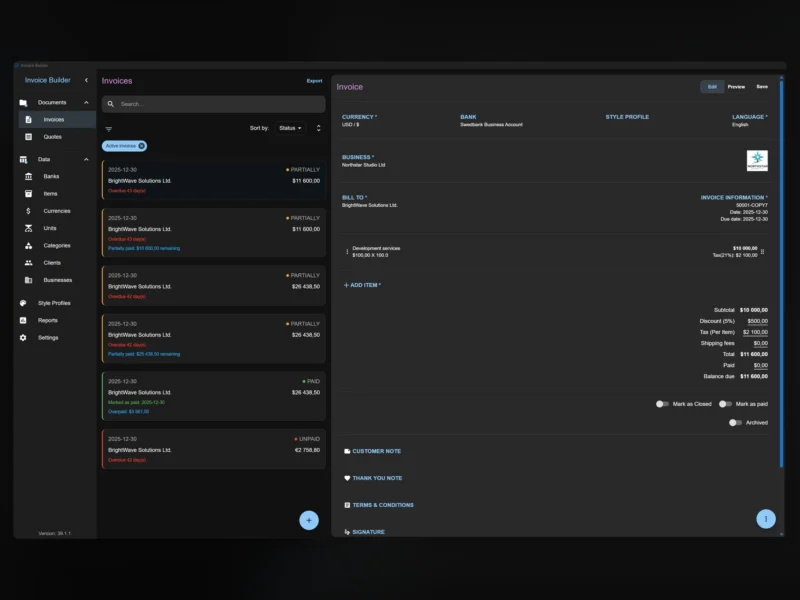
Invoice Builder is an invoicing and quoting application for freelancers and small businesses, and it starts from the opposite assumption to most of its competitors: there is no account, no cloud and no subscription. Your invoices live in a database file on your own machine, in an Electron desktop app for Windows, Linux and macOS. If you want the same data on more than one device, the same codebase runs as a self-hosted web application in Docker, backed by SQLite or PostgreSQL.
The project is MIT-licensed, written in TypeScript with Electron and React, and maintained by a single developer. It is actively shipped – release 3.2.1 landed in October 2026 – and it has the shape of a tool someone built because they needed it: fast to open, no sign-in wall, and no server to keep alive if you do not want one.
Invoices, quotes and a layout builder
The core loop is a live document editor. An invoice opens on the left of a detail pane and the PDF preview updates as you type, with A4 and Letter page formats and per-document language and currency. Quotes are a first-class document type rather than a renamed invoice, so a quote carries its own numbering, states and PDF.
Where it goes further than a printed template is the Visual Layout Builder: you drag and drop the blocks of the document – header, business details, line item table, totals, notes, signature – and save the arrangement as a reusable style profile. That is the feature small businesses usually end up buying a commercial package for, and here it applies to both invoices and quotes.
The data behind a document
Businesses, clients, banks, items, categories, units and currencies are all kept as their own records, and each of those lists has XLSX import and export. An invoice is therefore assembled from records rather than typed from scratch, and a client’s bank details are entered once.
The financials are more flexible than the average small invoicing tool: surcharges, discounts, shipping, tax that can be treated as inclusive or exclusive of the listed price, partial payments, and explicit document states. Receipts print natively on the desktop build, and print to PDF from the browser in the Docker build.
Two details matter for anyone who has kept books for a while. Every document stores a snapshot of the data it was issued with, so editing a client’s address next year does not rewrite last year’s invoice. And the database can be backed up, restored, and exported or imported as JSON – which means the file you own is genuinely portable, not a hostage.
E-invoicing: UBL, Peppol and XRechnung
Invoices can be exported as structured XML in three formats that public-sector and business-to-business e-invoicing rules actually ask for: UBL 2.1, Peppol BIS Billing 3.0 and XRechnung. Most self-hosted invoicing tools stop at a PDF, so this is a real differentiator – although, as with any tool in this space, the export is a starting point to check against your own jurisdiction’s rules rather than a certification.
Desktop first, self-hosted when you need it
The desktop build installs from a DEB package or AppImage on Linux, a setup executable on Windows, and a DMG on macOS, with in-app updates. The web mode is the same application plus a Node.js web server, published as ghcr.io/piratuks/invoice-builder: clone the repository for the compose file, run docker compose up -d, and open port 3001 to create or connect a database. Documentation, including the screen-by-screen guides and the Docker self-hosting notes, lives at piratuks.github.io/invoice-builder, and there is a public demo instance for a look before you install anything.
MIT, and one upgrade caveat worth knowing
Invoice Builder is released under the MIT Licence, so you may use, modify and redistribute it, including commercially, provided the copyright notice is kept. There is no paid tier holding features back and no seat count.
The caveat is for anyone upgrading an older database: version 3.0.2 moved to a consolidated schema and no longer carries the historical migration chain, so a database that has not completed migrations through 2.10.0 will not be upgraded. Back up the database file before an upgrade, which is a file copy – and treat that backup as the reason to prefer this kind of tool in the first place.
Alternatives
- Invoice Ninja – AGPL-3.0 invoicing with recurring billing, projects and payment gateways, for when invoicing is a team workflow rather than one person’s desk
- Akaunting – GPL-3.0 accounting with invoicing, expenses and reporting in one place
- Invio – a much lighter self-hosted invoicing container, if you want a web app and nothing else